

![[instructor-led training course]](https://python-course.eu/images/common/classroom_training_courses.jpg)
![[input mini]](https://python-course.eu/images/python-tutorial/input_mini.jpg)
![[PDF versions of this site]](https://python-course.eu/images/common/PDF_150w.webp)
![[PDF logo]](https://python-course.eu/images/common/pdf_logo_20w.webp)
name = input("What's your name? ")
print("Nice to meet you " + name + "!")
OUTPUT:
What's your name? Melisa
Nice to meet you Melisa!
| [ Web Proxy ] |
| Viewing: https://python-course.eu/python-tutorial/input.php | [Back] [Original] |
Live Python classes by highly experienced instructors:
 [instructor-led training course]
Instructor-led training courses by Bernd Klein
This website contains a free and extensive online tutorial by Bernd Klein, using material from his classroom Python training courses.
If you are interested in an instructor-led classroom training course, have a look at these Python classes:
[instructor-led training course]
Instructor-led training course by Bernd Klein at Bodenseo
Image kabliczech - Fotolia.com
This page was written by Bernd Klein.
Bernd is an experienced computer scientist with a history of working in the education management industry and is skilled in Python, Perl, Computer Science, and C++. He has a Dipl.-Informatiker / Master Degree focused in Computer Science from Saarland University.
 [PDF logo] PDF version of this site
This website is free of annoying ads. We want to keep it like this. You can help with your donation:
[Go]By Bernd Klein. Last modified: 29 Jun 2022.
There are hardly any programs without any input. Input can come in various ways, for example, from a database, another computer, mouse clicks and movements or from the internet. Yet, in most cases the input stems from the keyboard. For this purpose, Python provides the function input(). input has an optional parameter, which is the prompt string.
If the input function is called, the program flow will be stopped until the user has given an input and has ended the input with the return key. The text of the optional parameter, i.e. the prompt, will be printed on the screen.
The input of the user will be returned as a string without any changes. If this raw input has to be transformed into another data type needed by the algorithm, we can use either a casting function or the eval function.
Let's have a look at the following example:
name = input("What's your name? ")
print("Nice to meet you " + name + "!")
What's your name? Melisa Nice to meet you Melisa!
age = input("Your age? ")
print("So, you are already " + age + " years old, " + name + "!")
Your age? 26
So, you are already 26 years old, Melisa!
We save the program as "input_test.py" and run it:
 $ python input_test.py
What's your name? "Frank"
Nice to meet you Frank!
Your age? 42
So, you are already 42 years old, Frank!
We will further experiment with the input function in the following interactive Python session:
cities_canada = input("Largest cities in Canada: ")
print(cities_canada, type(cities_canada))
Largest cities in Canada: Toronto, Calgary, Montreal, Ottawa
Toronto, Calgary, Montreal, Ottawa <class 'str'>
cities_canada = eval(input("Largest cities in Canada: "))
print(cities_canada, type(cities_canada))
Largest cities in Canada: Toronto, Calgary, Montreal, Ottawa
population = input("Population of Toronto? ")
print(population, type(population))
Population of Toronto? 2615069
2615069 <class 'str'>
population = int(input("Population of Toronto? "))
print(population, type(population))
Population of Toronto? 2615069
2615069 <class 'int'>
Live Python training
Enjoying this page? We offer live Python training courses covering the content of this site.
See our Python training courses
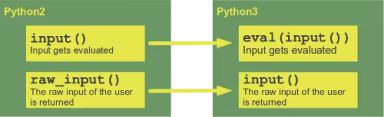
The usage of input or better the implicit evaluation of the input has often lead to serious programming mistakes in the earlier Python versions, i.e. 2.x Therefore, in Python 3 the input function behaves like the raw_input function from Python2.
The changes between the versions are illustrated in the following diagram:
 [Differences between input, raw_input and the Python versions]
Live Python training
Enjoying this page? We offer live Python training courses covering the content of this site.
Upcoming online Courses
See our Python training courses
top
| Web Proxy Viewer | New URL | Original Page |
![[Differences between input, raw_input and the Python versions]](https://python-course.eu/images/python-tutorial/input_difference_python2_python3.webp)