## English | [](/Document-Chinese.md)
#### A better online document is available at https://apijsondocs.readthedocs.io
### Examples:
#### Get a User
Request:
{
  "User":{
  }
}
[Click here to test](http://apijson.cn:8080/get/{"User":{}})
Response:
{
  "User":{
    "id":38710,
    "sex":0,
    "name":"TommyLemon",
    "certified":true,
    "tag":"Android&Java",
    "phone":13000038710,
    "head":"http://static.oschina.net/uploads/user/1218/2437072_100.jpg?t=1461076033000",
    "date":1485948110000,
    "pictureList":[
      "http://static.oschina.net/uploads/user/1218/2437072_100.jpg?t=1461076033000",
      "http://common.cnblogs.com/images/icon_weibo_24.png"
    ]
  },
  "code":200,
  "msg":"success"
}
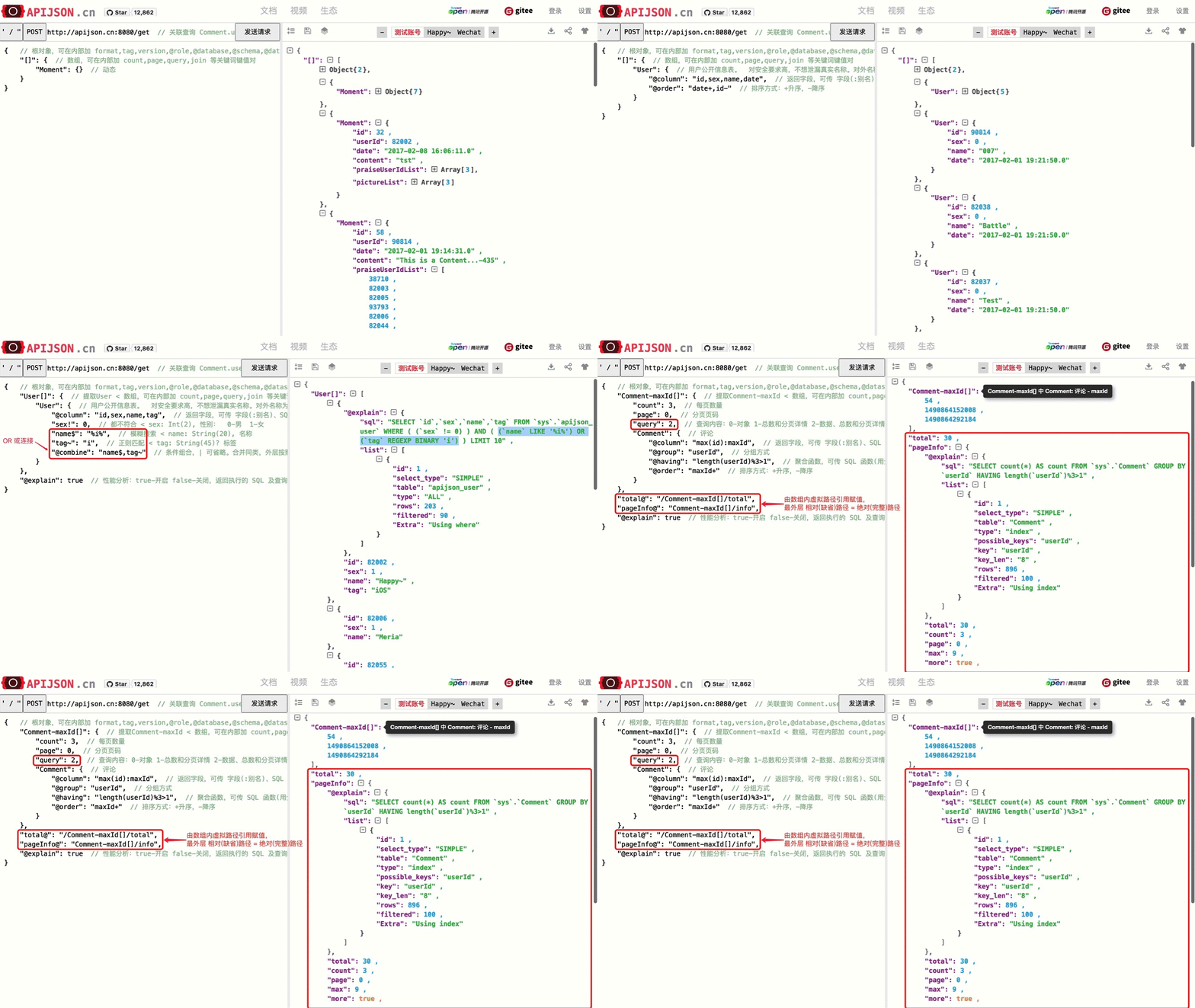
[GIF] APIJSON single objects: simple queries, statistics, groups, orders, aggregations, comparisons, filters, aliases, etc.

#### Get an array of Users
Request:
{
  "[]":{
    "count":3, //just get 3 results
    "User":{
      "@column":"id,name" //just get ids and names
    }
  }
}
[Click here to test](http://apijson.cn:8080/get/{"[]":{"count":3,"User":{"@column":"id,name"}}})
Response:
{
  "[]":[
    {
      "User":{
        "id":38710,
        "name":"TommyLemon"
      }
    },
    {
      "User":{
        "id":70793,
        "name":"Strong"
      }
    },
    {
      "User":{
        "id":82001,
        "name":"Android"
      }
    }
  ],
  "code":200,
  "msg":"success"
}
[GIF] APIJSON single arrays: simple queries, statistics, groups, orders, aggregations, paginations, searches, regexps, combinations, etc.
#### Get a Moment and its publisher
Request:
{
  "Moment":{
  },
  "User":{
    "id@":"Moment/userId"  //User.id = Moment.userId
  }
}
[Click here to test](http://apijson.cn:8080/get/{"Moment":{},"User":{"id@":"Moment%252FuserId"}})
Response:
{
  "Moment":{
    "id":12,
    "userId":70793,
    "date":"2017-02-08 16:06:11.0",
    "content":"1111534034"
  },
  "User":{
    "id":70793,
    "sex":0,
    "name":"Strong",
    "tag":"djdj",
    "head":"http://static.oschina.net/uploads/user/585/1170143_50.jpg?t=1390226446000",
    "contactIdList":[
      38710,
      82002
    ],
    "date":"2017-02-01 19:21:50.0"
  },
  "code":200,
  "msg":"success"
}
#### Get a Moment list like Twitter tweets
Request:
{
  "[]":{                             //get an array
    "page":0,                        //pagination
    "count":2,
    "Moment":{                       //get a Moment
      "content$":"%a%"               //filter condition: content contains 'a'
    },
    "User":{
      "id@":"/Moment/userId",        //User.id = Moment.userId, short reference pathstarts from grandparents path
      "@column":"id,name,head"       //get specified keys with the written order
    },
    "Comment[]":{                    //get a Comment array, and unwrap Comment object
      "count":2,
      "Comment":{
        "momentId@":"[]/Moment/id"   //Comment.momentId = Moment.id, full reference path
      }
    }
  }
}
[Click here to test](http://apijson.cn:8080/get/{"[]":{"page":0,"count":2,"Moment":{"content$":"%2525a%2525"},"User":{"id@":"%252FMoment%252FuserId","@column":"id,name,head"},"Comment[]":{"count":2,"Comment":{"momentId@":"[]%252FMoment%252Fid"}}}})
Response:
{
  "[]":[
    {
      "Moment":{
        "id":15,
        "userId":70793,
        "date":1486541171000,
        "content":"APIJSON is a JSON Transmission Protocol",
        "praiseUserIdList":[
          82055,
          82002,
          82001
        ],
        "pictureList":[
          "http://static.oschina.net/uploads/user/1218/2437072_100.jpg?t=1461076033000",
          "http://common.cnblogs.com/images/icon_weibo_24.png"
        ]
      },
      "User":{
        "id":70793,
        "name":"Strong",
        "head":"http://static.oschina.net/uploads/user/585/1170143_50.jpg?t=1390226446000"
      },
      "Comment[]":[
        {
          "id":176,
          "toId":166,
          "userId":38710,
          "momentId":15,
          "date":1490444883000,
          "content":"thank you"
        },
        {
          "id":1490863469638,
          "toId":0,
          "userId":82002,
          "momentId":15,
          "date":1490863469000,
          "content":"Just do it"
        }
      ]
    },
    {
      "Moment":{
        "id":58,
        "userId":90814,
        "date":1485947671000,
        "content":"This is a Content...-435",
        "praiseUserIdList":[
          38710,
          82003,
          82005,
          93793,
          82006,
          82044,
          82001
        ],
        "pictureList":[
          "http://static.oschina.net/uploads/img/201604/22172507_aMmH.jpg"
        ]
      },
      "User":{
        "id":90814,
        "name":7,
        "head":"http://static.oschina.net/uploads/user/51/102723_50.jpg?t=1449212504000"
      },
      "Comment[]":[
        {
          "id":13,
          "toId":0,
          "userId":82005,
          "momentId":58,
          "date":1485948050000,
          "content":"This is a Content...-13"
        },
        {
          "id":77,
          "toId":13,
          "userId":93793,
          "momentId":58,
          "date":1485948050000,
          "content":"This is a Content...-77"
        }
      ]
    }
  ],
  "code":200,
  "msg":"success"
}
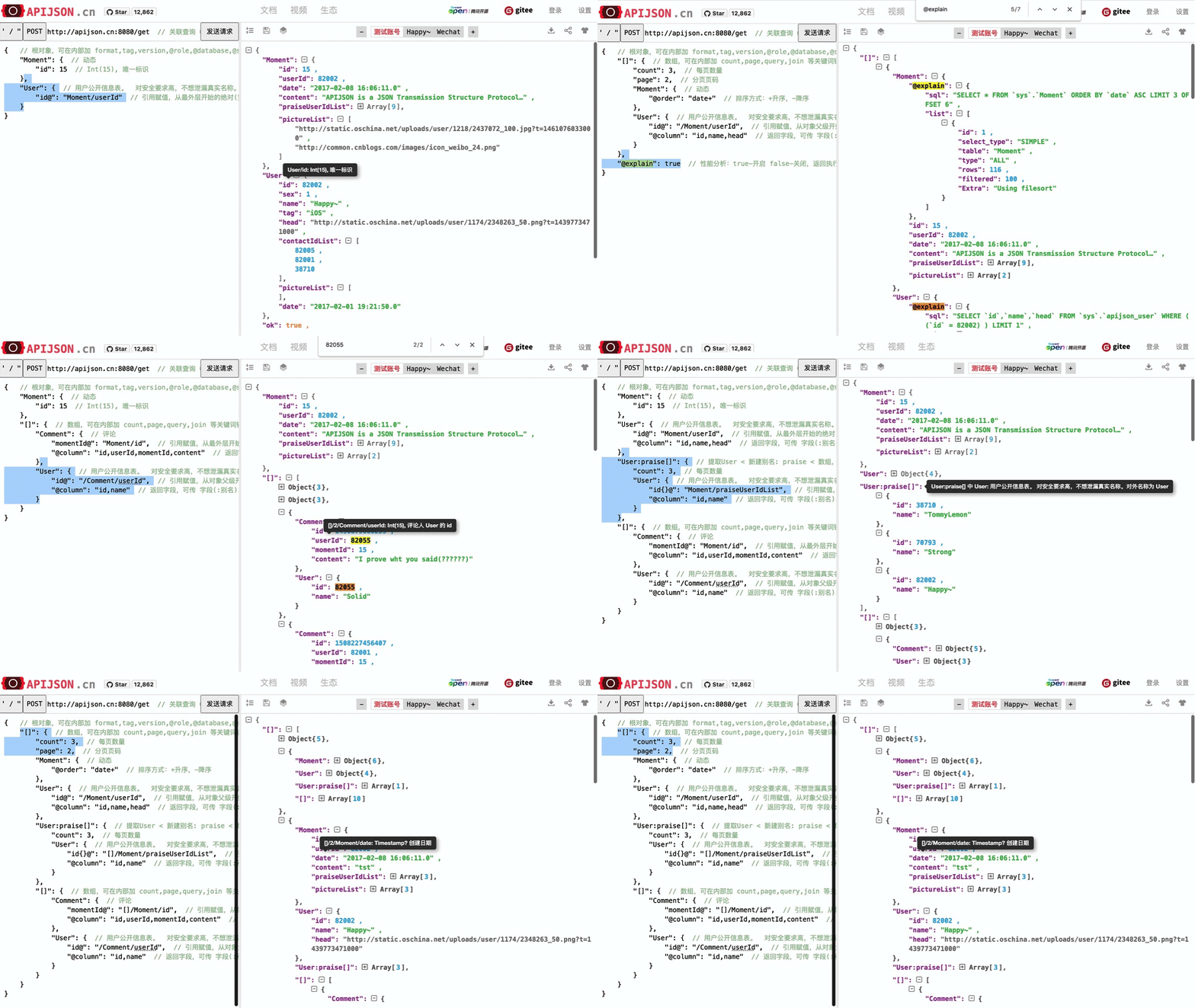
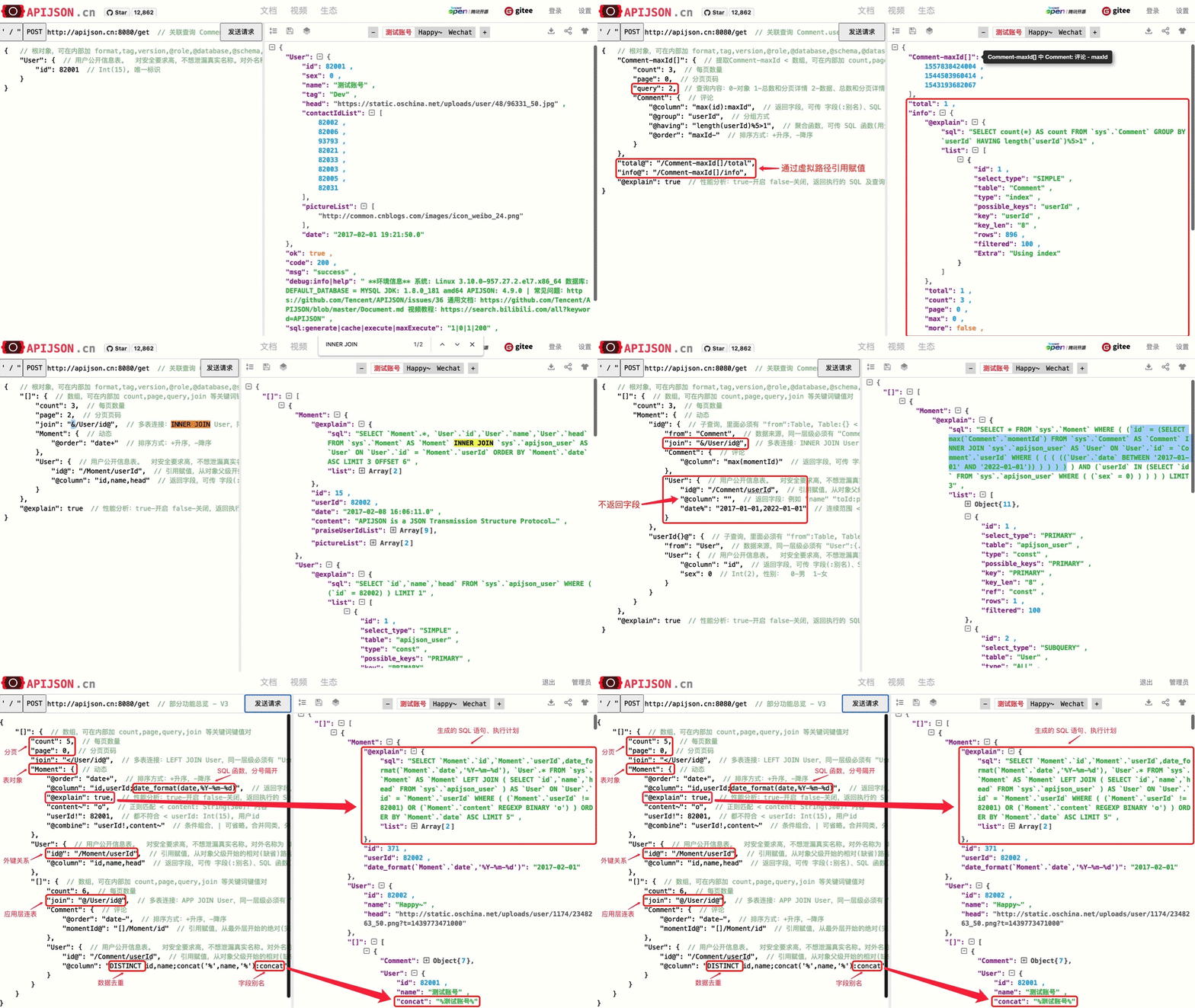
[GIF] APIJSON query multi related tables: one to one, one to many, many to one, various conditions, etc.
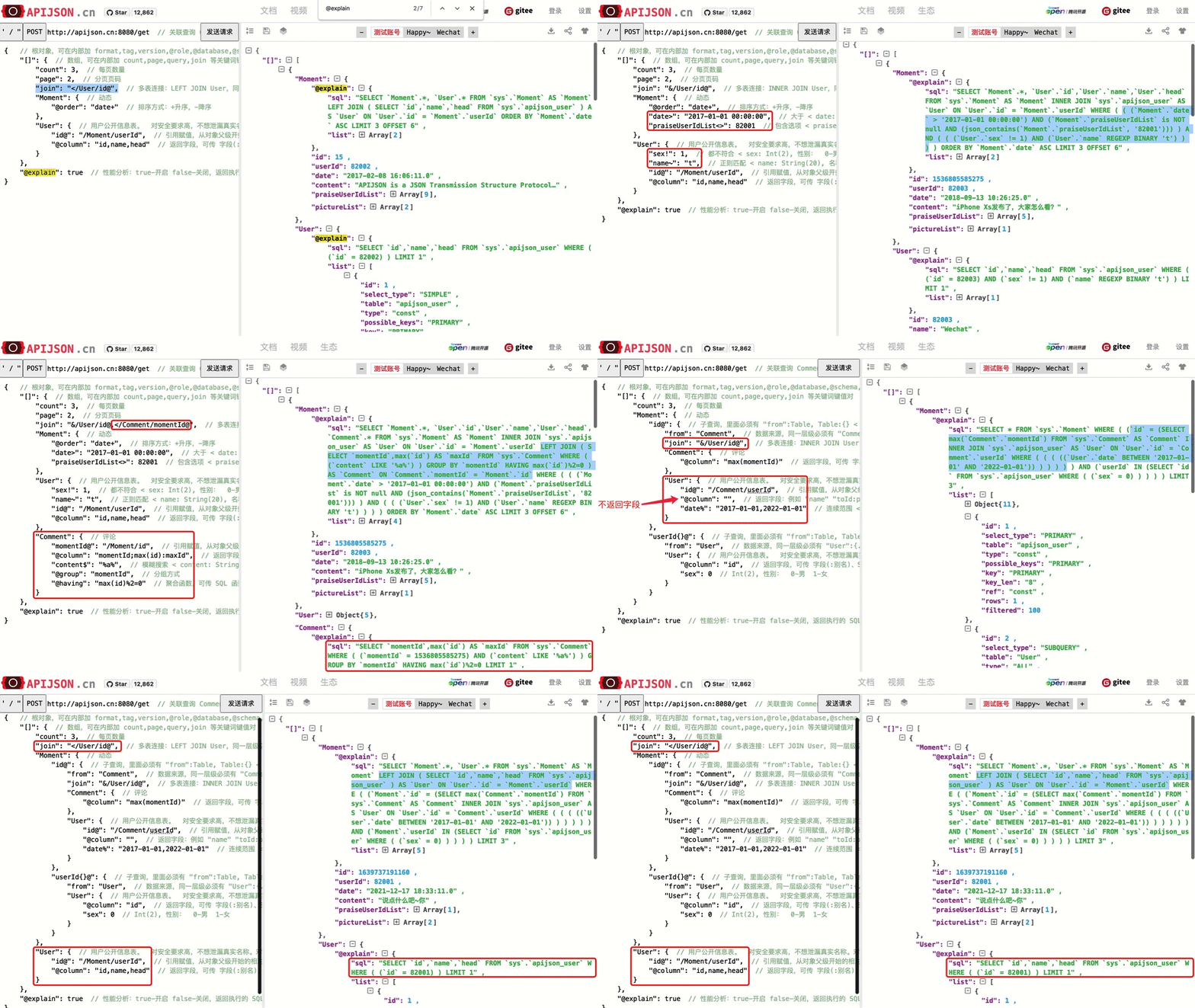
[GIF] APIJSON joins: < LEFT JOIN, & INNER JOIN, etc.
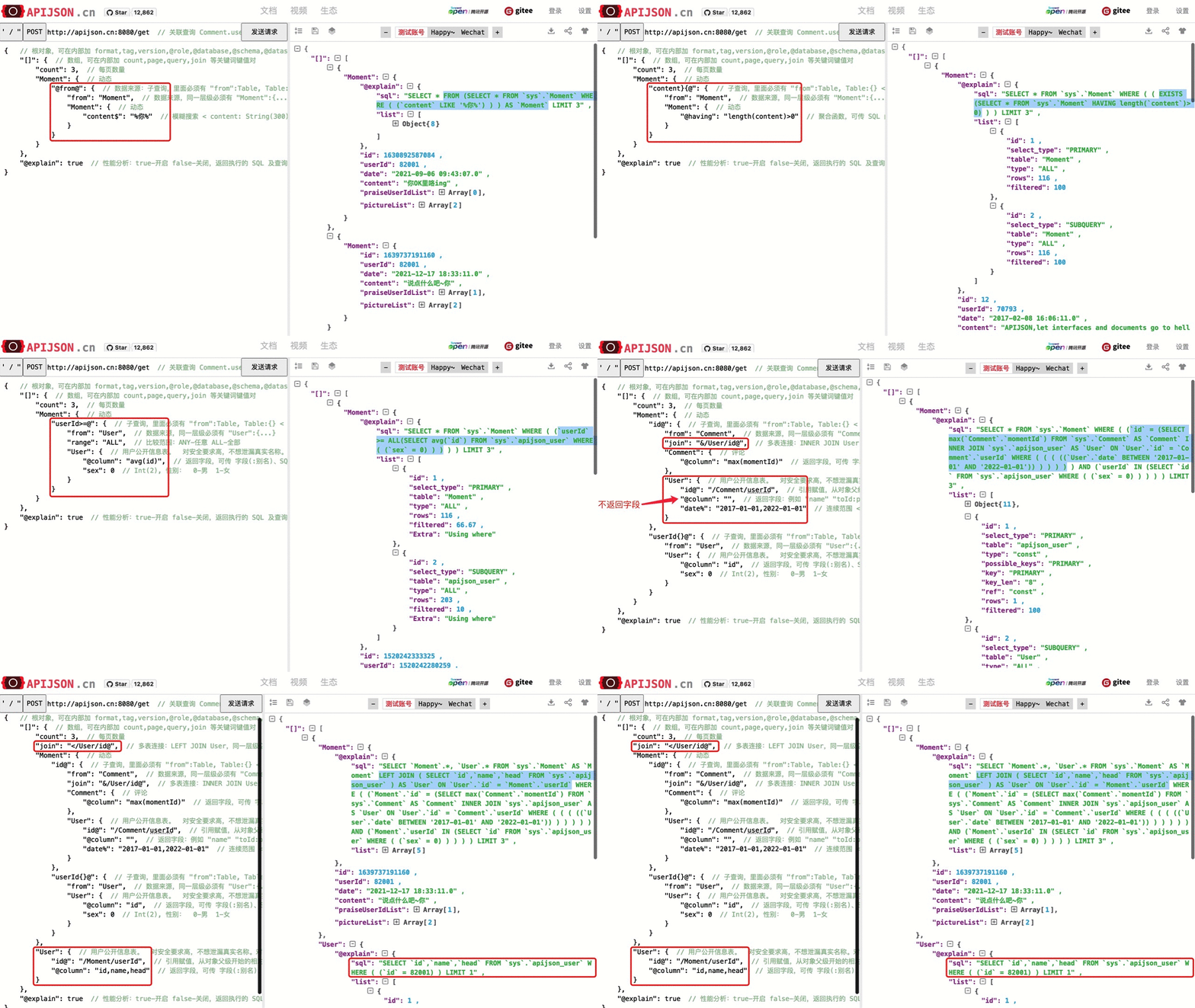
[GIF] APIJSON subqueries@from@ FROM, key@ =, key>@ >, key{}@ IN, key}{@ EXISTS, etc.
[GIF] APIJSON: a set of some features, simple to complex
[Test it online](http://apijson.cn/api)
## API Design Rules
### 1. Methods and API endpoints
Methods | URL | Request | Response
------------ | ------------ | ------------ | ------------
**GET**:
A general way to get data.
You can use dev tools to make edits in a web browser. | base_url/get/ | {
TableName:{
//Add contiditions here.
}
}
Eg. To get a Moment with `id = 235`
{
"Moment":{
"id":235
}
} | {
TableName:{
...
},
"code":200,
"msg":"success"
}
Eg.
{
"Moment":{
"id":235,
"userId":38710,
"content":"APIJSON is the real-time coding-free, powerful and secure ORM"
},
"code":200,
"msg":"success"
}
**HEAD**:
A general way to get counts.
You can use dev tools to make edits in a web browser. | base_url/head/ | {
TableName:{
}
}
{} are conditions.
Eg. Get the number of Moments posted by the user with `id = 38710`
{
"Moment":{
"userId":38710
}
} | {
TableName:{
"code":200,
"msg":"success",
"count":10
},
"code":200,
"msg":"success"
}
Eg.
{
"Moment":{
"code":200,
"msg":"success",
"count":10
},
"code":200,
"msg":"success"
}
**GETS**:
Get data with high security and confidentiality.
Eg. bank accounts, birth date. | base_url/gets/ | You need to add `"tag":tag` with the same level of `Moment:{}`. Others are the same as **GET**. | Same as **GET**.
**HEADS**:
Get counts of confidential data(eg. bank account).| base_url/heads/ | You need to add `"tag":tag` with the same level of `Moment:{}`. Others are the same as **HEAD**. | Same as **HEAD**.
**POST**:
Add new data. | base_url/post/ | {
TableName:{
},
"tag":tag
}
The id in {...} is generated automatically when table is built and cant be set by the user.
Eg. A user with `id = 38710` posts a new Moment
{
"Moment":{
"userId":38710,
"content":"APIJSON is the real-time coding-free, powerful and secure ORM"
},
"tag":"Moment"
} | {
TableName:{
"code":200,
"msg":"success",
"id":38710
},
"code":200,
"msg":"success"
}
Eg.
{
"Moment":{
"code":200,
"msg":"success",
"id":120
},
"code":200,
"msg":"success"
}
**PUT**:
Make changes to a specific item.
Only change the part sent to server. | base_url/put/ | {
TableName:{
"id":id,
},
"tag":tag
}
You can also add multiple id as `id{}`.
Eg. Make changes to Moment's content with id= 235:
{
"Moment":{
"id":235,
"content":"APIJSON is the real-time coding-free, powerful and secure ORM"
},
"tag":"Moment"
} | Same as **POST**.
**DELETE**:
Delete data. | base_url/delete/ | {
TableName:{
"id":id
},
"tag":tag
}
You can also add multiple id as `id{}`.
Or Delete contents with multiple id
{
"Comment":{
"id{}":[100,110,120]
},
"tag":"Comment[]"
} | {
TableName:{
"code":200,
"msg":"success",
"id[]":[100,110,120]
"count":3
},
"code":200,
"msg":"success"
}
Eg.
{
"Comment":{
"code":200,
"msg":"success",
"id[]":[100,110,120],
"count":3
},
"code":200,
"msg":"success"
}
**Note**:
1. TableName means the name of the table where you get data. Itll respond with a JSON Object(the form is {....})with columns inside.
2. `"tag":tag` is needed when methods are not GET or HEAD. The tag after the colon is the key in JSON Object of making requests. Generally, its the name of the table youre looking for.
3. GET, HEAD are methods for general data requests.They support versatile JSON Object structure. Other methods are used for requesting confidential data and the requesting JSON Object needs to be in the same form/order as that in the database. Otherwise, the request shall be denied.
4. GETS and GET, HEADS and HEAD return the same type of data. But the request form is a little different.
5. For HTTP, all API methods (get,gets,head,heads,post,put,delete) make requests with HTTP POST.
6. All JSON Objects here are with {...} form. You can put items or objects in it.
7. Each object in the database has a unique address.
### 2. Keyswords in URL parameters
Functions | Key-value pairs | Examples
------------ | ------------ | ------------
Get data in arrays | `"key[]":{}`
The part after the colon is a JSONObject. *key* is optional. When *key* is the same as the table name , the JSONObject will be in a simplified form. For example, `{Table:{Content}}` will be written as `{Content}`.| [{"User[]":{"User":{}}}](http://apijson.cn:8080/get/{"User[]":{"count":3,"User":{}}})
It is used for getting data from a user. Here, key and tablename are all "User", then
`{"User":{"id", ...}}`
will be written as
`{"id", ...}`
Get data that meets specific conditions | `"key{}":[]`
The part after the colon is a JSONArray with conditions inside.| ["id{}":[38710,82001,70793]](http://apijson.cn:8080/get/{"User[]":{"count":3,"User":{"id{}":[38710,82001,70793]}}})
In SQL, this would be `id IN(38710,82001,70793)`.
It means getting data with id equals 38710,82001,70793.
Get data with comparison operation| `"key{}":"condition0,condition1..."`
Conditions can be any SQL comparision operation. Use''to include any non-number characters.| ["id{}":"90000"](http://apijson.cn:8080/get/{"User[]":{"count":3,"User":{"id{}":"90000"}}})
In SQL, it'd be
`id90000`,
which means get User array with id\90000
Get data that contains an element | `"key":Object` => `"key":[Object]`
*key* must be a JSONArray while *Object* cannot be JSON.| ["contactIdList":38710](http://apijson.cn:8080/get/{"User[]":{"count":3,"User":{"contactIdList":38710}}})
In SQL, this would be
`json_contains(contactIdList,38710)`.
It means find data of the User whose contactList contains 38710.
See if it exists |`"key}{@":{`
`"from":"Table",`
`"Table":{ ... }`
`}`
}{ means EXISTS.
*key* is the one you want to check.
Here is a *Subquery* in it, see specifications below for more information. | ["id}{@":{
"from":"Comment",
"Comment":{
"momentId":15
}
}](http://apijson.cn:8080/get/{"User":{"id}{@":{"from":"Comment","Comment":{"momentId":15}}}})
WHERE EXISTS(SELECT * FROM Comment WHERE momentId=15)
Include functions in parameters | `"key()":"function (key0,key1...)"`
This will trigger the back-end
`function(JSONObject request, String key0, String key1...)`
to get or testify data.
Use - and + to show the order of priority: analyze key-() > analyze the current object > analyze key() > analyze child object > analyze key+()| ["isPraised()":"isContain(praiseUserIdList,userId)"](http://apijson.cn:8080/get/{"Moment":{"id":301,"isPraised()":"isContain(praiseUserIdList,userId)"}})
This will use function boolean isContain(JSONObject request, String array, String value). In this case, client will get "isPraised":true(In this case, client use function to testify if a user clicked like button for a Moment.)
Refer a value | `"key@":"key0/key1/.../refKey"`
Use / to show path. The part before the colon is the key that wants to refer. The path after the colon starts with the parent level of the key.| ["Moment":{
"userId":38710
},
"User":{
"id@":"/Moment/userId"
}](http://apijson.cn:8080/get/{"Moment":{"userId":38710},"User":{"id@":"%252FMoment%252FuserId"}})
In this example, the value of id in User refer to the *userId* in *Moment*, which means
`User.id = Moment.userId`.
After the request is sent,
`"id@":"/Moment/userId"` will be `"id":38710`.
Subquery | `"key@":{`
`"range":"ALL",`
`"from":"Table",`
`"Table":{ ... }`
`}`
*range* can be ALL, ANY.
*from* means which table you want to query.
Its very similar to how you query in SQL.
You can also use *count*, *join*, etc. | ["id@":{
"from":"Comment",
"Comment":{
"@column":"min(userId)"
}
}](http://apijson.cn:8080/get/{"User":{"id@":{"from":"Comment","Comment":{"@column":"min(userId)"}}}})
`WHERE id=(SELECT min(userId) FROM Comment)`.
Fuzzy matching | `"key$":"SQL search expressions"` => `"key$":["SQL search expressions"]`
Any SQL search expressions.Eg.%key%(include key), key%(start with key),%k%e%y%(include k, e, y). % means any characters. | ["name$":"%m%"](http://apijson.cn:8080/get/{"User[]":{"count":3,"User":{"name$":"%2525m%2525"}}})
In SQL, it's
`name LIKE '%m%'`,
meaning that get User with m in name.
Regular Expression| `"key~":"regular expression"` => `"key~":["regular expression"]`
It can be any regular expressions.Eg. ^[0-9]+$ *~ not case sensitive, advanced search is applicable.| ["name~":"^[0-9]+$"](http://apijson.cn:8080/get/{"User[]":{"count":3,"User":{"name~":"^[0-9]%252B$"}}})
In SQL, it's
`name REGEXP '^[0-9]+$'`.
Get data in a range| `"key%":"start,end"` => `"key%":["start,end"]`
The data type of start and end can only be either Boolean, Number or String. Eg. "2017-01-01,2019-01-01" ["1,90000", "82001,100000"]. It's used for getting data from a specific time range. | ["date%":"2017-10-01,2018-10-01"](http://apijson.cn:8080/get/{"User[]":{"count":3,"User":{"date%2525":"2017-10-01,2018-10-01"}}})
In SQL, it's
`date BETWEEN '2017-10-01' AND '2018-10-01'`,
meaning to get User data that registered between 2017-10-01 and 2018-10-01.
Make an alias | `"name:alias"`
this changes name to alias in returning results. Its applicable to column, tableName, SQL Functions, etc. but only in GET, HEAD requests. | ["@column":"toId:parentId"](http://apijson.cn:8080/get/{"Comment":{"@column":"id,toId:parentId","id":51}})
In SQL, it's
`toId AS parentId`.
It'll return `parentId` instead of `toId`.
For @key format like "lc_wai6b3vk2:(lc_wai6b3vk)", it means renaming field lc_wai6b3vk2 to lc_wai6b3vk, commonly used for field renaming scenarios. Example:
{
"lc_sinan_ba074fbb": {
"lc_wai6b3vk": "11",
"lc_wai6b3vk2": "22",
"@combine": "lc_wai6b3vk \\| lc_wai6b3vk2",
"@key": "lc_wai6b3vk2:(lc_wai6b3vk)"
}
}
corresponds to SQL `(lc_wai6b3vk = '11' OR lc_wai6b3vk2 = '22')`, but the lc_wai6b3vk2 field will be renamed and displayed as lc_wai6b3vk in the returned result
Add / expand an item | `"key+":Object`
The type of Object is decided by *key*. Types can be Number, String, JSONArray. Froms are 82001,"apijson",["url0","url1"] respectively. Its only applicable to PUT request.| "praiseUserIdList+":[82001]. In SQL, it's
`json_insert(praiseUserIdList,82001)`.
Add an *id* that praised the Moment.
Delete / decrease an item | `"Key-":Object`
Its the contrary of "key+" | "balance-":100.00. In SQL, it's
`balance = balance - 100.00`,
meaning there's 100 less in balance.
Operations | &, \|, !
They're used in logic operations. Its the same as AND, OR, NOT in SQL respectively.
By default, for the same key, its \| (OR)operation among conditions; for different keys, the default operation among conditions is &(AND).
| ["id&{}":">80000,80000,90000,90000,90000," - RIGHT JOIN
"&" - INNER JOIN
"\|" - FULL JOIN
"!" - OUTER JOIN
"@" - APP JOIN
Where @ APP JOIN is in application layer.Itll get all the keys in tables that refKeys in result tables are referred to, like refKeys:[value0, value1.]. Then, as the results get data according to `key=$refKey` a number of times (COUNT), it uses key `IN($refKeys)` to put these counts together in just one SQL query, in order to improve the performance.
Other JOIN functions are the same as those in SQL.
`"join":"