AngularJS Eclipse Plugin
=================
[](http://travis-ci.org/angelozerr/angularjs-eclipse)
AngularJS Eclipse Plugin extends Eclipse WTP to :
* provides an HTML editor which supports AngularJS expression and directive. See [HTML features](https://github.com/angelozerr/angularjs-eclipse/wiki/HTML-Features) for more informations.
* provides an [Angular Explorer](https://github.com/angelozerr/angularjs-eclipse/wiki/Angular-Explorer-View) view which displays modules, controllers of your project in a tree.
* provides a Javascript editor which supports AngularJS features (modules, etc). See [Javascript features](https://github.com/angelozerr/angularjs-eclipse/wiki/Javascript-Features) for more informations.
AngularJS Eclipse is based on [tern.java](https://github.com/angelozerr/tern.java) to manage powerfull completion on HTML files (AngularsJS Expression, directive, modules) and Javascripts files (see [Tern Eclipse IDE](https://github.com/angelozerr/tern.java/wiki/Tern-Eclipse-IDE))
If you start with AngularJS Eclipse, please read [Getting Started](https://github.com/angelozerr/angularjs-eclipse/wiki/Getting-Started).
# Installation
AngularJS Eclipse is developped/tested with Eclipse Kepler. It is adwised to use Kepler (even if AngularJS Eclipse could work with older version of Eclipse).
It's not yet an official release, but if you wish to test the snapshot version of AngularJS Eclipse, you can install it with the Eclipse Update site
http://oss.opensagres.fr/angularjs-eclipse/1.0.0-SNAPSHOT/.
# AngularJS Configuration
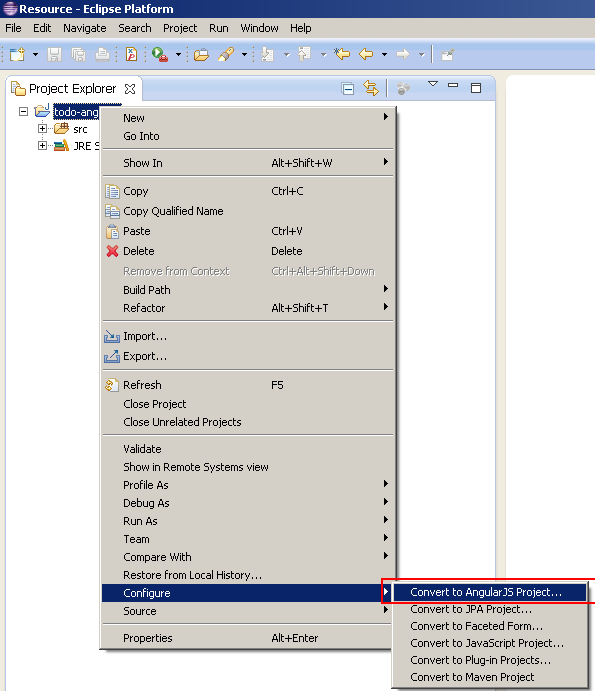
Before opening your HTML files (to see AngulaJS synt), you must convert your project to AngularJS Project :
# HTML Editor
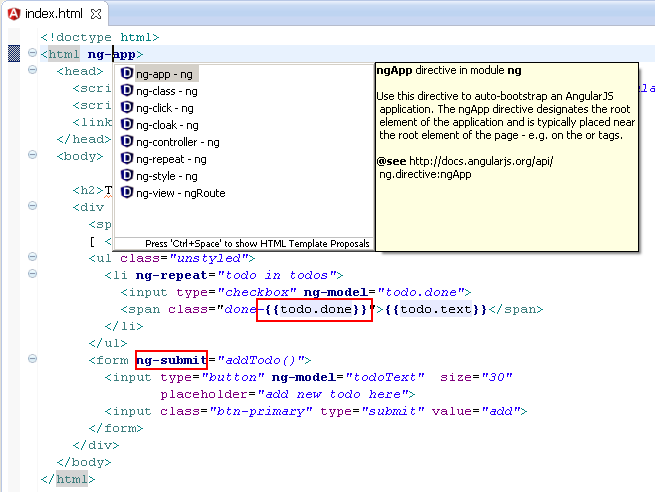
After that, you can open your HTML with AngularJS Editor :

You will see that AngularJS directive + EL are highlighted, completion is available for directive name :
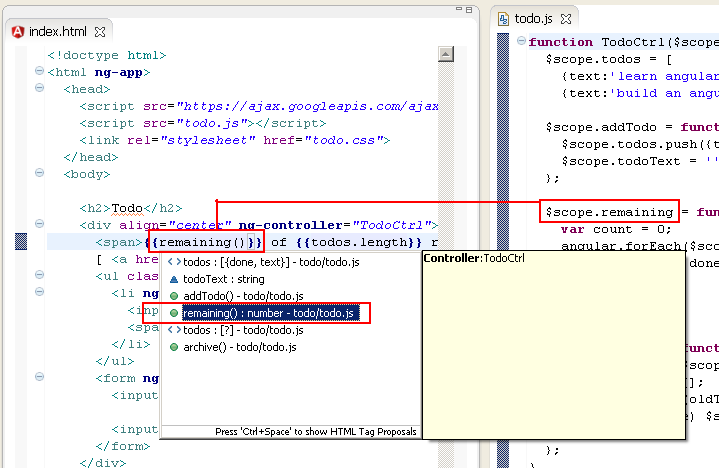
After [configuring tern server](https://github.com/angelozerr/tern.java/wiki/Tern-Eclipse-IDE-Node.js), completions, hover, validation, hyperlink are available for modules, controllers, angular expression :
See [HTML features](https://github.com/angelozerr/angularjs-eclipse/wiki/HTML-Features) for more informations.
# Javascript Editor
See [Javascript features](https://github.com/angelozerr/angularjs-eclipse/wiki/Javascript-Features) and [Tern Eclipse IDE](https://github.com/angelozerr/tern.java/wiki/Tern-Eclipse-IDE) for more informations.
# Build
See cloudbees job: https://opensagres.ci.cloudbees.com/job/angularjs-eclipse/