| [ Web Proxy ] |
| Viewing: https://raw.githubusercontent.com/QuantStack/git2cpp/main/wasm/README.md | [Back] [Original] |
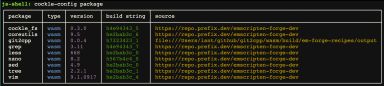 [cockle-config output]
Note that the `source` for the `git2cpp` package is the local filesystem rather than from
`prefix.dev`. The version number of `git2cpp` in this table is not necessarily correct as it is the
version number of the current Emscripten-forge recipe rather than the version of the local `git2cpp`
source code which can be checked using `git2cpp -v` at the `cockle`/`terminal` command line.
If you want to remotely access git servers using `git2cpp` subcommands such as `clone`, `fetch`
and `push`, then serve with a local CORS proxy using:
```bash
make serve-with-cors
```
which will use the CORS proxy on `http://localhost:8881/`.
## Rebuild
After making changes to the local `git2cpp` source code you can rebuild the WebAssembly package,
both deployments and test code using from the `wasm` directory:
```bash
make rebuild
```
## Test
To test the WebAssembly build use from the `wasm` directory:
```bash
make test
```
This runs the tests in the top-level `test` directory with various monkey patching so that
`git2cpp` commands are executed in the browser.
The tests that are run are defined in the function `pytest_ignore_collect` in `conftest_wasm.py`.
If there are problems running the tests then ensure you have the latest `playwright` browser installed:
```bash
playwright install chromium
```
To run all of the tests including those that require the `GIT2CPP_TEST_PRIVATE_TOKEN`:
```bash
GIT2CPP_TEST_PRIVATE_TOKEN= make test
```
You can run a specific test from the top-level `test` directory (not the `wasm/test` directory)
using:
```bash
GIT2CPP_TEST_WASM=1 pytest -v test_git.py::test_version
```
### Manually running the test servers
If wasm tests are failing it can be helpful to run the test servers and manually run `cockle`
commands to help understand the problem. To do this use:
```bash
cd wasm/test
npm run serve
```
This will start both the test server on port 8000 and the CORS server on port 8881. Open a browser
at http://localhost:8000/ and to run a command such as `ls -l` open the dev console and enter the
following at the prompt: `await window.cockle.shellRun('ls -al')`. The generated output will appear
in a new `
[cockle-config output]
Note that the `source` for the `git2cpp` package is the local filesystem rather than from
`prefix.dev`. The version number of `git2cpp` in this table is not necessarily correct as it is the
version number of the current Emscripten-forge recipe rather than the version of the local `git2cpp`
source code which can be checked using `git2cpp -v` at the `cockle`/`terminal` command line.
If you want to remotely access git servers using `git2cpp` subcommands such as `clone`, `fetch`
and `push`, then serve with a local CORS proxy using:
```bash
make serve-with-cors
```
which will use the CORS proxy on `http://localhost:8881/`.
## Rebuild
After making changes to the local `git2cpp` source code you can rebuild the WebAssembly package,
both deployments and test code using from the `wasm` directory:
```bash
make rebuild
```
## Test
To test the WebAssembly build use from the `wasm` directory:
```bash
make test
```
This runs the tests in the top-level `test` directory with various monkey patching so that
`git2cpp` commands are executed in the browser.
The tests that are run are defined in the function `pytest_ignore_collect` in `conftest_wasm.py`.
If there are problems running the tests then ensure you have the latest `playwright` browser installed:
```bash
playwright install chromium
```
To run all of the tests including those that require the `GIT2CPP_TEST_PRIVATE_TOKEN`:
```bash
GIT2CPP_TEST_PRIVATE_TOKEN= make test
```
You can run a specific test from the top-level `test` directory (not the `wasm/test` directory)
using:
```bash
GIT2CPP_TEST_WASM=1 pytest -v test_git.py::test_version
```
### Manually running the test servers
If wasm tests are failing it can be helpful to run the test servers and manually run `cockle`
commands to help understand the problem. To do this use:
```bash
cd wasm/test
npm run serve
```
This will start both the test server on port 8000 and the CORS server on port 8881. Open a browser
at http://localhost:8000/ and to run a command such as `ls -l` open the dev console and enter the
following at the prompt: `await window.cockle.shellRun('ls -al')`. The generated output will appear
in a new `| Web Proxy Viewer | New URL | Original Page |