|
Cpp-Taskflow
2.2.0
|
| [ Web Proxy ] |
| Viewing: https://raw.githubusercontent.com/beoy/cpp-taskflow/master/docs/chapter3.html | [Back] [Original] |
|
Cpp-Taskflow
2.2.0
|
Running a for-loop in parallel is the most fundamental building block in parallel programming. In this chapter, we are going to demonstrate how to use Cpp-Taskflow to create a task dependency graph of parallel for-loop.
Cpp-Taskflow has a STL-style method tf::Taskflow::parallel_for(I beg, I end, C&& callable, size_t partitions) that partitions a range of items and applies a callable to each item in the partition in parallel. The method constructs a task dependency graph representing this workload and returns a task pair as two synchronization points to this task graph.
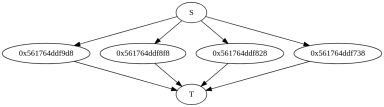
The above code generates the following task dependency graph. The label 0x56* represents an internal task node to execute the callable object. By default (partitions=0), Cpp-Taskflow evenly partitions and distributes the workload across the maximum hardware concurrency. Suppose our example has four logical cores, each internal node corresponds to a partition taking two items (eight tasks in total).
Debrief:
parallel_for S and T Here is one possible output of this program:
By default, Cpp-Taskflow partitions the workload evenly across the workers. In some cases, it is useful to disable this feature and apply user-specified partition. The method parallel_for tasks an unsigned integer partitions as the number of partitions over the items.
The above example will force each of the eight partitions to run exactly one item. This can be useful when you have unbalanced workload per item and would like to enable more efficient parallelization.
Again, you can leave the partition variable to 0 to use our default partition strategy.
You can explicitly construct a dependency graph that represents a parallel execution of a for-loop using only the basic methods tf::Taskflow::emplace and tf::Task::precede.
Cpp-Taskflow provides an overload tf::Taskflow::parallel_for(I beg, I end, I step, C&& callable, size_t partitions) to parallelize an index-based for-loop. It takes three numbers beg, end, and step of the same type I and applies callable to each index in the range [beg, end) with the step size step.
It also works on the opposite order with negative step size.
Similarly, you can explicitly specify the partition size:
By default, Cpp-Taskflow performs even partition across the number of available threads if no partition size is given.
This example demonstrates how to use tf::Taskflow::parallel_for to create a parallel map pattern. The map operator modifies each item in the container to one if it is an odd number, or zero if it is an even number.
The program outputs the following:
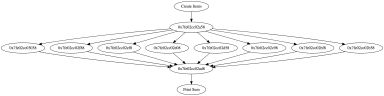
This example demonstrates how to pipeline a parallel-for workload with other tasks.
The output of this programs is:
Debrief:
 [doxygen] 1.8.13
 | Web Proxy Viewer | New URL | Original Page |



![[]](https://raw.githubusercontent.com/beoy/cpp-taskflow/master/docs/search/mag_sel.png)
![[]](https://raw.githubusercontent.com/beoy/cpp-taskflow/master/docs/search/close.png)
![[parallel_for1.png]](https://raw.githubusercontent.com/beoy/cpp-taskflow/master/docs/parallel_for1.png)
![[parallel_for2.png]](https://raw.githubusercontent.com/beoy/cpp-taskflow/master/docs/parallel_for2.png)
![[parallel_for_example2.png]](https://raw.githubusercontent.com/beoy/cpp-taskflow/master/docs/parallel_for_example2.png)
![[doxygen]](https://raw.githubusercontent.com/beoy/cpp-taskflow/master/docs/doxygen.png)