# python devtools
[](https://github.com/samuelcolvin/python-devtools/actions?query=event%3Apush+branch%3Amain+workflow%3ACI)
[](https://codecov.io/gh/samuelcolvin/python-devtools)
[](https://pypi.python.org/pypi/devtools)
[](https://github.com/samuelcolvin/python-devtools)
[](https://github.com/samuelcolvin/python-devtools/blob/main/LICENSE)
**Python's missing debug print command and other development tools.**
For more information, see [documentation](https://python-devtools.helpmanual.io/).
## Install
Just
```bash
pip install devtools[pygments]
```
`pygments` is not required but if it's installed, output will be highlighted and easier to read.
`devtools` has no other required dependencies except python 3.7, 3.8, 3.9, 3.10 or 3.11.
If you've got python 3.7+ and `pip` installed, you're good to go.
## Usage
```py
from devtools import debug
whatever = [1, 2, 3]
debug(whatever)
```
Outputs:
```py
test.py:4 :
whatever: [1, 2, 3] (list)
```
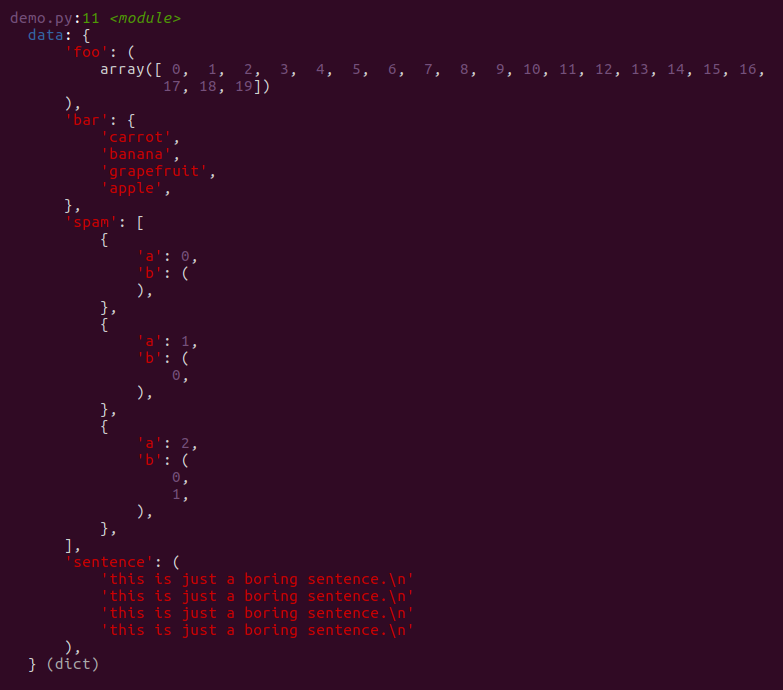
That's only the tip of the iceberg, for example:
```py
import numpy as np
data = {
'foo': np.array(range(20)),
'bar': {'apple', 'banana', 'carrot', 'grapefruit'},
'spam': [{'a': i, 'b': (i for i in range(3))} for i in range(3)],
'sentence': 'this is just a boring sentence.\n' * 4
}
debug(data)
```
outputs:
## Usage without Import
devtools can be used without `from devtools import debug` if you add `debug` into `__builtins__`
in `sitecustomize.py`.
For instructions on adding `debug` to `__builtins__`,
see the [installation docs](https://python-devtools.helpmanual.io/usage/#usage-without-import).