# VC-LTL - An elegant way to compile lighter binaries.




- [](ReadMe.osc.md)
> [VC-LTL 5.0](https://github.com/Chuyu-Team/VC-LTL5) available, 4.0 version no longer provides support!!!

I would like to turn into a stone bridge, go through 500 years of wind, 500 years of Sun, rain for 500 years, but she walked off a bridge!
## 1. About VC-LTL
VC-LTL is an open source CRT library based on the MS VCRT that reduce program binary size and say goodbye to Microsoft runtime DLLs, such as msvcr120.dll, api-ms-win-crt-time-l1-1-0.dll and other dependencies.
VC-LTL was originally a dedicated Dism++ runtime and was isolated and open sourced from Dism++ source code on Mar 6, 2017.
There are plenty of modules in large projects. If all binaries uses static
compilation, it will use plenty of disk space and finally may crashed because
of the fiber local storage (FLS) limitation.
But the VC-LTL can make your project using the built-in `msvcrt.dll` in the
Windows. It solves the C runtime deployment problem and the fiber local storage
(FLS) limitation problem effectively, and greatly reduce the binaries size.
What a handy library!
Everyone can use it for free, even for the commerical use. Of course, I hope
that if you mentioned the VC-LTL in your project, because I want to help more
people.
* GitHub: [github.com/Chuyu-Team/VC-LTL (English)](https://github.com/Chuyu-Team/VC-LTL)
* Gitee: [gitee.com/Chuyu-Team/VC-LTL (Chinese)](https://gitee.com/Chuyu-Team/VC-LTL)
* QQ Group: [633710173](https://shang.qq.com/wpa/qunwpa?idkey=21d51d8ad1d77b99ea9544b399e080ec347ca6a1bc04267fb59cebf22644a42a)
### 1.1. The principle of VC-LTL
After using the VC-LTL, the binaries will be dynamically linked to the built-in
`msvcrt.dll` in the Windows to reduce the binaries size. It is generally
available if you use the VC-LTL in the project using the C Runtime and the STL.
However you cannot use the VC-LTL in the MFC project with the VC-LTL because it
is too complex to support.
> After using the VC-LTL, the size of the binaries will reduce about 30%
if compiled from the C++ source code, and about 50% if compiled
from the pure C source code.
### 1.2. Highlight
*
* C/C++guard:cfthreadSafeInit
* Windows XP RTMYes
* pull requestsVC-LTL
> Let's say goodbye to the Visual Studio 2008.
## 2. VC-LTL Compatibility
| Module | XP Mode | Vista Mode | UCRT Mode | Files
| :------: | :-----: | :--------: | :-------: | --------
| CRT | 94.716% | 96.347% | 100% | vcruntime.lib, libvcruntime.lib, msvcrt.lib, msvcmrt.lib, msvcrt_Platform.lib, libucrt.lib, ucrt.lib, libucrt_shared.lib, vc.lib
| STL | 100% | 100% | 100% | libcpmt.lib, msvcprt.lib
| ConcRT | 100% | 100% | 100% | libconcrt.lib, concrt.lib
| WinRT | X | 100% | X | vccorlib.lib (Windows 8.1 or later)
| ATL | 100% | 100% | 100% | -
| MFC | X | X | 100% | -
| AMP | - | - | - | -
| OpenMP | 100% | 100% | 100% | Requires `vcomp140.dll` from the Visual C++ Runtime
### 2.1. Supported Visual Studio Versions
* Visual Studio 2015 (Support Clang with Microsoft CodeGen, Clang 3.7 with Microsoft CodeGen, Clang-LLVM)
* Visual Studio 2017 (Support Clang with Microsoft CodeGen, Clang-LLVM)
* Visual Studio 2019 (Support Clang-LLVM)
### 2.2. Supported Build Tools
| Build Tool | Helper
| -------------- | --
| Visual Studio | [VC-LTL helper for Visual Studio.props](#32-using-vc-ltl-in-visual-studio)
| CMake | [VC-LTL helper for cmake.cmake](#33-using-vc-ltl-in-cmake)
| NMake, CL | [VC-LTL helper for nmake.cmd](#34-using-vc-ltl-in-nmakecl)
| QMake | VC-LTL helper for qmake.pri
### 2.3. Supported Windows Versions
| OS | x86 | x64 | arm | arm64
| ---- | --- | --- | --- | ----
| Windows XP, Windows Server 2003 | | | - | -
| Windows Vista, Windows Server 2008 | | | - | -
| Windows 7, Windows Server 2008 R2 | | | - | -
| Windows 8, Windows Server 2012, Windows RT | | | | -
| Windows 8.1, Windows Server 2012 R2, Windows RT 8.1 | | | | -
| Windows 10, Windows Server 2016, Windows Server 2019| | | |
> The binaries compiled with the VC-LTL is compatible with Windows XP and
later, even in the environment which installed no hotfixes.
## 3. How to used?
We will enter the theme, we have prepared a rich [VC-LTL Samples](https://github.com/Chuyu-Team/vc-ltl-samples) for your reference, and welcome to join our QQ group (633710173).
### 3.1. Using VC-LTL in Visual Studio
#### 3.1.1. Choose reference mode
##### 3.1.1.1. Reference via NuGet (recommend)
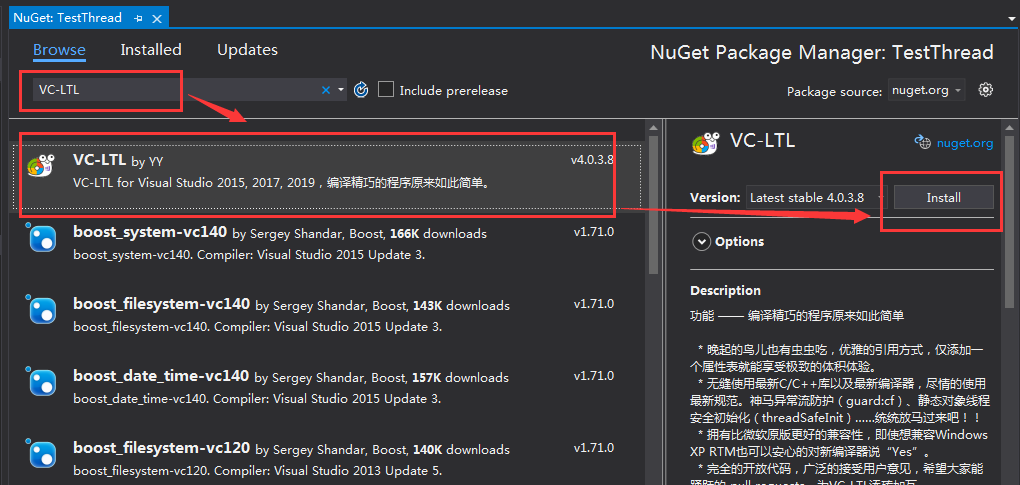
Right-click on the project and select "Manage NuGet Packages", then search for `VC-LTL` and choose the version that suits you, and finally click Install.
##### 3.1.1.2. Reference via Registry
If you download and unzip [VC-LTL Binary](https://github.com/Chuyu-Team/VC-LTL/releases/latest) to `D:\Src\VC-LTL`, please double-click `D:\Src\VC-LTL\Install.cmd`.
> The script will save the information in the registry `HKCU\Code\VC-LTL`.
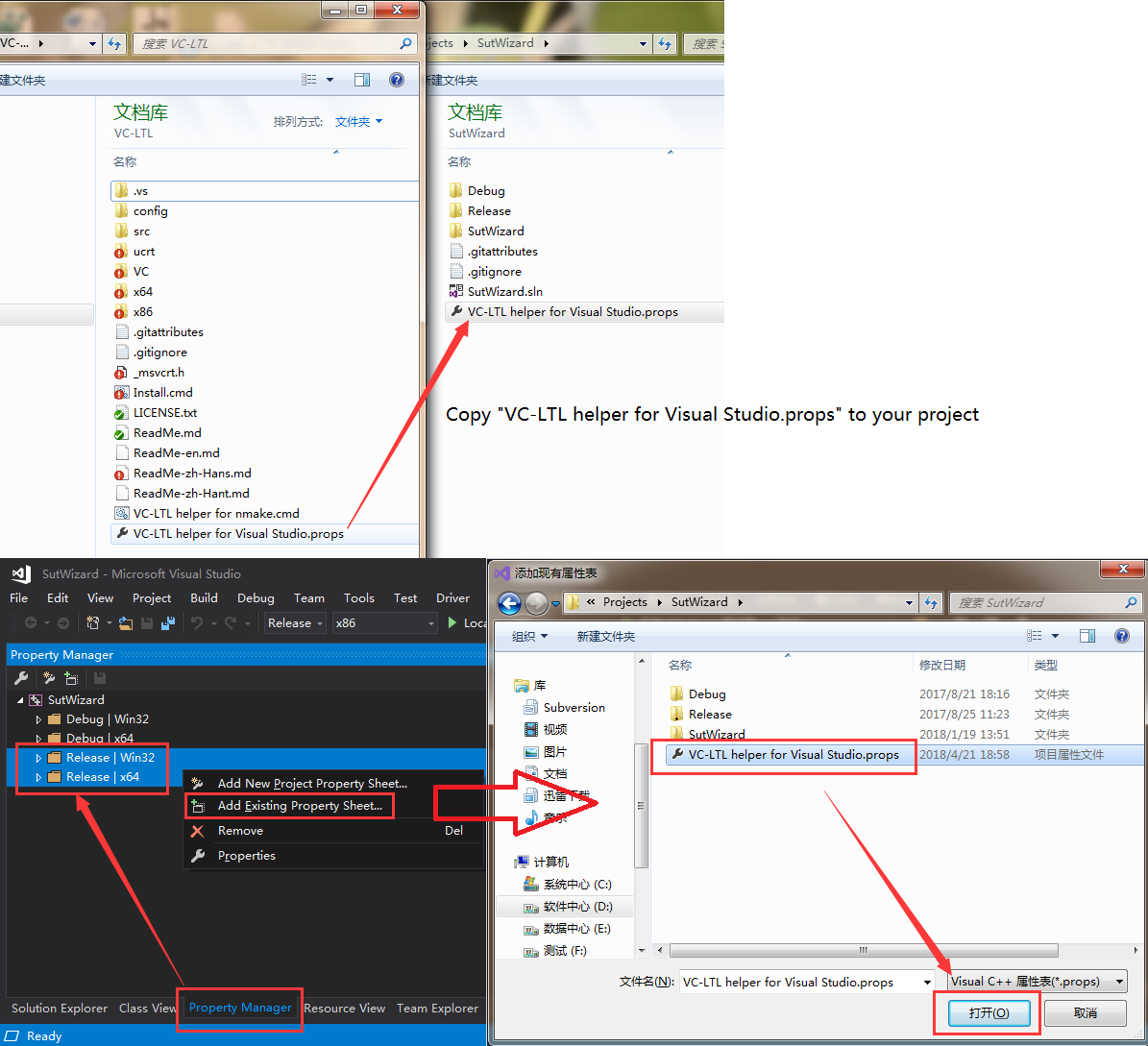
Copy `VC-LTL helper for Visual Studio.props` to your project, then open the Property Manager ( View - Property Manager ) and right-click on the Release Configuration, click on `Add Existing Property Sheet...`, and finally select `VC-LTL helper for Visual Studio.props`.
#### 3.1.2. Configure Project Properties
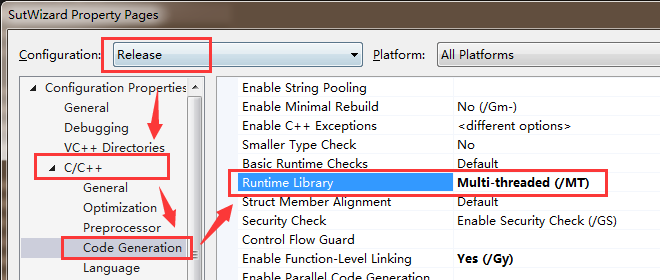
* C/C++ - Code Generation -`Runtime Library` adjust to `Multi-threaded (/MT)`
> For XP support, please Right click on the project, Properties - VC-LTL - Windows XP - "Yes".
### 3.2. Using VC-LTL in CMake
If you download and unzip [VC-LTL Binary](https://github.com/Chuyu-Team/VC-LTL/releases/latest) to `D:\Src\VC-LTL`, please double-click `D:\Src\VC-LTL\Install.cmd`.
> The script will save the information in the registry `HKCU\Code\VC-LTL`.
#### 3.2.1. Add VC-LTL Module File
Copy `VC-LTL helper for cmake.cmake` to your project. Then add `include("VC-LTL helper for cmake.cmake")` to `CMakeLists.txt`.
**Example:**
```
cmake_minimum_required(VERSION 3.5.2)
project(ltltest)
include("VC-LTL helper for cmake.cmake")
add_subdirectory(src)
```
#### 3.2.2. Modify The Configuration
> Make sure to use `/MT` to compile project when using VC-LTL. For XP support, please modify `VC-LTL helper for cmake.cmake` to enable `set(SupportWinXP "true")`.
### 3.3. Using VC-LTL in NMake/CL
#### 3.3.1. Run VC-LTL Cmd Script
If you download and unzip [VC-LTL Binary](https://github.com/Chuyu-Team/VC-LTL/releases/latest) to `D:\Src\VC-LTL`, please double-click `D:\Src\VC-LTL\Install.cmd`.
> The script will save the information in the registry `HKCU\Code\VC-LTL`.
Copy `VC-LTL helper for nmake.cmd` to your project. Run `vcvars32.bat` or `vcvars64.bat` and execute this script. The script will automatically modify the `include` and `lib` environment variables.
**Example:**
```
call "C:\Program Files (x86)\Microsoft Visual Studio\2017\Community\VC\Auxiliary\Build\vcvars32.bat"
call "D:\VC-LTL\VC-LTL helper for nmake.cmd"
nmake /f Test.mak
```
#### 3.3.2. Modify The Configuration
> Make sure to use `/MT` to compile project when using VC-LTL. For XP support, please modify `VC-LTL helper for nmake.cmd` to enable `set SupportWinXP=true`.
### 3.4. Rebuild (Release only)
Is the file size smaller? If you fail to compile, please refer to [4. FAQ](#4-faq). You can also feedback and work together to improve VC-LTL.
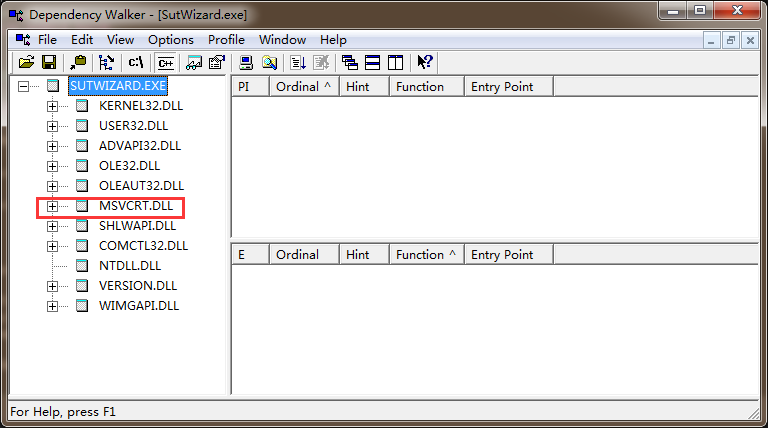
If VC-LTL is referenced correctly, it will be output at the time of generation: `note: ltlVC-LTL _DISABLE_DEPRECATE_LTL_MESSAGE `.
> Compile with VC-LTL must be compiled with `/MT`, and all dependent static libraries must also be recompiled with VC-LTL.
## 4. FAQ
### 4.1. msvcrt.dll
#### Cause
VC-LTL`note: ltlVC-LTL _DISABLE_DEPRECATE_LTL_MESSAGE `
#### Workaround
1 `VC-LTL helper for Visual Studio.props`
2
* VC++ - - (I)
* VC++ - - (I)
### 4.2. delete
#### Cause
vc.libmsvcrt_Platform.lib
#### Workaround
* VC++ - - (I)
* VC++ - - (I)
### 4.3. RuntimeLibrary
#### Cause
VC-LTLlib
#### Workaround
VC-LTLliblib
## 5. Known Issues
* WinXPBugprintf0x3FFFFFFFXP0x3FFFFFFF `_CRT_STDIO_SIZE_MAX` 4.0.2.5 Advanced
* WinXPBugprintf`%ll`XP`%I64`4.0.2.5 Advanced
* msvcrt`setlocale/_create_locale`UCRTlocale nameVC 2008 `setlocale(0, "chs");` `setlocale(0, "zh-CN");`
## Excursus - Known project using VC-LTL
| Project | Note
| --- | ----
| [NSudo](https://github.com/M2Team/NSudo) | VC-LTL30%NSudo for arm64
| [Menu98](https://github.com/rikka0w0/Menu98) | VC-LTL
| [](http://bhbrowser.com/) | DNSVC-LTL
| [librech551](https://github.com/rgwan/librech551) | CH55x ISPVC-LTL
| [Dism++](https://www.chuyu.me/) | Dism GUIVC-LTL
| [360](https://www.360.cn/) | 360360EvtMgr.exe360leakfixer.exe360Util.dllleakrepair.dllVC-LTLVC-LTLWinXP
## Excursus - Third Party Licenses
* [Visual Studio](https://github.com/Chuyu-Team/VC-LTL/tree/master/src/Licenses)
* [Windows 10 SDK](https://github.com/Chuyu-Team/VC-LTL/tree/master/src/ucrt/Licenses)
* [boost](https://github.com/Chuyu-Team/VC-LTL/tree/master/src/boost_1_66_0/LICENSE_1_0.txt)
## Changes
[Changes](https://github.com/Chuyu-Team/VC-LTL/wiki#changes)