MacPython / Xcode Integration
Legacy Wiki Page
This page was migrated from the old MoinMoin-based wiki. Information may be outdated or no longer applicable. For current documentation, see python.org.
Running scripts from Xcode
Its not terribly difficult to tell Xcode to launch a Python process and start your script. Create a custom executable, point it at Python, and set the arguments and environment variables appropriately. Detailed instructions are here:
http://ulaluma.com/pyx/archives/2004/02/running_python.html
User Scripts
StartupScript - A Python replacement for the Apple-provided example written in Perl. Install at
~/Library/ApplicationSupport/Apple/DeveloperTools/un_commentLines.py - A Python version of the Apple-provided Un-Comment script to be Python-aware. (Youll need to remove the shortcut in the first comment script.) Install at
~/Library/ApplicationSupport/Apple/DeveloperTools/Scripts/10-UserScripts/30-Comments. [1/1/5] Fixed error with perl scripts, and added support for commenting applescripts.
Xcode Plug-Ins
XOgre-0.0.tgz - A quick hack to replace Xcodes Find menu with OgreKits (regular expression engine). Put the pbplugin at
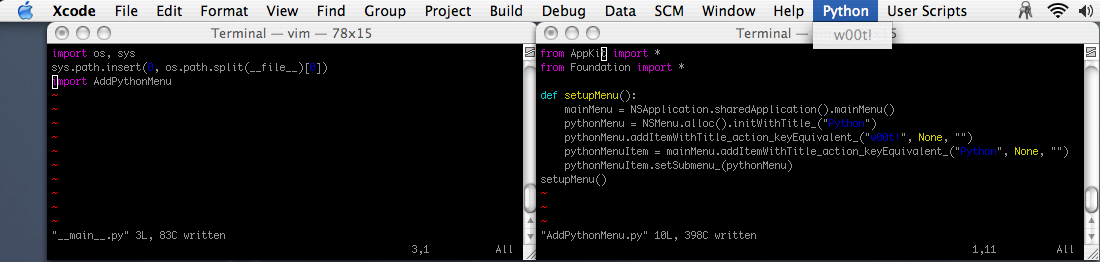
~/Library/ApplicationSupport/Apple/DeveloperTools/Plug-Ins.XPython-0.0.tgz (XPython-bin-0.0.tgz for built Plug-In and two examples) - I put Python in Xcode! Unpack the built version at
~/Library/ApplicationSupport/Apple/DeveloperTools/. Check this out:\
 []
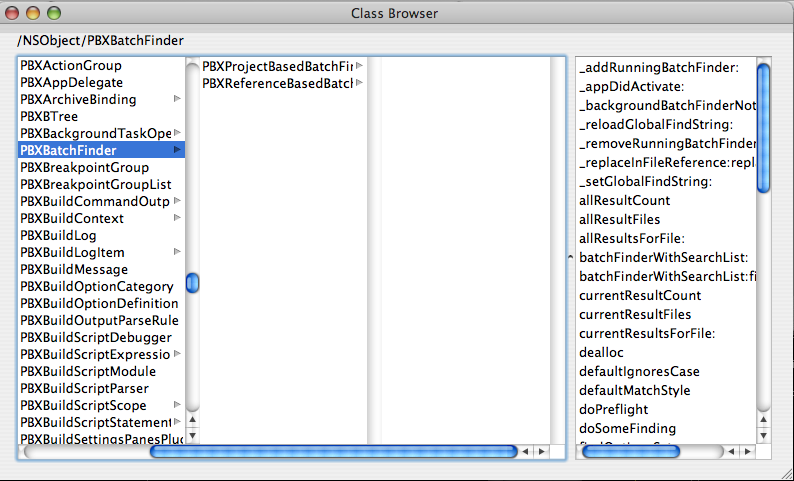
And even scarier.. heres the MacPython/PyObjC class browser demo INSIDE Xcode. Just look at all those proprietary Apple classes:
 []
Notes
The User Scripts feature is totally borrowed from TextExtras! Look at
/System/Library/PrivateFrameworks/DevToolsInterface.framework/Versions/A/Resources/UtilityScriptsits *the same*.