Commit 3e6df80
| Original file line number | Diff line number | Diff line change | |
|---|---|---|---|
@@ -9,6 +9,8 @@ | |||
| 9 | 9 | [](https://github.com/jae-jae/Userscript-Plus/tree/master/src/common/lang) | |
| 10 | 10 | [](https://github.com/jae-jae/Userscript-Plus) | |
| 11 | 11 | ||
| 12 | + > 显示当前网站所有的UserJS,一种更容易安装UserJS的方式对于Tampermonkey | ||
| 13 | + | ||
| 12 | 14 | **Userscript+** 是一款`Tampermonkey`脚本,作用是当你浏览网页的时候,从右下角自动为你推荐适用于当前页面的`Tampermonkey`脚本,并且可以一键安装指定的脚本。 | |
| 13 | 15 | ||
| 14 | 16 | 很多时候,我们并不知道一些网站是否有用户提供用来优化页面的脚本,而**Userscript+** 就能帮你自动寻找适用的UserJS,并默认按照评分高低排序推荐给你,给你带来一种全新的`Tampermonkey`使用体验! | |
@@ -33,6 +35,7 @@ | |||
| 33 | 35 | - 支持访问脚本首页和作者首页 | |
| 34 | 36 | - 点击关闭按钮后,当前网站的`本次会话`的所有页面都将不会再出现本插件的提示框 | |
| 35 | 37 | - 只有当找到了适用于当前网站的脚本的时候才会显示提示框 | |
| 38 | + - i18n国际化多语言支持 | ||
| 36 | 39 | - Vue+iView界面设计流畅漂亮 | |
| 37 | 40 | ||
| 38 | 41 | ## 白名单和黑名单 | |
@@ -44,12 +47,10 @@ | |||
| 44 | 47 | ||
| 45 | 48 | ## 已知Bug | |
| 46 | 49 | ||
| 47 | - 1. 在某些网站下面插件界面图标不显示,如:Githuh | ||
| 50 | + 1. 在某些网站下面插件界面图标不显示,如:Github | ||
| 48 | 51 | ||
| 49 | 52 | **原因**:这是因为这些网站的安全策略阻止了插件图标字体文件的加载,导致图标无法正常显示 | |
| 50 | 53 | ||
| 51 | - | ||
| 52 | - | ||
| 53 | 54 | ## 贡献代码 | |
| 54 | 55 | ||
| 55 | 56 | 如果你愿意为本项目贡献代码,请遵守[standard](https://standardjs.com/)规范。 | |
| Original file line number | Diff line number | Diff line change | |
|---|---|---|---|
@@ -9,7 +9,56 @@ | |||
| 9 | 9 | [](https://github.com/jae-jae/Userscript-Plus/tree/master/src/common/lang) | |
| 10 | 10 | [](https://github.com/jae-jae/Userscript-Plus) | |
| 11 | 11 | ||
| 12 | - Show current site all UserJS,The easier way to install UserJs for Tampermonkey. | ||
| 12 | + > Show current site all UserJS,The easier way to install UserJs for Tampermonkey. | ||
| 13 | + | ||
| 14 | + **Userscript +** is a `Tampermonkey` user script, the role is when you browse the web, from the bottom right corner automatically for you to recommend the current page `Tampermonkey` script, and can install a designated script. | ||
| 15 | + | ||
| 16 | + Many times, we do not know whether some sites have users to provide the script to optimize the page, but **Userscript+** will be able to help you automatically find the applicable UserJS, and by default, according to the score from high to low order recommended to you, bring you a new `Tampermonkey` use experience! | ||
| 13 | 17 | ||
| 14 | - 显示当前网站的所有可用Tampermonkey脚本 | ||
| 15 | 18 | > [中文说明](https://github.com/jae-jae/Userscript-Plus/blob/master/README-ZH.md) | |
| 19 | + | ||
| 20 | + ## Installation | ||
| 21 | + 1. Install the Chrome plugin `Tampermonkey` | ||
| 22 | + | ||
| 23 | + Chrome Store: [https://chrome.google.com/webstore/detail/tampermonkey/dhdgffkkebhmkfjojejmpbldmpobfkfo]( https://chrome.google.com/webstore/detail/tampermonkey/dhdgffkkebhmkfjojejmpbldmpobfkfo) | ||
| 24 | + | ||
| 25 | + 2. Install `Userscript+` | ||
| 26 | + | ||
| 27 | + You can install this script via `GreasyFork` or` GitHub`:: | ||
| 28 | + - GreasyFork: [https://greasyfork.org/zh-CN/scripts/24508](https://greasyfork.org/zh-CN/scripts/24508-userscript-show-site-all-userjs) | ||
| 29 | + - GitHub: [https://github.com/jae-jae/Userscript-Plus/raw/master/dist/show-site-all-userjs.user.js](https://github.com/jae-jae/Userscript-Plus/raw/master/dist/show-site-all-userjs.user.js) | ||
| 30 | + | ||
| 31 | + ## Features | ||
| 32 | + - Automatically appear in the lower right corner, recommend scripts for you, and will automatically disappear after 10 seconds | ||
| 33 | + - Filter the top 50 script with the highest score | ||
| 34 | + - The script list supports custom sorting | ||
| 35 | + - Supports one-click installation script | ||
| 36 | + - Support for viewing script details | ||
| 37 | + - Support access to the script home page and author home page | ||
| 38 | + - Click the close button, the current site `this session` all the pages will no longer appear prompt box | ||
| 39 | + - A prompt box is displayed only when found available script for the current site | ||
| 40 | + - i18n international multilingual support | ||
| 41 | + - Vue + iView UI design smooth and beautiful | ||
| 42 | + | ||
| 43 | + ## Whitelist and blacklist | ||
| 44 | + > Edit script => Settings tab => Includes/Excludes | ||
| 45 | + | ||
| 46 | + In the `Tampermonkey` to enter the script editing interface, select` Setting `tab, this tab below the` Includes/Excludes `option, set the white list and blacklist here, see Figure: | ||
| 47 | + | ||
| 48 | + 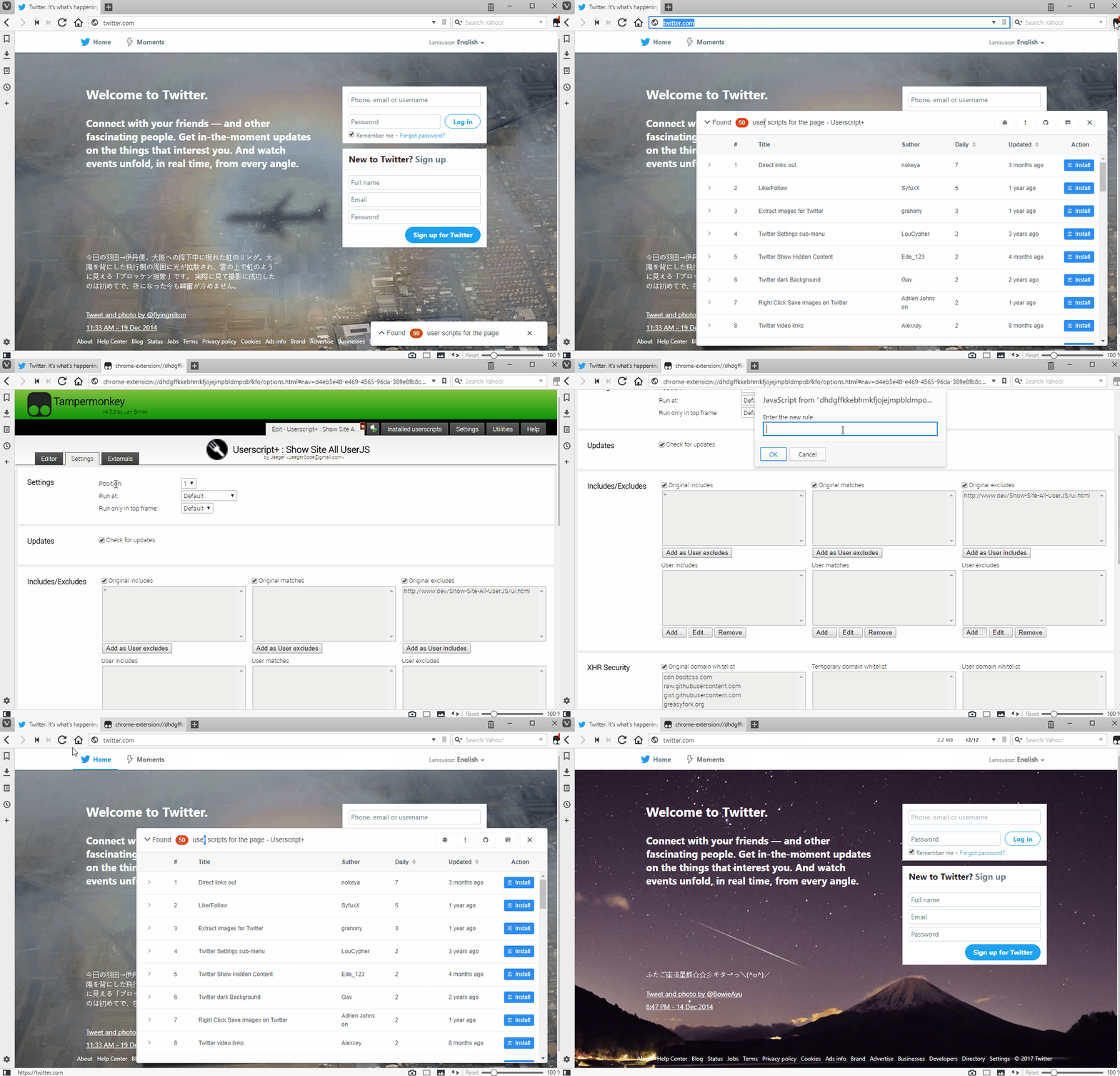 | ||
| 49 | + | ||
| 50 | + ## Known bug | ||
| 51 | + | ||
| 52 | + 1. In some sites below the plug-in interface icon is not displayed,Such as:Github | ||
| 53 | + | ||
| 54 | + **Reason**:This is because the security policy of these sites to prevent the plug-in icon font file loading, resulting in the icon does not display properly. | ||
| 55 | + | ||
| 56 | + ## Contribute | ||
| 57 | + | ||
| 58 | + If you are willing to contribute code to this project, please follow the [standard](https://standardjs.com/) specification. | ||
| 59 | + | ||
| 60 | + ## License | ||
| 61 | + MIT | ||
| 62 | + | ||
| 63 | + | ||
| 64 | + | ||
0 commit comments