Commit 68903b8
| Original file line number | Diff line number | Diff line change | |
|---|---|---|---|
@@ -1,3 +1,11 @@ | |||
| 1 | + <!-- | ||
| 2 | + <<< Author notes: Step 1 >>> | ||
| 3 | + Choose 3-5 steps for your course. | ||
| 4 | + The first step is always the hardest, so pick something easy! | ||
| 5 | + Link to docs.github.com for further explanations. | ||
| 6 | + Encourage users to open new tabs for steps! | ||
| 7 | + --> | ||
| 8 | + | ||
| 1 | 9 | ## Step 1: Create your first codespace and push code | |
| 2 | 10 | ||
| 3 | 11 | _Welcome to "Develop code using GitHub Codespaces and Visual Studio Code"! :wave:_ | |
@@ -33,23 +41,23 @@ To begin developing using GitHub Codespaces, you can create a codespace from a t | |||
| 33 | 41 | 1. From inside the codespace in the VS Code explorer window, select the `index.html` file. | |
| 34 | 42 | 1. Replace the **h1** header with the below: | |
| 35 | 43 | ||
| 36 | - ``` | ||
| 37 | - <h1>Hello from the codespace!</h1> | ||
| 38 | - ``` | ||
| 44 | + ```html | ||
| 45 | + <h1>Hello from the codespace!</h1> | ||
| 46 | + ``` | ||
| 39 | 47 | ||
| 40 | 48 | 1. Save the file. | |
| 41 | 49 | > **Note**: The file should autosave. | |
| 42 | 50 | 1. Use the VS Code terminal to commit the file change by entering the following commit message: | |
| 43 | 51 | ||
| 44 | - ``` | ||
| 45 | - git commit -a -m "Adding hello from the codespace!" | ||
| 46 | - ``` | ||
| 52 | + ```shell | ||
| 53 | + git commit -a -m "Adding hello from the codespace!" | ||
| 54 | + ``` | ||
| 47 | 55 | ||
| 48 | 56 | 1. Push the changes back to your repository. From the VS Code terminal, enter: | |
| 49 | 57 | ||
| 50 | - ``` | ||
| 51 | - git push | ||
| 52 | - ``` | ||
| 58 | + ```shell | ||
| 59 | + git push | ||
| 60 | + ``` | ||
| 53 | 61 | ||
| 54 | 62 | 1. Your code has been pushed to your repository! | |
| 55 | 63 | 1. Switch back to the homepage of your repository and view the `index.html` to verify the new code was pushed to your repository. | |
| Original file line number | Diff line number | Diff line change | |
|---|---|---|---|
@@ -1,3 +1,9 @@ | |||
| 1 | + <!-- | ||
| 2 | + <<< Author notes: Step 2 >>> | ||
| 3 | + Start this step by acknowledging the previous step. | ||
| 4 | + Define terms and link to docs.github.com. | ||
| 5 | + --> | ||
| 6 | + | ||
| 1 | 7 | ## Step 2: Add a custom image to your codespace! | |
| 2 | 8 | ||
| 3 | 9 | _Nice work! :tada: You created your first codespace and pushed code using VS Code!_ | |
@@ -15,23 +21,23 @@ Let's add a `devcontainer.json` file and add a custom image. | |||
| 15 | 21 | 1. Navigating back to your **Code** tab of your repository, click the **Add file** drop-down button, and then click `Create new file`. | |
| 16 | 22 | 1. Type or paste the following in the empty text field prompt to name your file. | |
| 17 | 23 | ||
| 18 | - ``` | ||
| 19 | - .devcontainer/devcontainer.json | ||
| 20 | - ``` | ||
| 24 | + ``` | ||
| 25 | + .devcontainer/devcontainer.json | ||
| 26 | + ``` | ||
| 21 | 27 | ||
| 22 | 28 | 1. In the body of the new **.devcontainer/devcontainer.json** file, add the following content: | |
| 23 | 29 | ||
| 24 | - ``` | ||
| 25 | - { | ||
| 26 | - // Name this configuration | ||
| 27 | - "name": "Codespace for Skills!", | ||
| 28 | - // Use the base codespace image | ||
| 29 | - "image": "mcr.microsoft.com/vscode/devcontainers/universal:latest", | ||
| 30 | + ```jsonc | ||
| 31 | + { | ||
| 32 | + // Name this configuration | ||
| 33 | + "name": "Codespace for Skills!", | ||
| 34 | + // Use the base codespace image | ||
| 35 | + "image": "mcr.microsoft.com/vscode/devcontainers/universal:latest", | ||
| 30 | 36 | ||
| 31 | - "remoteUser": "codespace", | ||
| 32 | - "overrideCommand": false | ||
| 33 | - } | ||
| 34 | - ``` | ||
| 37 | + "remoteUser": "codespace", | ||
| 38 | + "overrideCommand": false | ||
| 39 | + } | ||
| 40 | + ``` | ||
| 35 | 41 | ||
| 36 | 42 | 1. Click **Commit changes** and then select **Commit changes directly to the `main` branch**. | |
| 37 | 43 | 1. Create a new codespace by navigating back to the **Code** tab of your repository. | |
@@ -43,6 +49,6 @@ Let's add a `devcontainer.json` file and add a custom image. | |||
| 43 | 49 | ||
| 44 | 50 | 1. Verify that your new codespace is is running, as you did previously. | |
| 45 | 51 | ||
| 46 | - Note the image being used is the default image provided for GitHub Codespaces. It includes runtimes and tools for Python, Node.js, Docker, and more. See the full list here: https://aka.ms/ghcs-default-image. Your development team can use any custom image that has the necessary prerequisites installed. For more information, see [codespace image](https://aka.ms/configure-codespace). | ||
| 52 | + Note the image being used is the default image provided for GitHub Codespaces. It includes runtimes and tools for Python, Node.js, Docker, and more. See the full list here: https://aka.ms/ghcs-default-image. Your development team can use any custom image that has the necessary prerequisites installed. For more information, see [codespace image](https://aka.ms/configure-codespace). | ||
| 47 | 53 | ||
| 48 | 54 | 1. Wait about 20 seconds then refresh this page (the one you're following instructions from). [GitHub Actions](https://docs.github.com/en/actions) will automatically update to the next step. | |
| Original file line number | Diff line number | Diff line change | |
|---|---|---|---|
@@ -1,3 +1,9 @@ | |||
| 1 | + <!-- | ||
| 2 | + <<< Author notes: Step 3 >>> | ||
| 3 | + Start this step by acknowledging the previous step. | ||
| 4 | + Define terms and link to docs.github.com. | ||
| 5 | + --> | ||
| 6 | + | ||
| 1 | 7 | ## Step 3: Customize your codespace! | |
| 2 | 8 | ||
| 3 | 9 | _Nice work! :tada: You created a codespace with a custom image!_ | |
@@ -11,7 +17,7 @@ Let's customize some settings in the `.devcontainer.json` file! | |||
| 11 | 17 | 1. Navigate to the `.devcontainer/devcontainer.json` file. | |
| 12 | 18 | 1. Add the following customizations to the body of the file before the last `}`. | |
| 13 | 19 | ||
| 14 | - ``` | ||
| 20 | + ```jsonc | ||
| 15 | 21 | , | |
| 16 | 22 | // Add the IDs of extensions you want installed when the container is created. | |
| 17 | 23 | "customizations": { | |
@@ -26,7 +32,7 @@ Let's customize some settings in the `.devcontainer.json` file! | |||
| 26 | 32 | ] | |
| 27 | 33 | } | |
| 28 | 34 | } | |
| 29 | - ``` | ||
| 35 | + ``` | ||
| 30 | 36 | ||
| 31 | 37 | 1. Click **Commit changes** and then select **Commit changes directly to the `main` branch**. | |
| 32 | 38 | 1. Create a new codespace by navigating to the landing page of your repository. | |
@@ -40,7 +46,7 @@ Let's customize some settings in the `.devcontainer.json` file! | |||
| 40 | 46 | 1. The `codespace.md` file should show up in the VS Code editor. | |
| 41 | 47 | 1. The `copilot` extension should show up in the VS Code extension list. | |
| 42 | 48 | ||
| 43 | - This will add a VS Code extension as well as open a file on start up of the codespace. | ||
| 49 | + This will add a VS Code extension as well as open a file on start up of the codespace. | ||
| 44 | 50 | ||
| 45 | 51 | Next lets add some code to run upon creation of the codespace! | |
| 46 | 52 | ||
@@ -49,10 +55,10 @@ Next lets add some code to run upon creation of the codespace! | |||
| 49 | 55 | 1. Edit the `.devcontainer/devcontainer.json` file. | |
| 50 | 56 | 1. Add the following postCreateCommand to the body of the file before the last `}`. | |
| 51 | 57 | ||
| 52 | - ``` | ||
| 58 | + ```jsonc | ||
| 53 | 59 | , | |
| 54 | 60 | "postCreateCommand": "echo '# Writing code upon codespace creation!' >> codespace.md" | |
| 55 | - ``` | ||
| 61 | + ``` | ||
| 56 | 62 | ||
| 57 | 63 | 1. Click **Commit changes** and then select **Commit changes directly to the `main` branch**. | |
| 58 | 64 | 1. Create a new codespace by navigating to the landing page of your repository. | |
| Original file line number | Diff line number | Diff line change | |
|---|---|---|---|
@@ -1,3 +1,9 @@ | |||
| 1 | + <!-- | ||
| 2 | + <<< Author notes: Step 4 >>> | ||
| 3 | + Start this step by acknowledging the previous step. | ||
| 4 | + Define terms and link to docs.github.com. | ||
| 5 | + --> | ||
| 6 | + | ||
| 1 | 7 | ## Step 4: Personalize your codespace! | |
| 2 | 8 | ||
| 3 | 9 | _Nicely done customizing your codespace!_ :partying_face: | |
@@ -28,32 +34,33 @@ Let's see how this works! | |||
| 28 | 34 | > Wait about **2 minutes** for the codespace to spin itself up. | |
| 29 | 35 | ||
| 30 | 36 | 1. Verify your codespace is running. The browser should contain a VS Code web-based editor and a terminal should be present such as the below: | |
| 37 | + | ||
| 31 | 38 | 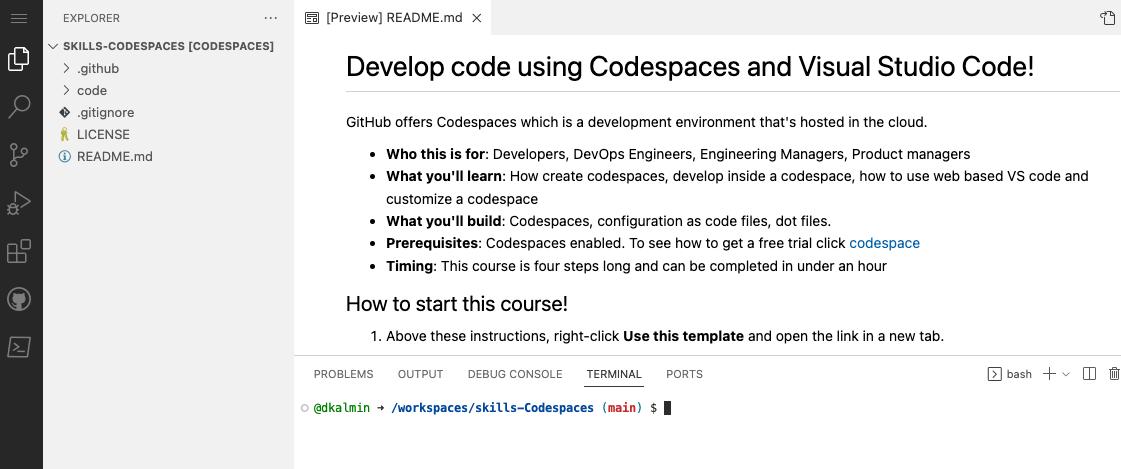 | |
| 32 | 39 | ||
| 33 | 40 | 1. From inside the codespace in the VS Code explorer window, create a new file `setup.sh`. | |
| 34 | 41 | 1. Add the following code inside of the file: | |
| 35 | 42 | ||
| 36 | - ``` | ||
| 37 | - #!/bin/bash | ||
| 43 | + ```bash | ||
| 44 | + #!/bin/bash | ||
| 38 | 45 | ||
| 39 | - sudo apt-get update | ||
| 40 | - sudo apt-get install sl | ||
| 41 | - ``` | ||
| 46 | + sudo apt-get update | ||
| 47 | + sudo apt-get install sl | ||
| 48 | + ``` | ||
| 42 | 49 | ||
| 43 | 50 | 1. Save the file. | |
| 44 | 51 | > **Note**: The file should autosave. | |
| 45 | 52 | 1. Commit the file changes. From the VS Code terminal enter: | |
| 46 | 53 | ||
| 47 | - ``` | ||
| 48 | - git add setup.sh --chmod=+x | ||
| 49 | - git commit -m "Adding setup.sh from the codespace!" | ||
| 50 | - ``` | ||
| 54 | + ```shell | ||
| 55 | + git add setup.sh --chmod=+x | ||
| 56 | + git commit -m "Adding setup.sh from the codespace!" | ||
| 57 | + ``` | ||
| 51 | 58 | ||
| 52 | 59 | 1. Push the changes back to your repository. From the VS Code terminal, enter: | |
| 53 | 60 | ||
| 54 | - ``` | ||
| 55 | - git push | ||
| 56 | - ``` | ||
| 61 | + ```shell | ||
| 62 | + git push | ||
| 63 | + ``` | ||
| 57 | 64 | ||
| 58 | 65 | 1. Switch back to the homepage of your repository and view the `setup.sh` to verify the new code was pushed to your repository. | |
| 59 | 66 | 1. Close the codespace web browser tab. | |
@@ -65,9 +72,9 @@ git push | |||
| 65 | 72 | 1. Verify the `setup.sh` file is present in your VS Code editor. | |
| 66 | 73 | 1. From the VS Code terminal, type or paste: | |
| 67 | 74 | ||
| 68 | - ``` | ||
| 69 | - /usr/games/sl | ||
| 70 | - ``` | ||
| 75 | + ```shell | ||
| 76 | + /usr/games/sl | ||
| 77 | + ``` | ||
| 71 | 78 | ||
| 72 | 79 | 1. Enjoy the show! | |
| 73 | 80 | 1. Wait about 20 seconds then refresh this page (the one you're following instructions from). [GitHub Actions](https://docs.github.com/en/actions) will automatically update to the next step. | |
| Original file line number | Diff line number | Diff line change | |
|---|---|---|---|
@@ -1,3 +1,8 @@ | |||
| 1 | + <!-- | ||
| 2 | + <<< Author notes: Finish >>> | ||
| 3 | + Review what we learned, ask for feedback, provide next steps. | ||
| 4 | + --> | ||
| 5 | + | ||
| 1 | 6 | ## Finish | |
| 2 | 7 | ||
| 3 | 8 | _Congratulations friend, you've completed this course!_ | |
| Original file line number | Diff line number | Diff line change | |
|---|---|---|---|
@@ -1,4 +1,4 @@ | |||
| 1 | - name: Step 1, 1-Create codespace and push code | ||
| 1 | + name: Step 1, Create codespace and push code | ||
| 2 | 2 | ||
| 3 | 3 | # This step triggers after push to main. | |
| 4 | 4 | # This workflow updates from step 1 to step 2. | |
| Original file line number | Diff line number | Diff line change | |
|---|---|---|---|
@@ -1,4 +1,4 @@ | |||
| 1 | - name: Step 2, 2-custom image check | ||
| 1 | + name: Step 2, Custom image check | ||
| 2 | 2 | ||
| 3 | 3 | # This step triggers after First Codespace. | |
| 4 | 4 | # This workflow updates from step 2 to step 3. | |
| Original file line number | Diff line number | Diff line change | |
|---|---|---|---|
@@ -1,4 +1,4 @@ | |||
| 1 | - name: Step 3, 3-Customize Codespace | ||
| 1 | + name: Step 3, Customize Codespace | ||
| 2 | 2 | ||
| 3 | 3 | # This step triggers after we push to main. | |
| 4 | 4 | # This workflow updates from step 3 to step 4. | |
| Original file line number | Diff line number | Diff line change | |
|---|---|---|---|
@@ -1,4 +1,4 @@ | |||
| 1 | - name: Step 4, 4-Personalize your Codespace | ||
| 1 | + name: Step 4, Personalize your Codespace | ||
| 2 | 2 | ||
| 3 | 3 | # This step triggers after push to main#setup.sh. | |
| 4 | 4 | # This workflow updates from step 4 to step X. | |
| Original file line number | Diff line number | Diff line change | |
|---|---|---|---|
@@ -62,6 +62,11 @@ In this course, you will: | |||
| 62 | 62 | ||
| 63 | 63 | <footer> | |
| 64 | 64 | ||
| 65 | + <!-- | ||
| 66 | + <<< Author notes: Footer >>> | ||
| 67 | + Add a link to get support, GitHub status page, code of conduct, license link. | ||
| 68 | + --> | ||
| 69 | + | ||
| 65 | 70 | --- | |
| 66 | 71 | ||
| 67 | 72 | Get help: [Review the GitHub status page](https://www.githubstatus.com/) | |
0 commit comments