css
/*  */
linear                /* linear(0, 1) */

/*  */
linear(0, 0.25, 1)
linear(0, 0.25 75%, 1)

/*  3  */
ease                  /* cubic-bezier(0.25, 0.1, 0.25, 1) */
ease-in               /* cubic-bezier(0.42, 0, 1, 1) */
ease-out              /* cubic-bezier(0, 0, 0.58, 1) */
ease-in-out           /* cubic-bezier(0.42, 0, 0.58, 1) */

/*  3  */
cubic-bezier(0.25, 0.1, 0.25, 1)

/*  */
step-start            /* steps(1, jump-start) */
step-end              /* steps(1, jump-end) */

/*  */
steps(4, end)
steps(10, jump-both)
<easing-function>
<linear-easing-function><cubic-bezier-easing-function>-
ease-
cubic-bezier(0.25, 0.1, 0.25, 1)ease-in-out ease-in-
cubic-bezier(0.42, 0, 1, 1) ease-out-
cubic-bezier(0, 0, 0.58, 1) ease-in-out-
cubic-bezier(0.42, 0.0, 0.58, 1.0)ease-inease-out cubic-bezier()-
2 4
<number>X[0, 1]
<step-easing-function>-
step-start-
steps(1, jump-start)steps(1, start) step-end-
steps(1, jump-end)steps(1, end) ["step-start" (0, 1) (1, 1) "step-end" (1, 0) (1, 1) ]
steps()


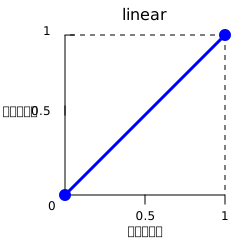
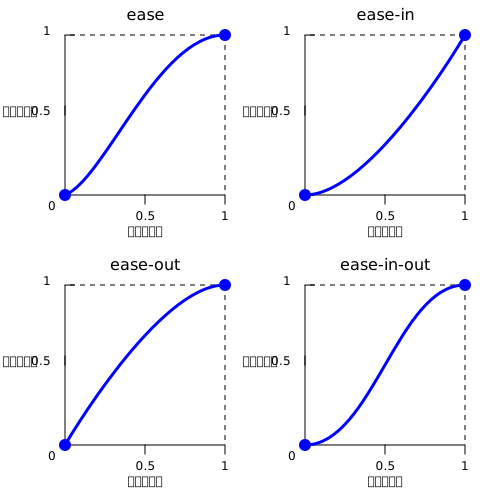
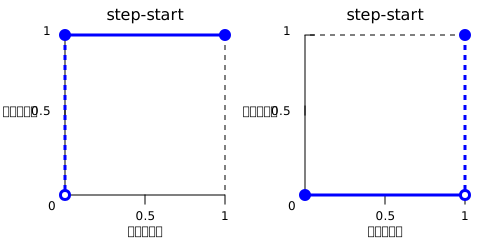
<easing-function> =CSS Easing Functions Level 2, CSS Values and Units Module Level 4
<linear-easing-function> |
<cubic-bezier-easing-function> |
<step-easing-function>
<linear-easing-function> =
linear |
<linear()>
<cubic-bezier-easing-function> =
ease |
ease-in |
ease-out |
ease-in-out |
<cubic-bezier()>
<step-easing-function> =
step-start |
step-end |
<steps()>
<linear()> =
linear( [ <number> && <percentage>{0,2} ]# )
<cubic-bezier()> =
cubic-bezier( [ <number [0,1]> , <number> ]#{2} )
<steps()> =
steps( <integer> , <step-position>? )
<integer> =
<number-token>
<step-position> =
jump-start |
jump-end |
jump-none |
jump-both |
start |
end
cubic-bezier() steps()
HTML
html
<div>
  <div></div>
</div>
<ul>
  <li>
    <button class="animation-button"></button>
  </li>
  <li>
    <label for="easing-select">:</label>
    <select id="easing-select">
      <option selected>linear</option>
      <option>linear(0, 0.5 50%, 1)</option>
      <option>ease</option>
      <option>ease-in</option>
      <option>ease-in-out</option>
      <option>ease-out</option>
      <option>cubic-bezier(0.1, -0.6, 0.2, 0)</option>
      <option>cubic-bezier(0, 1.1, 0.8, 4)</option>
      <option>steps(5, end)</option>
      <option>steps(3, start)</option>
      <option>steps(4)</option>
    </select>
  </li>
</ul>
CSS
css
body > div {
  position: relative;
  height: 100px;
}

div > div {
  position: absolute;
  width: 50px;
  height: 50px;
  background-color: blue;
  background-image: radial-gradient(
    circle at 10px 10px,
    rgb(25 255 255 / 80%),
    rgb(25 255 255 / 40%)
  );
  border-radius: 50%;
  top: 25px;
  animation: 1.5s infinite alternate;
}

@keyframes move-right {
  from {
    left: 10%;
  }

  to {
    left: 90%;
  }
}

li {
  display: flex;
  align-items: center;
  justify-content: center;
  margin-bottom: 20px;
}
JavaScript
js
const selectElem = document.querySelector("select");
const startBtn = document.querySelector("button");
const divElem = document.querySelector("div > div");

startBtn.addEventListener("click", () => {
  if (startBtn.textContent === "") {
    divElem.style.animationName = "move-right";
    startBtn.textContent = "";
    divElem.style.animationTimingFunction = selectElem.value;
  } else {
    divElem.style.animationName = "unset";
    startBtn.textContent = "";
  }
});

selectElem.addEventListener("change", () => {
  divElem.style.animationTimingFunction = selectElem.value;
});
| CSS Easing Functions Level 1 # easing-functions |
- CSS
- CSS
- CSS
linear()easing generator - Jake Archibald- cubic-bezier.com - Lea Verou (2011)