Declaration
public static Color ColorField(Rect position, GUIContent label, Color value, bool showEyedropper, bool showAlpha, bool hdr);
Obsolete
Use EditorGUI.ColorField(Rect position, GUIContent label, Color value, bool showEyedropper, bool showAlpha, bool hdr).
Declaration
public static Color ColorField(Rect position, GUIContent label, Color value, bool showEyedropper, bool showAlpha, bool hdr, ColorPickerHDRConfig hdrConfig);Parameters
| Parameter | Description |
|---|---|
| position | Rectangle on the screen to use for the field. |
| label | Optional label to display in front of the field. |
| value | The color to edit. |
| showEyedropper | If true, the color picker should show the eyedropper control. If false, don't show it. |
| showAlpha | If true, allow the user to set an alpha value for the color. If false, hide the alpha component. |
| hdr | If true, treat the color as an HDR value. If false, treat it as a standard LDR value. |
Returns
Color The color selected by the user.
Description
Makes a field for selecting a Color.
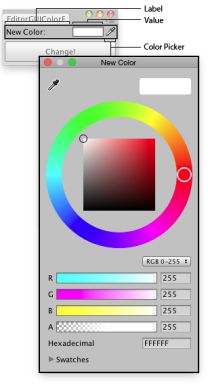 [EditorGUIColorField.png]
Color field in an Editor Window.
![[EditorGUIColorField.png]](https://docs.unity3d.com/ScriptReference/../StaticFiles/ScriptRefImages/EditorGUIColorField.png)
using UnityEngine;
using UnityEditor;

// Change The color of the selected Game Objects
class EditorGUIColorField : EditorWindow
{
    Color matColor  = Color.white;

    [MenuItem("Examples/Mass Color Change")]

    static void Init()
    {
        var window = GetWindow<EditorGUIColorField>();
        window.position = new Rect(0, 0, 170, 60);
        window.Show();
    }

    void OnGUI()
    {
        matColor = EditorGUI.ColorField(new Rect(3, 3, position.width - 6, 15),
            "New Color:",
            matColor);
        if (GUI.Button(new Rect(3, 25, position.width - 6, 30), "Change!"))
        {
            ChangeColors();
        }
    }

    void ChangeColors()
    {
        if (Selection.activeGameObject)
        {
            foreach (GameObject obj in Selection.gameObjects)
            {
                Renderer rend = obj.GetComponent<Renderer>();

                if (rend != null)
                {
                    rend.sharedMaterial.color = matColor;
                }
            }
        }
    }
}