Declaration
public static int IntSlider(Rect position, string label, int value, int leftValue, int rightValue);Declaration
public static int IntSlider(Rect position, GUIContent label, int value, int leftValue, int rightValue);Parameters
| Parameter | Description |
|---|---|
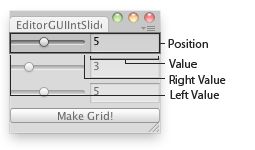
| position | Rectangle on the screen to use for the slider. |
| label | Optional label in front of the slider. |
| value | The value the slider shows. This determines the position of the draggable thumb. |
| leftValue | The value at the left end of the slider. |
| rightValue | The value at the right end of the slider. |
Returns
int The value that has been set by the user.
Description
Makes a slider the user can drag to change an integer value between a min and a max.
 [EditorGUIIntSlider.png]
Int Slider in an Editor Window.
![[EditorGUIIntSlider.png]](https://docs.unity3d.com/ScriptReference/../StaticFiles/ScriptRefImages/EditorGUIIntSlider.png)
using UnityEditor;
using UnityEngine;
using System.Collections;

// Simple editor script that lets you clone your object in a grid

public class EditorGUIIntSlider : EditorWindow
{
    int cloneTimesX = 1;
    int cloneTimesY = 1;
    int cloneTimesZ = 1;
    int spacing = 2;

    [MenuItem("Examples/Editor GUI int slider usage")]
    static void Init()
    {
        UnityEditor.EditorWindow window = GetWindow(typeof(EditorGUIIntSlider));
        window.position = new Rect(100, 100, 250, 100);
        window.Show();
    }

    void OnGUI()
    {
        cloneTimesX = EditorGUI.IntSlider(new Rect(0, 0, position.width, 20), cloneTimesX.ToString(), cloneTimesX, 1, 10);
        cloneTimesY = EditorGUI.IntSlider(new Rect(0, 25, position.width, 20), cloneTimesY.ToString(), cloneTimesY, 1, 10);
        cloneTimesZ = EditorGUI.IntSlider(new Rect(0, 50, position.width, 20), cloneTimesZ.ToString(), cloneTimesZ, 1, 10);

        if (GUI.Button(new Rect(0, 75, position.width, 15), "Make Grid!"))
        {
            CloneSelected();
        }
    }

    void CloneSelected()
    {
        if (!Selection.activeGameObject)
        {
            Debug.Log("Select a GameObject first");
            return;
        }

        for (int i = 0; i < cloneTimesX; i++)
        {
            for (int j = 0; j < cloneTimesY; j++)
            {
                for (int k = 0; k < cloneTimesZ; k++)
                {
                    Instantiate(Selection.activeGameObject,
                        new Vector3(i, j, k) * spacing,
                        Selection.activeGameObject.transform.rotation);
                }
            }
        }
    }
}
Declaration
public static void IntSlider(Rect position, SerializedProperty property, int leftValue, int rightValue);Declaration
public static void IntSlider(Rect position, SerializedProperty property, int leftValue, int rightValue, string label);Declaration
public static void IntSlider(Rect position, SerializedProperty property, int leftValue, int rightValue, GUIContent label);Parameters
| Parameter | Description |
|---|---|
| position | Rectangle on the screen to use for the slider. |
| label | Optional label in front of the slider. |
| property | The value the slider shows. This determines the position of the draggable thumb. |
| leftValue | The value at the left end of the slider. |
| rightValue | The value at the right end of the slider. |
Description
Makes a slider the user can drag to change a value between a min and a max.