Declaration
public static int Popup(Rect position, int selectedIndex, string[] displayedOptions, GUIStyle style = EditorStyles.popup);Declaration
public static int Popup(Rect position, int selectedIndex, GUIContent[] displayedOptions, GUIStyle style = EditorStyles.popup);Declaration
public static int Popup(Rect position, string label, int selectedIndex, string[] displayedOptions, GUIStyle style = EditorStyles.popup);Declaration
public static int Popup(Rect position, GUIContent label, int selectedIndex, GUIContent[] displayedOptions, GUIStyle style = EditorStyles.popup);Parameters
| Parameter | Description |
|---|---|
| position | Rectangle on the screen to use for the field. |
| label | Optional label in front of the field. |
| selectedIndex | The index of the option the field shows. |
| displayedOptions | An array with the options shown in the popup. |
| style | Optional GUIStyle. |
Returns
int The index of the option that has been selected by the user.
Description
Makes a generic popup selection field.
Takes the currently selected index as a parameter and returns the index selected by the user.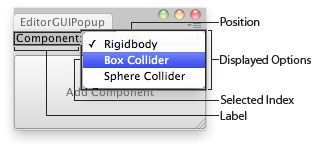 [EditorGUIPopup.png]
Popup in and Editor Window.
![[EditorGUIPopup.png]](https://docs.unity3d.com/ScriptReference/../StaticFiles/ScriptRefImages/EditorGUIPopup.png)
using UnityEngine;
using UnityEditor;


// Adds a component to the selected GameObjects

class EditorGUIPopup : EditorWindow
{
    string[] options = { "Rigidbody", "Box Collider", "Sphere Collider" };
    int index = 0;

    [MenuItem("Examples/Editor GUI Popup usage")]
    static void Init()
    {
        var window = GetWindow<EditorGUIPopup>();
        window.position = new Rect(0, 0, 180, 80);
        window.Show();
    }

    void OnGUI()
    {
        index = EditorGUI.Popup(
            new Rect(0, 0, position.width, 20),
            "Component:",
            index,
            options);

        if (GUI.Button(new Rect(0, 25, position.width, position.height - 26), "Add Component"))
            AddComponentToObjects();
    }

    void AddComponentToObjects()
    {
        if (!Selection.activeGameObject)
        {
            Debug.LogError("Please select at least one GameObject first");
            return;
        }

        foreach (GameObject obj in Selection.gameObjects)
        {
            switch (index)
            {
                case 0:
                    obj.AddComponent<Rigidbody>();
                    break;

                case 1:
                    obj.AddComponent<BoxCollider>();
                    break;

                case 2:
                    obj.AddComponent<SphereCollider>();
                    break;
            }
        }
    }
}
Note: The displayedOptions lists an array of options. When these elements contain "/" (slash characters) the elements are use for sub-menus. The text to the left of the slashes determines the structure.