Declaration
public void EndWindows();Description
Close a window group started with EditorWindow.BeginWindows.
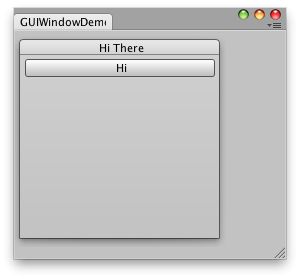 [GUIWindowDemo.png]
Simple editor Window with a window and a button inside.
![[GUIWindowDemo.png]](https://docs.unity3d.com/ScriptReference/../StaticFiles/ScriptRefImages/GUIWindowDemo.png)
using UnityEditor;
using UnityEngine;
using System.Collections;

public class IMGUIWindowDemo : EditorWindow
{
    // The position of the window
    public Rect windowRect = new Rect(100, 100, 200, 200);
    void OnGUI()
    {
        BeginWindows();

        // All GUI.Window or GUILayout.Window must come inside here
        windowRect = GUILayout.Window(1, windowRect, DoWindow, "Hi There");

        EndWindows();
    }

    // The window function. This works just like ingame GUI.Window
    void DoWindow(int unusedWindowID)
    {
        GUILayout.Button("Hi");
        GUI.DragWindow();
    }

    // Add menu item to show this demo.
    [MenuItem("Test/GUIWindow Demo")]
    static void Init()
    {
        EditorWindow.GetWindow(typeof(IMGUIWindowDemo));
    }
}
The placement of the BeginWindows / EndWindows pair determines where popup windows will appear; all windows are clipped to the clipping area
defined by GUI.BeginGroup or GUI.BeginScrollView. A small example of that: [GUIWindowDemo2.png]
Simple editor window with a window and a button inside using scroll bars.
![[GUIWindowDemo2.png]](https://docs.unity3d.com/ScriptReference/../StaticFiles/ScriptRefImages/GUIWindowDemo2.png)
using UnityEditor;
using UnityEngine;
using System.Collections;

public class IMGUIWindowDemo2 : EditorWindow
{
    // The position of the window
    public Rect windowRect = new Rect(100, 100, 200, 200);

    // Scroll position
    public Vector2 scrollPos = Vector2.zero;

    void OnGUI()
    {
        // Set up a scroll view
        scrollPos = GUI.BeginScrollView(new Rect(0, 0, position.width, position.height), scrollPos, new Rect(0, 0, 1000, 1000));

        // Same code as before - make a window. Only now, it's INSIDE the scrollview
        BeginWindows();
        windowRect = GUILayout.Window(1, windowRect, DoWindow, "Hi There");
        EndWindows();
        // Close the scroll view
        GUI.EndScrollView();
    }

    void DoWindow(int unusedWindowID)
    {
        GUILayout.Button("Hi");
        GUI.DragWindow();
    }

    [MenuItem("Test/GUIWindow Demo 2")]
    static void Init()
    {
        EditorWindow.GetWindow(typeof(IMGUIWindowDemo2));
    }
}