The example below opens an Editor window with a button. Clicking the button displays a context menu, which lets you change the color to apply to the GUI in the window. Copy the example's contents into a script called GenericMenuExample.cs and put it into a folder in your project called Editor.
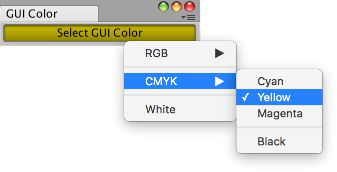 [GenericMenu.png].
using UnityEngine;
using UnityEditor;

public class GenericMenuExample : EditorWindow
{
    // open the window from the menu item Example -> GUI Color
    [MenuItem("Example/GUI Color")]
    static void Init()
    {
        EditorWindow window = GetWindow<GenericMenuExample>();
        window.position = new Rect(50f, 50f, 200f, 24f);
        window.Show();
    }

    // serialize field on window so its value will be saved when Unity recompiles
    [SerializeField]
    Color m_Color = Color.white;

    void OnEnable()
    {
        titleContent = new GUIContent("GUI Color");
    }

    // a method to simplify adding menu items
    void AddMenuItemForColor(GenericMenu menu, string menuPath, Color color)
    {
        // the menu item is marked as selected if it matches the current value of m_Color
        menu.AddItem(new GUIContent(menuPath), m_Color.Equals(color), OnColorSelected, color);
    }

    // the GenericMenu.MenuFunction2 event handler for when a menu item is selected
    void OnColorSelected(object color)
    {
        m_Color = (Color)color;
    }

    void OnGUI()
    {
        // set the GUI to use the color stored in m_Color
        GUI.color = m_Color;

        // display the GenericMenu when pressing a button
        if (GUILayout.Button("Select GUI Color"))
        {
            // create the menu and add items to it
            GenericMenu menu = new GenericMenu();

            // forward slashes nest menu items under submenus
            AddMenuItemForColor(menu, "RGB/Red", Color.red);
            AddMenuItemForColor(menu, "RGB/Green", Color.green);
            AddMenuItemForColor(menu, "RGB/Blue", Color.blue);

            // an empty string will create a separator at the top level
            menu.AddSeparator("");

            AddMenuItemForColor(menu, "CMYK/Cyan", Color.cyan);
            AddMenuItemForColor(menu, "CMYK/Yellow", Color.yellow);
            AddMenuItemForColor(menu, "CMYK/Magenta", Color.magenta);
            // a trailing slash will nest a separator in a submenu
            menu.AddSeparator("CMYK/");
            AddMenuItemForColor(menu, "CMYK/Black", Color.black);

            menu.AddSeparator("");

            AddMenuItemForColor(menu, "White", Color.white);

            // display the menu
            menu.ShowAsContext();
        }
    }
}
![[GenericMenu.png]](https://docs.unity3d.com/ScriptReference/../StaticFiles/ScriptRefImages/GenericMenu.png)