Declaration
public static Vector3 PositionHandle(PositionHandleIds ids, Vector3 position, Quaternion rotation);Parameters
| Parameter | Description |
|---|---|
| position | The center of the handle in 3D space. |
| rotation | The orientation of the handle in 3D space. |
| ids | The control IDs of the handles. Use PositionHandleIds.default. |
Returns
Vector3 The new value modified by the user's interaction with the handle. If the user has not moved the handle, it will return the same value as you passed into the function.
Description
Make a position handle.
This handle behaves like the built-in move tool in Unity.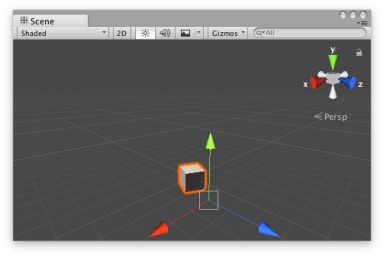 [PositionHandle.png]
Position handle in the Scene View.''
Add the following script to your Assets folder as PositionHandleExample.cs and add the PositionHandleExample component to an object in a Scene.
![[PositionHandle.png]](https://docs.unity3d.com/ScriptReference/../StaticFiles/ScriptRefImages/PositionHandle.png)
using UnityEngine;

[ExecuteInEditMode]
public class PositionHandleExample : MonoBehaviour
{
    public Vector3 targetPosition { get { return m_TargetPosition; } set { m_TargetPosition = value; } }
    [SerializeField]
    private Vector3 m_TargetPosition = new Vector3(1f, 0f, 2f);

    public virtual void Update()
    {
        transform.LookAt(m_TargetPosition);
    }
}
Add the following script to Assets/Editor as PositionHandleExampleEditor.cs and select the object with the PositionHandleExample component.
using UnityEditor;
using UnityEngine;

[CustomEditor(typeof(PositionHandleExample)), CanEditMultipleObjects]
public class PositionHandleExampleEditor : Editor
{
    protected virtual void OnSceneGUI()
    {
        PositionHandleExample example = (PositionHandleExample)target;

        EditorGUI.BeginChangeCheck();
        Vector3 newTargetPosition = Handles.PositionHandle(example.targetPosition, Quaternion.identity);
        if (EditorGUI.EndChangeCheck())
        {
            Undo.RecordObject(example, "Change Look At Target Position");
            example.targetPosition = newTargetPosition;
            example.Update();
        }
    }
}