Description
A class for a compound handle to edit multiaxial angular motion limits in the Scene view.
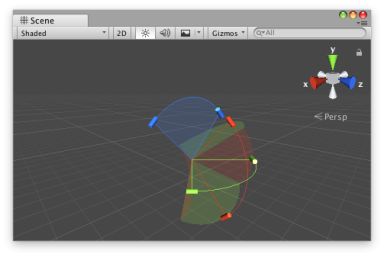 [JointAngularLimitHandle.png]
JointAngularLimitHandle in the Scene View.
[JointAngularLimitHandle.png]
JointAngularLimitHandle in the Scene View.
The shapes rendered by the DrawHandle method assume that angular limits are applied first along the x-axis, then the y-axis, and finally the z-axis.
The following component defines angular limits for a CharacterJoint to be added at run time.
![[JointAngularLimitHandle.png]](https://docs.unity3d.com/ScriptReference/../StaticFiles/ScriptRefImages/JointAngularLimitHandle.png)
using UnityEngine;

public class JointExample : MonoBehaviour
{
    public float xMin { get { return m_XMin; } set { m_XMin = value; } }
    [SerializeField]
    float m_XMin = -45f;

    public float xMax { get { return m_XMax; } set { m_XMax = value; } }
    [SerializeField]
    float m_XMax = 45f;

    public float yMax { get { return m_YMax; } set { m_YMax = value; } }
    [SerializeField]
    float m_YMax = 45f;

    public float zMax { get { return m_ZMax; } set { m_ZMax = value; } }
    [SerializeField]
    float m_ZMax = 45f;

    protected virtual void Start()
    {
        var joint = gameObject.AddComponent<CharacterJoint>();

        var limit = joint.lowTwistLimit;
        limit.limit = m_XMin;
        joint.lowTwistLimit = limit;

        limit = joint.highTwistLimit;
        limit.limit = m_XMax;
        joint.highTwistLimit = limit;

        limit = joint.swing1Limit;
        limit.limit = m_YMax;
        joint.swing1Limit = limit;

        limit = joint.swing2Limit;
        limit.limit = m_ZMax;
        joint.swing2Limit = limit;
    }
}
The following Custom Editor example allows you to edit the serialized angular limits in the Scene view.
using UnityEditor;
using UnityEditor.IMGUI.Controls;
using UnityEngine;

[CustomEditor(typeof(JointExample)), CanEditMultipleObjects]
public class JointExampleEditor : Editor
{
    JointAngularLimitHandle m_Handle = new JointAngularLimitHandle();

    // the OnSceneGUI callback uses the Scene view camera for drawing handles by default
    protected virtual void OnSceneGUI()
    {
        var jointExample = (JointExample)target;

        // copy the target object's data to the handle
        m_Handle.xMin = jointExample.xMin;
        m_Handle.xMax = jointExample.xMax;

        // CharacterJoint and ConfigurableJoint implement y- and z-axes symmetrically
        m_Handle.yMin = -jointExample.yMax;
        m_Handle.yMax = jointExample.yMax;

        m_Handle.zMin = -jointExample.zMax;
        m_Handle.zMax = jointExample.zMax;

        // set the handle matrix to match the object's position/rotation with a uniform scale
        Matrix4x4 handleMatrix = Matrix4x4.TRS(
            jointExample.transform.position,
            jointExample.transform.rotation,
            Vector3.one
        );

        EditorGUI.BeginChangeCheck();

        using (new Handles.DrawingScope(handleMatrix))
        {
            // maintain a constant screen-space size for the handle's radius based on the origin of the handle matrix
            m_Handle.radius = HandleUtility.GetHandleSize(Vector3.zero);

            // draw the handle
            EditorGUI.BeginChangeCheck();
            m_Handle.DrawHandle();
            if (EditorGUI.EndChangeCheck())
            {
                // record the target object before setting new values so changes can be undone/redone
                Undo.RecordObject(jointExample, "Change Joint Example Properties");

                // copy the handle's updated data back to the target object
                jointExample.xMin = m_Handle.xMin;
                jointExample.xMax = m_Handle.xMax;

                jointExample.yMax = m_Handle.yMax == jointExample.yMax ? -m_Handle.yMin : m_Handle.yMax;

                jointExample.zMax = m_Handle.zMax == jointExample.zMax ? -m_Handle.zMin : m_Handle.zMax;
            }
        }
    }
}
Properties
| Property | Description |
|---|---|
| angleHandleDrawFunction | The CapFunction to use when displaying the angle control handle. |
| angleHandleSizeFunction | The SizeFunction to specify how large the angle control handle should be. |
| fillAlpha | Returns or specifies the opacity to use when rendering fill shapes for the range of motion for each axis. Defaults to 0.1. |
| radius | Returns or specifies the radius of the arc for the handle. Defaults to 1.0. |
| wireframeAlpha | Returns or specifies the opacity to use for the curved lines along the outside of the arcs of motion. Defaults to 1.0. |
| xHandleColor | Returns or specifies the color to use for the handle limiting motion around the x-axis. Defaults to Handles.xAxisColor. |
| xMax | Returns or specifies the maximum angular motion about the x-axis. |
| xMin | Returns or specifies the minimum angular motion about the x-axis. |
| xMotion | Returns or specifies how angular motion is limited about the x-axis. Defaults to ConfigurableJointMotion.Limited. |
| xRange | Returns or specifies the range of valid values for angular motion about the x-axis. Defaults to [-180.0, 180.0]. |
| yHandleColor | Returns or specifies the color to use for the handle limiting motion around the y-axis. Defaults to Handles.yAxisColor. |
| yMax | Returns or specifies the maximum angular motion about the y-axis. |
| yMin | Returns or specifies the minimum angular motion about the y-axis. |
| yMotion | Returns or specifies how angular motion is limited about the y-axis. Defaults to ConfigurableJointMotion.Limited. |
| yRange | Returns or specifies the range of valid values for angular motion about the y-axis. Defaults to [-180.0, 180.0]. |
| zHandleColor | Returns or specifies the color to use for the handle limiting motion around the z-axis. Defaults to Handles.zAxisColor. |
| zMax | Returns or specifies the maximum angular motion about the z-axis. |
| zMin | Returns or specifies the minimum angular motion about the z-axis. |
| zMotion | Returns or specifies how angular motion is limited about the z-axis. Defaults to ConfigurableJointMotion.Limited. |
| zRange | Returns or specifies the range of valid values for angular motion about the z-axis. Defaults to [-180.0, 180.0]. |
Constructors
| Constructor | Description |
|---|---|
| JointAngularLimitHandle | Creates a new instance of the JointAngularLimitHandle class. |
Public Methods
| Method | Description |
|---|---|
| DrawHandle | A function to display this instance in the current handle camera using its current configuration. |