public bool isValid;
Description
Allows you to enable and disable the wizard create button, so that the user can not click it.
Additional resources: ScriptableWizard.OnWizardUpdate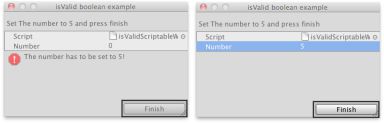 [isValidScriptableWizard.png]
The finish button gets disabled until the user sets the number to 5.
![[isValidScriptableWizard.png]](https://docs.unity3d.com/ScriptReference/../StaticFiles/ScriptRefImages/isValidScriptableWizard.png)
// Asks the user to set the var "Number" to 5, if is not set to 5
// the "Finish" button will not be reachable

using UnityEngine;
using UnityEditor;

public class isValidScriptableWizard : ScriptableWizard
{
    public int number = 0;
    [MenuItem("Example/Show isValid Usage")]
    static void CreateWindow()
    {
        ScriptableWizard.DisplayWizard(
            "isValid boolean example",
            typeof(isValidScriptableWizard),
            "Finish");
    }

    void OnWizardUpdate()
    {
        helpString = "Set The number to 5 and press finish";
        if (number != 5)
        {
            errorString = "The number has to be set to 5!";
            isValid = false;
        }
        else
        {
            errorString = "";
            isValid = true;
        }
    }
}