Description
Use TransformHandle.Rotate to rotate GameObjects in a variety of ways. The rotation is often provided as an Euler angle and not a Quaternion.
You can specify a rotation in world axes or local axes.
World axis rotation uses the coordinate system of the Scene, so when you start rotate a GameObject, its x, y, and z axes are aligned with the x, y, and z world axes. So if you rotate a cube in world space, its axes align with the world. When you select a cube in the Unity Editors Scene view, rotation Gizmos appear for the left/right, up/down and forward/back rotation axes. Moving these Gizmos rotates the cube around the axes. If you de-select and then re-select the cube, the axes restart in world alignment.
Local rotation uses the coordinate system of the GameObject itself. So, a newly created cube uses its x, y, and z axis set to zero rotation. Rotating the cube updates the rotation axes. If you de-select and the re-select the cube, the axes are shown in the same orientation as before.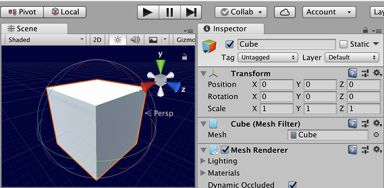 [TransformRotate1.png]
A cube not rotated in Local Gizmo Toggle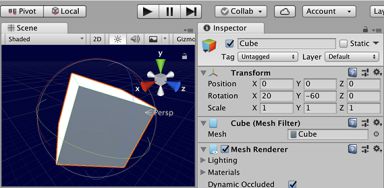 [TransformRotate2.png]
A cube rotated in Local Gizmo Toggle [TransformRotate3.png]
A cube not rotated in Global Gizmo Toggle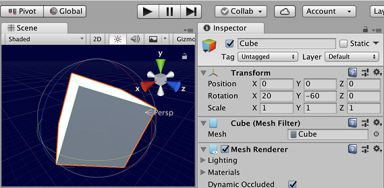 [TransformRotate4.png]
A cube rotated in Global Gizmo Toggle
For more information on Rotation in Unity, refer to Controlling rotation with the Quaternion class.
![[TransformRotate1.png]](https://docs.unity3d.com/ScriptReference/../StaticFiles/ScriptRefImages/TransformRotate1.png)
![[TransformRotate2.png]](https://docs.unity3d.com/ScriptReference/../StaticFiles/ScriptRefImages/TransformRotate2.png)
![[TransformRotate3.png]](https://docs.unity3d.com/ScriptReference/../StaticFiles/ScriptRefImages/TransformRotate3.png)
![[TransformRotate4.png]](https://docs.unity3d.com/ScriptReference/../StaticFiles/ScriptRefImages/TransformRotate4.png)
Parameters
| Parameter | Description |
|---|---|
| eulers | The rotation to apply in euler angles. |
| relativeTo | Determines whether to rotate the GameObject either locally to the GameObject or relative to the Scene in world space. |
Description
Applies a rotation of eulerAngles.z degrees around the z-axis, eulerAngles.x degrees around the x-axis, and eulerAngles.y degrees around the y-axis (in that order).
Rotate takes a Vector3 argument as an Euler angle. The second argument is the rotation axes, which can be set to local axis (Space.Self) or global axis (Space.World). The rotation is by the Euler amount.
Declaration
public void Rotate(float xAngle, float yAngle, float zAngle, Space relativeTo = Space.Self);Parameters
| Parameter | Description |
|---|---|
| xAngle | Degrees to rotate the GameObject around the X axis. |
| yAngle | Degrees to rotate the GameObject around the Y axis. |
| zAngle | Degrees to rotate the GameObject around the Z axis. |
| relativeTo | Determines whether to rotate the GameObject either locally to the GameObject or relative to the Scene in world space. |
Description
The implementation of this method applies a rotation of zAngle degrees around the z axis, xAngle degrees around the x axis, and yAngle degrees around the y axis (in that order).
Rotate can have the euler angle specified in 3 floats for x, y, and z.
The example shows two cubes: one cube uses Space.Self (the local space and axes of the GameObject) and the other uses Space.World (the space and axes in relation to the /Scene/). They are both first rotated 90 in the X axis so they are not aligned with the world axis by default. Use the xAngle, yAngle and zAngle values exposed in the inspector to see how different rotation values apply to both cubes. You might notice the way the cubes visually rotate is dependant on the current orientation and Space option used. Play around with the values while selecting the cubes in the scene view to try to understand how the values interact.
using UnityEngine;

// TransformHandle.Rotate example
//
// This script creates two different cubes: one red which is rotated using Space.Self; one green which is rotated using Space.World.
// Add it onto any GameObject in a scene and hit play to see it run. The rotation is controlled using xAngle, yAngle and zAngle, modifiable on the inspector.

public class ExampleScript : MonoBehaviour
{
    public float xAngle, yAngle, zAngle;

    private GameObject cube1, cube2;

    void Awake()
    {
        TransformHandle cube1TransformHandle = cube1.transformHandle;
        TransformHandle cube2TransformHandle = cube2.transformHandle;

        cube1 = GameObject.CreatePrimitive(PrimitiveType.Cube);
        cube1TransformHandle.position = new Vector3(0.75f, 0.0f, 0.0f);
        cube1TransformHandle.Rotate(90.0f, 0.0f, 0.0f, Space.Self);
        cube1.GetComponent<Renderer>().material.color = Color.red;
        cube1.name = "Self";

        cube2 = GameObject.CreatePrimitive(PrimitiveType.Cube);
        cube2TransformHandle.position = new Vector3(-0.75f, 0.0f, 0.0f);
        cube2TransformHandle.Rotate(90.0f, 0.0f, 0.0f, Space.World);
        cube2.GetComponent<Renderer>().material.color = Color.green;
        cube2.name = "World";
    }

    void Update()
    {
        cube1.transformHandle.Rotate(xAngle, yAngle, zAngle, Space.Self);
        cube2.transformHandle.Rotate(xAngle, yAngle, zAngle, Space.World);
    }
}
Parameters
| Parameter | Description |
|---|---|
| axis | The axis to apply rotation to. |
| angle | The degrees of rotation to apply. |
| relativeTo | Determines whether to rotate the GameObject either locally to the GameObject or relative to the Scene in world space. |
Description
Rotates the object around the given axis by the number of degrees defined by the given angle.
Rotate has an axis, angle and the local or global parameters. The rotation axis can be in any direction.
Parameters
| Parameter | Description |
|---|---|
| eulers | The rotation to apply in euler angles. |
Description
Applies a rotation of eulerAngles.z degrees around the z-axis, eulerAngles.x degrees around the x-axis, and eulerAngles.y degrees around the y-axis (in that order).
The rotation is relative to the GameObject's local space (Space.Self).
Declaration
public void Rotate(float xAngle, float yAngle, float zAngle);Parameters
| Parameter | Description |
|---|---|
| xAngle | Degrees to rotate the GameObject around the X axis. |
| yAngle | Degrees to rotate the GameObject around the Y axis. |
| zAngle | Degrees to rotate the GameObject around the Z axis. |
Description
The implementation of this method applies a rotation of zAngle degrees around the z axis, xAngle degrees around the x axis, and yAngle degrees around the y axis (in that order).
The rotation is relative to the GameObject's local space (Space.Self).
Parameters
| Parameter | Description |
|---|---|
| axis | The axis to apply rotation to. |
| angle | The degrees of rotation to apply. |
Description
Rotates the object around the given axis by the number of degrees defined by the given angle.
Rotate has an axis, angle and the local or global parameters. The rotation axis can be in any direction. The rotation is relative to the GameObject's local space (Space.Self).