Parameters
| Parameter | Description |
|---|---|
| vector | The vector to project. |
| onNormal | The vector to project onto. This vector doesn't need to be normalized. |
Returns
Vector3
The vector that results from the projection of vector. This vector points in the same direction as onNormal.
Description
Projects a vector onto another vector.
The resulting projection is the amount of vector that points in the same direction as onNormal.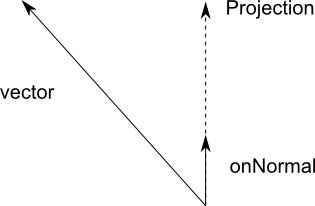 [Vec3ProjectDiagram.png]
Diagram showing a vector projected onto the vector onNormal. The projected vector extends past onNormal in the same direction because the magnitude of vector in the direction of onNormal is greater than the magnitude of onNormal. The result points to the point along the infinite line in the direction of onNormal that's closest to the point specified by vector.
The function returns a zero vector if onNormal is almost zero. onNormal doesn't need to be a normalized vector.
You can use projection to work out the closest point along a line to a target vector. This information can be useful for moving or orienting items in the direction of a moving target.
![[Vec3ProjectDiagram.png]](https://docs.unity3d.com/ScriptReference/../StaticFiles/ScriptRefImages/Vec3ProjectDiagram.png)
using UnityEngine;
using System.Collections;

public class ExampleClass : MonoBehaviour
{
    void Slide(Transform target, Vector3 railDirection)
    {
        Vector3 heading = target.position - transform.position;
        Vector3 force = Vector3.Project(heading, railDirection);

        GetComponent<Rigidbody>().AddForce(force);
    }
}