Parameters
| Parameter | Description |
|---|---|
| inDirection | The vector to be reflected in the plane. |
| inNormal | The normal vector that defines the plane of reflection. |
Returns
Vector3
The reflected vector. It has the same magnitude as inDirection.
Description
Reflects a vector off the plane defined by a normal vector.
This method calculates the reflection vector using the following formula:
B = A 2 N A N
where A is the incoming vector and N defines the normal (perpendicular) vector of the reflection plane.
The returned value is a vector of equal magnitude to inDirection but with its direction reflected.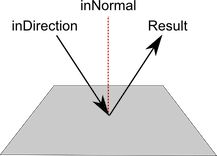 [Vec3ReflectDiagram.png]
Reflection of a vector off a plane.
![[Vec3ReflectDiagram.png]](https://docs.unity3d.com/ScriptReference/../StaticFiles/ScriptRefImages/Vec3ReflectDiagram.png)
// This example moves a GameObject to the reflected position
// of a second object
//
// To run this example, create two GameObjects at different
// positions. In the Editor, assign these GameObjects as the
// Original and Relflect Object variables. The reflected object
// moves to the reflected position of the original object.

using UnityEngine;

public class ReflectExample : MonoBehaviour
{
    public Transform originalObject;
    public Transform reflectedObject;

    void Update()
    {
        // Makes the reflected object appear opposite of the original object,
        // mirrored in the y-z plane of the world
        reflectedObject.position = Vector3.Reflect(originalObject.position, Vector3.right);
    }
}