What is Poedit
Poedit is an open-source translation file editor for localizing software interfaces that use gettext, like WordPress coreCore Core is the set of software required to run WordPress. The Core Development Team builds WordPress., plugins, and themes. It is available for Windows, macOS, and Linux.
With Poedit you can download a POT filePOT file POT files are the template files for PO files. They will have all the translation strings left empty. A POT file is essentially an empty PO file without the translations, with just the original strings. with the original WordPress stringsString A string is a translatable part of the software. A translation consists of a multitude of localized strings. and create a .PO file and .MO filesMO files MO, or Machine Object is a binary data file that contains object data referenced by a program. It is typically used to translate program code, and may be loaded or imported into the GNU gettext program. This is the format used in a WordPress install. These files are normally located inside …/wp-content/languages/ with your translations. Poedit offers a clean and easy to use translations interface and supports plural forms and UTF-8. Poedit comes in two versions: Free and Licensed. The benefit of the licensed version is that you can pre-translate original WordPress strings.
Download and install Poedit
Download link: http://poedit.net/download.php

Download the official WordPress POT file
Download theofficial WordPress POT file
- To download the original strings, click on the project you want to translate.
- Select your localeLocale Locale = language version, often a combination of a language code and a region code, for instance es_MX denotes Spanish as its used in Mexico. A list of all locales supported by WordPress in https://make.wordpress.org/polyglots/teams/, as shown in the image below:

- Then click on Export, after which you will see a pop-up:

- From the drop-down menu next to Open with, select Poedit.
- This will launch Poedit and display the original strings.
- Now, you can begin to translate the empty strings or edit the strings with existing translations.

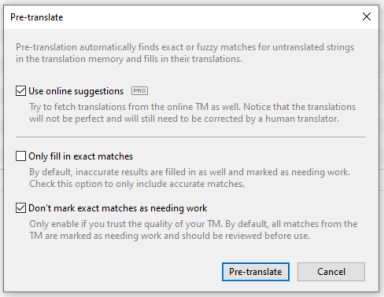
- If you have a licensed version of Poedit, you can now pre-translate the empty strings.


Create .po and .mo files
- Open the .pot file in Poedit.
- Go to File Save as to save your translations in a .po file. Your file should carry the name of the language you will be translating into. Check the Codex page to give your file the right name: https://codex.wordpress.org/WordPress_in_Your_Language.
The name you should use is the combination of the projects text domain (locate it inside codes) and a short stringString A string is a translatable part of the software. A translation consists of a multitude of localized strings. in parentheses next to a languages name (e.g. French Franais (fr_FR)). For example, if the text domain is bwp-minify and the translation is French, just name the .po filebwp-minify-fr_FR. - Poedit will automatically compilea .moMO files MO, or Machine Object is a binary data file that contains object data referenced by a program. It is typically used to translate program code, and may be loaded or imported into the GNU gettext program. This is the format used in a WordPress install. These files are normally located inside …/wp-content/languages/ file for you when you save your work on the existing .po file. In order to do that, make sure you go to File Preferences and on the Editor tab check the Automatically compile .mo file on save box.

Translating with Poedit
The basic translation screen consists of a list of strings for translation and two separate windows for the original string and the translated string.
The process is easy:
- Click ona string from the pool.
- Add the translation in the translation modal (there could be developer notes in the modal on the right, so don’t forget to look for those).
- Save your translations.
Translated strings are shown next to the original in the pool of strings and you can keep track of your progress in the bottom of the translation screen.
 [PoEdit Translation Screen]
Note: If you use pre-translation, the translations that are added will have a different color. You will need to change the state of the string by editing it and then saving.
 [Pre-translated strings appear in a different color in Poedit.]
Or use the button Needs work on the right of the line to edit and approve the string.
 [Use the Needs Work button to edit and save pre-translated strings.]
Uploading your translations
After you have downloaded the original POT file from the project and translated it with Poedit, you will need to upload the file into the project to import your translations.
- To save and compile your translations, go to File Save as to save your translations in a PO file.

- Before uploading your translated file, make sure the locale is set correctly.
- Once set, you can then import your translations into the project by using the Import translations link. From here, you will be able to select your translation file.

You can also find the instructions here: Importing External Files
- After you have selected and imported your file, you will see the number of strings imported.

- Finally, please check if there are any strings that are shown as Untranslated, Fuzzy, or Warning,” they will need to be fixed.
Additional notes
- If you see a yellow warning sign next to one (or more) of your translations in Poedit, this means something is wrong with the translation.
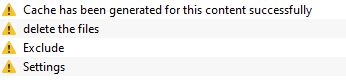
- If you select the string, you will be able to see the cause of the error:

- You need to resolve these warnings before uploading your file. As soon as you fix the string, the warning is removed and the error message will disappear.
- Also note that Poedit sometimes removes characters, which can cause problems with placeholders. For examples: % s instead of %s, or %1s instead of %1$s

![[PoEdit Translation Software]](https://make.wordpress.org/polyglots/files/2014/03/Screenshot-2014-07-02-11.19.49.png)
![[Select your locale in translate.wordpress.org.]](https://make.wordpress.org/polyglots/files/2020/09/image17.png)
![[Poedit pop-up after export.]](https://make.wordpress.org/polyglots/files/2020/09/export-pop-up.png)
![[When Poedit launches, you will see the strings.]](https://make.wordpress.org/polyglots/files/2020/09/image3.png)
![[]](https://make.wordpress.org/polyglots/files/2020/09/image10.png)
![[]](https://make.wordpress.org/polyglots/files/2020/09/image11-1.png)
![[]](https://make.wordpress.org/polyglots/files/2020/09/image2-1.png)
![[Set up Poedit to automatically compile an .mo file for you upon saving.]](https://make.wordpress.org/polyglots/files/2020/09/MO-file-preferences.png)
![[PoEdit Translation Screen]](https://make.wordpress.org/polyglots/files/2014/03/poEdittranslationscreen-1024x539.png)
![[Pre-translated strings appear in a different color in Poedit.]](https://make.wordpress.org/polyglots/files/2020/09/Pre-translated-strings.png)
![[Use the Needs Work button to edit and save pre-translated strings.]](https://make.wordpress.org/polyglots/files/2020/09/Needs-work-button-1024x216.png)
![[Click on Save to create a PO file to upload.]](https://make.wordpress.org/polyglots/files/2020/09/Save-translations.png)
![[Clicking on "Import translations" will allow you to select your file.]](https://make.wordpress.org/polyglots/files/2020/09/Import-translations.png)
![[After importing, you will see the total number of strings added.]](https://make.wordpress.org/polyglots/files/2020/09/translations-added.png)
![[These yellow icons indicate an error with the translation.]](https://make.wordpress.org/polyglots/files/2020/09/Translation-error.png)
![[Clicking on the string will show you the cause for the error.]](https://make.wordpress.org/polyglots/files/2020/09/error-cause.png)
![[Code is Poetry]](https://s.w.org/style/images/code-is-poetry-for-dark-bg.svg)
You must be logged in to post a comment.