Folders and files
| Name | Name | Last commit date | ||
|---|---|---|---|---|

An interesting collection of surprising snippets and lesser-known Python features.
Translations: Chinese 中文
Python, being a beautifully designed high-level and interpreter-based programming language, provides us with many features for the programmer's comfort. But sometimes, the outcomes of a Python snippet may not seem obvious to a regular user at first sight.
Here is a fun project to collect such tricky & counter-intuitive examples and lesser-known features in Python, attempting to discuss what exactly is happening under the hood!
While some of the examples you see below may not be WTFs in the truest sense, but they'll reveal some of the interesting parts of Python that you might be unaware of. I find it a nice way to learn the internals of a programming language, and I think you'll find them interesting as well!
If you're an experienced Python programmer, you can take it as a challenge to get most of them right in first attempt. You may be already familiar with some of these examples, and I might be able to revive sweet old memories of yours being bitten by these gotchas 😅
PS: If you're a returning reader, you can learn about the new modifications here.
So, here we go...
- Structure of the Examples
- Usage
- 👀 Examples
- Section: Strain your brain!
- ▶ Strings can be tricky sometimes *
- ▶ Time for some hash brownies!
- ▶ Return return everywhere!
- ▶ Deep down, we're all the same. *
- ▶ For what?
- ▶ Evaluation time discrepancy
- ▶ is is not what it is!
- ▶ A tic-tac-toe where X wins in the first attempt!
- ▶ The sticky output function
- ▶ is not ... is not is (not ...)
- ▶ The surprising comma
- ▶ Backslashes at the end of string
- ▶ not knot!
- ▶ Half triple-quoted strings
- ▶ Midnight time doesn't exist?
- ▶ What's wrong with booleans?
- ▶ Class attributes and instance attributes
- ▶ yielding None
- ▶ Mutating the immutable!
- ▶ The disappearing variable from outer scope
- ▶ When True is actually False
- ▶ From filled to None in one instruction...
- ▶ Subclass relationships *
- ▶ The mysterious key type conversion *
- ▶ Let's see if you can guess this?
- Section: Appearances are deceptive!
- Section: Watch out for the landmines!
- ▶ Modifying a dictionary while iterating over it
- ▶ Stubborn del operator *
- ▶ Deleting a list item while iterating
- ▶ Loop variables leaking out!
- ▶ Beware of default mutable arguments!
- ▶ Catching the Exceptions
- ▶ Same operands, different story!
- ▶ The out of scope variable
- ▶ Be careful with chained operations
- ▶ Name resolution ignoring class scope
- ▶ Needle in a Haystack
- Section: The Hidden treasures!
- Section: Miscellaneous
- Section: Strain your brain!
- Contributing
- Acknowledgements
- 🎓 License
All the examples are structured like below:
The asterisk at the end of the title indicates the example was not present in the first release and has been recently added.
# Setting up the code.
# Preparation for the magic...
Output (Python version):
>>> triggering_statement
Probably unexpected output
(Optional): One line describing the unexpected output.
- Brief explanation of what's happening and why is it happening.
Output:Setting up examples for clarification (if necessary)>>> trigger # some example that makes it easy to unveil the magic # some justified output
Note: All the examples are tested on Python 3.5.2 interactive interpreter, and they should work for all the Python versions unless explicitly specified in the description.
A nice way to get the most out of these examples, in my opinion, will be just to read the examples chronologically, and for every example:
- Carefully read the initial code for setting up the example. If you're an experienced Python programmer, most of the times you will successfully anticipate what's going to happen next.
- Read the output snippets and,
- Check if the outputs are the same as you'd expect.
- Make sure if you know the exact reason behind the output being the way it is.
- If no, take a deep breath, and read the explanation (and if you still don't understand, shout out! and create an issue here).
- If yes, give a gentle pat on your back, and you may skip to the next example.
PS: You can also read WTFpython at the command line. There's a pypi package and an npm package (supports colored formatting) for the same.
To install the npm package wtfpython
$ npm install -g wtfpythonAlternatively, to install the pypi package wtfpython
$ pip install wtfpython -UNow, just run wtfpython at the command line which will open this collection in your selected $PAGER.
1.
>>> a = "some_string"
>>> id(a)
140420665652016
>>> id("some" + "_" + "string") # Notice that both the ids are same.
140420665652016
2.
>>> a = "wtf"
>>> b = "wtf"
>>> a is b
True

>>> a = "wtf!"
>>> b = "wtf!"
>>> a is b
False

>>> a, b = "wtf!", "wtf!"
>>> a is b
True
3.
>>> 'a' * 20 is 'aaaaaaaaaaaaaaaaaaaa'
True
>>> 'a' * 21 is 'aaaaaaaaaaaaaaaaaaaaa'
False
Makes sense, right?
- Such behavior is due to CPython optimization (called string interning) that tries to use existing immutable objects in some cases rather than creating a new object every time.
- After being interned, many variables may point to the same string object in memory (thereby saving memory).
- In the snippets above, strings are implicitly interned. The decision of when to implicitly intern a string is implementation dependent. There are some facts that can be used to guess if a string will be interned or not:
- All length 0 and length 1 strings are interned.
- Strings are interned at compile time ('wtf' will be interned but ''.join(['w', 't', 'f'] will not be interned)
- Strings that are not composed of ASCII letters, digits or underscores, are not interned. This explains why 'wtf!' was not interned due to !. Cpython implementation of this rule can be found here
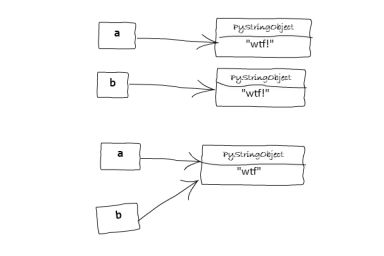
- When a and b are set to "wtf!" in the same line, the Python interpreter creates a new object, then references the second variable at the same time. If you do it on separate lines, it doesn't "know" that there's already wtf! as an object (because "wtf!" is not implicitly interned as per the facts mentioned above). It's a compiler optimization and specifically applies to the interactive environment.
- Constant folding is a technique for peephole optimization in Python. This means the expression 'a'*20 is replaced by 'aaaaaaaaaaaaaaaaaaaa' during compilation to reduce few clock cycles during runtime. Constant folding only occurs for strings having length less than 20. (Why? Imagine the size of .pyc file generated as a result of the expression 'a'*10**10). Here's the implementation source for the same.

1.
some_dict = {}
some_dict[5.5] = "Ruby"
some_dict[5.0] = "JavaScript"
some_dict[5] = "Python"
Output:
>>> some_dict[5.5]
"Ruby"
>>> some_dict[5.0]
"Python"
>>> some_dict[5]
"Python"
"Python" destroyed the existence of "JavaScript"?
- Python dictionaries check for equality and compare the hash value to determine if two keys are the same.
- Immutable objects with same value always have the same hash in Python.
Note: Objects with different values may also have same hash (known as hash collision).
>>> 5 == 5.0
True
>>> hash(5) == hash(5.0)
True
- When the statement some_dict[5] = "Python" is executed, the existing value "JavaScript" is overwritten with "Python" because Python recognizes 5 and 5.0 as the same keys of the dictionary some_dict.
- This StackOverflow answer explains beautifully the rationale behind it.
def some_func():
    try:
        return 'from_try'
    finally:
        return 'from_finally'
Output:
>>> some_func()
'from_finally'- When a return, break or continue statement is executed in the try suite of a "try…finally" statement, the finally clause is also executed ‘on the way out.
- The return value of a function is determined by the last return statement executed. Since the finally clause always executes, a return statement executed in the finally clause will always be the last one executed.
class WTF:
  pass
Output:
>>> WTF() == WTF() # two different instances can't be equal
False
>>> WTF() is WTF() # identities are also different
False
>>> hash(WTF()) == hash(WTF()) # hashes _should_ be different as well
True
>>> id(WTF()) == id(WTF())
True-
When id was called, Python created a WTF class object and passed it to the id function. The id function takes its id (its memory location), and throws away the object. The object is destroyed.
-
When we do this twice in succession, Python allocates the same memory location to this second object as well. Since (in CPython) id uses the memory location as the object id, the id of the two objects is the same.
-
So, object's id is unique only for the lifetime of the object. After the object is destroyed, or before it is created, something else can have the same id.
-
But why did the is operator evaluated to False? Let's see with this snippet.
class WTF(object):
  def __init__(self): print("I")
  def __del__(self): print("D")
Output:
>>> WTF() is WTF()
I
I
D
D
False
>>> id(WTF()) == id(WTF())
I
D
I
D
True
As you may observe, the order in which the objects are destroyed is what made all the difference here.
some_string = "wtf"
some_dict = {}
for i, some_dict[i] in enumerate(some_string):
    pass
Output:
>>> some_dict # An indexed dict is created.
{0: 'w', 1: 't', 2: 'f'}-
A for statement is defined in the Python grammar as:
for_stmt: 'for' exprlist 'in' testlist ':' suite ['else' ':' suite]
Where exprlist is the assignment target. This means that the equivalent of {exprlist} = {next_value} is executed for each item in the iterable. An interesting example that illustrates this:
for i in range(4):
    print(i)
    i = 10
Output:
0
1
2
3
Did you expect the loop to run just once?
💡 Explanation:
- The assignment statement i = 10 never affects the iterations of the loop because of the way for loops work in Python. Before the beginning of every iteration, the next item provided by the iterator (range(4) this case) is unpacked and assigned the target list variables (i in this case).
-
The enumerate(some_string) function yields a new value i (A counter going up) and a character from the some_string in each iteration. It then sets the (just assigned) i key of the dictionary some_dict to that character. The unrolling of the loop can be simplified as:
>>> i, some_dict[i] = (0, 'w')
>>> i, some_dict[i] = (1, 't')
>>> i, some_dict[i] = (2, 'f')
>>> some_dict
1.
array = [1, 8, 15]
g = (x for x in array if array.count(x) > 0)
array = [2, 8, 22]
Output:
>>> print(list(g))
[8]
2.
array_1 = [1,2,3,4]
g1 = (x for x in array_1)
array_1 = [1,2,3,4,5]

array_2 = [1,2,3,4]
g2 = (x for x in array_2)
array_2[:] = [1,2,3,4,5]
Output:
>>> print(list(g1))
[1,2,3,4]

>>> print(list(g2))
[1,2,3,4,5]- In a generator expression, the in clause is evaluated at declaration time, but the conditional clause is evaluated at runtime.
- So before runtime, array is re-assigned to the list [2, 8, 22], and since out of 1, 8 and 15, only the count of 8 is greater than 0, the generator only yields 8.
- The differences in the output of g1 and g2 in the second part is due the way variables array_1 and array_2 are re-assigned values.
- In the first case, array_1 is binded to the new object [1,2,3,4,5] and since the in clause is evaluated at the declaration time it still refers to the old object [1,2,3,4] (which is not destroyed).
- In the second case, the slice assignment to array_2 updates the same old object [1,2,3,4] to [1,2,3,4,5]. Hence both the g2 and array_2 still have reference to the same object (which has now been updated to [1,2,3,4,5]).
The following is a very famous example present all over the internet.
>>> a = 256
>>> b = 256
>>> a is b
True

>>> a = 257
>>> b = 257
>>> a is b
False

>>> a = 257; b = 257
>>> a is b
TrueThe difference between is and ==
- is operator checks if both the operands refer to the same object (i.e., it checks if the identity of the operands matches or not).
- == operator compares the values of both the operands and checks if they are the same.
- So is is for reference equality and == is for value equality. An example to clear things up,
>>> [] == []
True
>>> [] is [] # These are two empty lists at two different memory locations.
False
256 is an existing object but 257 isn't
When you start up python the numbers from -5 to 256 will be allocated. These numbers are used a lot, so it makes sense just to have them ready.
Quoting from https://docs.python.org/3/c-api/long.html
The current implementation keeps an array of integer objects for all integers between -5 and 256, when you create an int in that range you just get back a reference to the existing object. So it should be possible to change the value of 1. I suspect the behavior of Python, in this case, is undefined. :-)
>>> id(256)
10922528
>>> a = 256
>>> b = 256
>>> id(a)
10922528
>>> id(b)
10922528
>>> id(257)
140084850247312
>>> x = 257
>>> y = 257
>>> id(x)
140084850247440
>>> id(y)
140084850247344
Here the interpreter isn't smart enough while executing y = 257 to recognize that we've already created an integer of the value 257, and so it goes on to create another object in the memory.
Both a and b refer to the same object when initialized with same value in the same line.
>>> a, b = 257, 257
>>> id(a)
140640774013296
>>> id(b)
140640774013296
>>> a = 257
>>> b = 257
>>> id(a)
140640774013392
>>> id(b)
140640774013488- When a and b are set to 257 in the same line, the Python interpreter creates a new object, then references the second variable at the same time. If you do it on separate lines, it doesn't "know" that there's already 257 as an object.
- It's a compiler optimization and specifically applies to the interactive environment. When you enter two lines in a live interpreter, they're compiled separately, therefore optimized separately. If you were to try this example in a .py file, you would not see the same behavior, because the file is compiled all at once.
# Let's initialize a row
row = [""]*3 #row i['', '', '']
# Let's make a board
board = [row]*3
Output:
>>> board
[['', '', ''], ['', '', ''], ['', '', '']]
>>> board[0]
['', '', '']
>>> board[0][0]
''
>>> board[0][0] = "X"
>>> board
[['X', '', ''], ['X', '', ''], ['X', '', '']]
We didn't assign 3 "X"s or did we?
When we initialize row variable, this visualization explains what happens in the memory

And when the board is initialized by multiplying the row, this is what happens inside the memory (each of the elements board[0], board[1] and board[2] is a reference to the same list referred by row)

We can avoid this scenario here by not using row variable to generate board. (Asked in this issue).
>>> board = [['']*3 for _ in range(3)]
>>> board[0][0] = "X"
>>> board
[['X', '', ''], ['', '', ''], ['', '', '']]funcs = []
results = []
for x in range(7):
def some_func():
return x
funcs.append(some_func)
results.append(some_func()) # note the function call here
funcs_results = [func() for func in funcs]Output:
>>> results
[0, 1, 2, 3, 4, 5, 6]
>>> funcs_results
[6, 6, 6, 6, 6, 6, 6]
Even when the values of x were different in every iteration prior to appending some_func to funcs, all the functions return 6.
//OR
>>> powers_of_x = [lambda x: x**i for i in range(10)]
>>> [f(2) for f in powers_of_x]
[512, 512, 512, 512, 512, 512, 512, 512, 512, 512]-
When defining a function inside a loop that uses the loop variable in its body, the loop function's closure is bound to the variable, not its value. So all of the functions use the latest value assigned to the variable for computation.
-
To get the desired behavior you can pass in the loop variable as a named variable to the function. Why this works? Because this will define the variable again within the function's scope.
funcs = []
for x in range(7):
    def some_func(x=x):
        return x
    funcs.append(some_func)
Output:
>>> funcs_results = [func() for func in funcs]
>>> funcs_results
[0, 1, 2, 3, 4, 5, 6]
>>> 'something' is not None
True
>>> 'something' is (not None)
False- is not is a single binary operator, and has behavior different than using is and not separated.
- is not evaluates to False if the variables on either side of the operator point to the same object and True otherwise.
Output:
>>> def f(x, y,):
...     print(x, y)
...
>>> def g(x=4, y=5,):
...     print(x, y)
...
>>> def h(x, **kwargs,):
  File "<stdin>", line 1
    def h(x, **kwargs,):
                     ^
SyntaxError: invalid syntax
>>> def h(*args,):
  File "<stdin>", line 1
    def h(*args,):
                ^
SyntaxError: invalid syntax- Trailing comma is not always legal in formal parameters list of a Python function.
- In Python, the argument list is defined partially with leading commas and partially with trailing commas. This conflict causes situations where a comma is trapped in the middle, and no rule accepts it.
- Note: The trailing comma problem is fixed in Python 3.6. The remarks in this post discuss in brief different usages of trailing commas in Python.
Output:
>>> print("\\ C:\\")
\ C:\
>>> print(r"\ C:")
\ C:
>>> print(r"\ C:\")

    File "<stdin>", line 1
      print(r"\ C:\")
                     ^
SyntaxError: EOL while scanning string literal
- In a raw string literal, as indicated by the prefix r, the backslash doesn't have the special meaning.
>>> print(repr(r"wt\"f"))
'wt\\"f'
- What the interpreter actually does, though, is simply change the behavior of backslashes, so they pass themselves and the following character through. That's why backslashes don't work at the end of a raw string.
x = True
y = False
Output:
>>> not x == y
True
>>> x == not y
  File "<input>", line 1
    x == not y
           ^
SyntaxError: invalid syntax- Operator precedence affects how an expression is evaluated, and == operator has higher precedence than not operator in Python.
- So not x == y is equivalent to not (x == y) which is equivalent to not (True == False) finally evaluating to True.
- But x == not y raises a SyntaxError because it can be thought of being equivalent to (x == not) y and not x == (not y) which you might have expected at first sight.
- The parser expected the not token to be a part of the not in operator (because both == and not in operators have the same precedence), but after not being able to find an in token following the not token, it raises a SyntaxError.
Output:
>>> print('wtfpython''')
wtfpython
>>> print("wtfpython""")
wtfpython
>>> # The following statements raise `SyntaxError`
>>> # print('''wtfpython')
>>> # print("""wtfpython")- Python supports implicit string literal concatenation, Example,
>>> print("wtf" "python") wtfpython >>> print("wtf" "") # or "wtf""" wtf - ''' and """ are also string delimiters in Python which causes a SyntaxError because the Python interpreter was expecting a terminating triple quote as delimiter while scanning the currently encountered triple quoted string literal.
from datetime import datetime

midnight = datetime(2018, 1, 1, 0, 0)
midnight_time = midnight.time()

noon = datetime(2018, 1, 1, 12, 0)
noon_time = noon.time()

if midnight_time:
    print("Time at midnight is", midnight_time)

if noon_time:
    print("Time at noon is", noon_time)
Output:
('Time at noon is', datetime.time(12, 0))The midnight time is not printed.
Before Python 3.5, the boolean value for datetime.time object was considered to be False if it represented midnight in UTC. It is error-prone when using the if obj: syntax to check if the obj is null or some equivalent of "empty."
1.
# A simple example to count the number of boolean and
# integers in an iterable of mixed data types.
mixed_list = [False, 1.0, "some_string", 3, True, [], False]
integers_found_so_far = 0
booleans_found_so_far = 0

for item in mixed_list:
    if isinstance(item, int):
        integers_found_so_far += 1
    elif isinstance(item, bool):
        booleans_found_so_far += 1
Output:
>>> integers_found_so_far
4
>>> booleans_found_so_far
0
2.
another_dict = {}
another_dict[True] = "JavaScript"
another_dict[1] = "Ruby"
another_dict[1.0] = "Python"
Output:
>>> another_dict[True]
"Python"
3.
>>> some_bool = True
>>> "wtf"*some_bool
'wtf'
>>> some_bool = False
>>> "wtf"*some_bool
''-
Booleans are a subclass of int
>>> isinstance(True, int)
True
>>> isinstance(False, int)
True
-
The integer value of True is 1 and that of False is 0.
>>> True == 1 == 1.0 and False == 0 == 0.0
True
-
See this StackOverflow answer for the rationale behind it.
1.
class A:
    x = 1

class B(A):
    pass

class C(A):
    pass
Output:
>>> A.x, B.x, C.x
(1, 1, 1)
>>> B.x = 2
>>> A.x, B.x, C.x
(1, 2, 1)
>>> A.x = 3
>>> A.x, B.x, C.x
(3, 2, 3)
>>> a = A()
>>> a.x, A.x
(3, 3)
>>> a.x += 1
>>> a.x, A.x
(4, 3)
2.
class SomeClass:
    some_var = 15
    some_list = [5]
    another_list = [5]
    def __init__(self, x):
        self.some_var = x + 1
        self.some_list = self.some_list + [x]
        self.another_list += [x]
Output:
>>> some_obj = SomeClass(420)
>>> some_obj.some_list
[5, 420]
>>> some_obj.another_list
[5, 420]
>>> another_obj = SomeClass(111)
>>> another_obj.some_list
[5, 111]
>>> another_obj.another_list
[5, 420, 111]
>>> another_obj.another_list is SomeClass.another_list
True
>>> another_obj.another_list is some_obj.another_list
True- Class variables and variables in class instances are internally handled as dictionaries of a class object. If a variable name is not found in the dictionary of the current class, the parent classes are searched for it.
- The += operator modifies the mutable object in-place without creating a new object. So changing the attribute of one instance affects the other instances and the class attribute as well.
some_iterable = ('a', 'b')

def some_func(val):
    return "something"
Output:
>>> [x for x in some_iterable]
['a', 'b']
>>> [(yield x) for x in some_iterable]
<generator object <listcomp> at 0x7f70b0a4ad58>
>>> list([(yield x) for x in some_iterable])
['a', 'b']
>>> list((yield x) for x in some_iterable)
['a', None, 'b', None]
>>> list(some_func((yield x)) for x in some_iterable)
['a', 'something', 'b', 'something']- Source and explanation can be found here: https://stackoverflow.com/questions/32139885/yield-in-list-comprehensions-and-generator-expressions
- Related bug report: http://bugs.python.org/issue10544
some_tuple = ("A", "tuple", "with", "values")
another_tuple = ([1, 2], [3, 4], [5, 6])
Output:
>>> some_tuple[2] = "change this"
TypeError: 'tuple' object does not support item assignment
>>> another_tuple[2].append(1000) #This throws no error
>>> another_tuple
([1, 2], [3, 4], [5, 6, 1000])
>>> another_tuple[2] += [99, 999]
TypeError: 'tuple' object does not support item assignment
>>> another_tuple
([1, 2], [3, 4], [5, 6, 1000, 99, 999])
But I thought tuples were immutable...
-
Quoting from https://docs.python.org/2/reference/datamodel.html
Immutable sequences An object of an immutable sequence type cannot change once it is created. (If the object contains references to other objects, these other objects may be mutable and may be modified; however, the collection of objects directly referenced by an immutable object cannot change.)
-
+= operator changes the list in-place. The item assignment doesn't work, but when the exception occurs, the item has already been changed in place.
e = 7
try:
    raise Exception()
except Exception as e:
    pass
Output (Python 2.x):
>>> print(e)
# prints nothing
Output (Python 3.x):
>>> print(e)
NameError: name 'e' is not defined-
Source: https://docs.python.org/3/reference/compound_stmts.html#except
When an exception has been assigned using as target, it is cleared at the end of the except clause. This is as if
except E as N:
    foo
was translated into
except E as N:
    try:
        foo
    finally:
        del N
This means the exception must be assigned to a different name to be able to refer to it after the except clause. Exceptions are cleared because, with the traceback attached to them, they form a reference cycle with the stack frame, keeping all locals in that frame alive until the next garbage collection occurs.
-
The clauses are not scoped in Python. Everything in the example is present in the same scope, and the variable e got removed due to the execution of the except clause. The same is not the case with functions which have their separate inner-scopes. The example below illustrates this:
def f(x):
    del(x)
    print(x)

x = 5
y = [5, 4, 3]
Output:
>>>f(x)
UnboundLocalError: local variable 'x' referenced before assignment
>>>f(y)
UnboundLocalError: local variable 'x' referenced before assignment
>>> x
5
>>> y
[5, 4, 3]
-
In Python 2.x the variable name e gets assigned to Exception() instance, so when you try to print, it prints nothing.
Output (Python 2.x):
>>> e
Exception()
>>> print e
# Nothing is printed!
True = False
if True == False:
    print("I've lost faith in truth!")
Output:
I've lost faith in truth!
- Initially, Python used to have no bool type (people used 0 for false and non-zero value like 1 for true). Then they added True, False, and a bool type, but, for backward compatibility, they couldn't make True and False constants- they just were built-in variables.
- Python 3 was backward-incompatible, so it was now finally possible to fix that, and so this example won't work with Python 3.x!
some_list = [1, 2, 3]
some_dict = {
  "key_1": 1,
  "key_2": 2,
  "key_3": 3
}

some_list = some_list.append(4)
some_dict = some_dict.update({"key_4": 4})
Output:
>>> print(some_list)
None
>>> print(some_dict)
NoneMost methods that modify the items of sequence/mapping objects like list.append, dict.update, list.sort, etc. modify the objects in-place and return None. The rationale behind this is to improve performance by avoiding making a copy of the object if the operation can be done in-place (Referred from here)
Output:
>>> from collections import Hashable
>>> issubclass(list, object)
True
>>> issubclass(object, Hashable)
True
>>> issubclass(list, Hashable)
False
The Subclass relationships were expected to be transitive, right? (i.e., if A is a subclass of B, and B is a subclass of C, the A should a subclass of C)
- Subclass relationships are not necessarily transitive in Python. Anyone is allowed to define their own, arbitrary __subclasscheck__ in a metaclass.
- When issubclass(cls, Hashable) is called, it simply looks for non-Falsey "__hash__" method in cls or anything it inherits from.
- Since object is hashable, but list is non-hashable, it breaks the transitivity relation.
- More detailed explanation can be found here.
class SomeClass(str):
    pass

some_dict = {'s':42}
Output:
>>> type(list(some_dict.keys())[0])
str
>>> s = SomeClass('s')
>>> some_dict[s] = 40
>>> some_dict # expected: Two different keys-value pairs
{'s': 40}
>>> type(list(some_dict.keys())[0])
str-
Both the object s and the string "s" hash to the same value because SomeClass inherits the __hash__ method of str class.
-
SomeClass("s") == "s" evaluates to True because SomeClass also inherits __eq__ method from str class.
-
Since both the objects hash to the same value and are equal, they are represented by the same key in the dictionary.
-
For the desired behavior, we can redefine the __eq__ method in SomeClass
class SomeClass(str):
  def __eq__(self, other):
      return (
          type(self) is SomeClass
          and type(other) is SomeClass
          and super().__eq__(other)
      )

  # When we define a custom __eq__, Python stops automatically inheriting the
  # __hash__ method, so we need to define it as well
  __hash__ = str.__hash__

some_dict = {'s':42}
Output:
>>> s = SomeClass('s')
>>> some_dict[s] = 40
>>> some_dict
{'s': 40, 's': 42}
>>> keys = list(some_dict.keys())
>>> type(keys[0]), type(keys[1])
(__main__.SomeClass, str)
a, b = a[b] = {}, 5Output:
>>> a
{5: ({...}, 5)}-
According to Python language reference, assignment statements have the form
(target_list "=")+ (expression_list | yield_expression)
and
An assignment statement evaluates the expression list (remember that this can be a single expression or a comma-separated list, the latter yielding a tuple) and assigns the single resulting object to each of the target lists, from left to right.
-
The + in (target_list "=")+ means there can be one or more target lists. In this case, target lists are a, b and a[b] (note the expression list is exactly one, which in our case is {}, 5).
-
After the expression list is evaluated, it's value is unpacked to the target lists from left to right. So, in our case, first the {}, 5 tuple is unpacked to a, b and we now have a = {} and b = 5.
-
a is now assigned to {} which is a mutable object.
-
The second target list is a[b] (you may expect this to throw an error because both a and b have not been defined in the statements before. But remember, we just assigned a to {} and b to 5).
-
Now, we are setting the key 5 in the dictionary to the tuple ({}, 5) creating a circular reference (the {...} in the output refers to the same object that a is already referencing). Another simpler example of circular reference could be
>>> some_list = some_list[0] = [0]
>>> some_list
[[...]]
>>> some_list[0]
[[...]]
>>> some_list is some_list[0]
True
>>> some_list[0][0][0][0][0][0] == some_list
True
Similar is the case in our example (a[b][0] is the same object as a)
-
So to sum it up, you can break the example down to
a, b = {}, 5
a[b] = a, b
And the circular reference can be justified by the fact that a[b][0] is the same object as a
>>> a[b][0] is a
True
Output:
>>> value = 11
>>> valuе = 32
>>> value
11
Wut?
Note: The easiest way to reproduce this is to simply copy the statements from the above snippet and paste them into your file/shell.
Some non-Western characters look identical to letters in the English alphabet but are considered distinct by the interpreter.
>>> ord('е') # cyrillic 'e' (Ye)
1077
>>> ord('e') # latin 'e', as used in English and typed using standard keyboard
101
>>> 'е' == 'e'
False

>>> value = 42 # latin e
>>> valuе = 23 # cyrillic 'e', Python 2.x interpreter would raise a `SyntaxError` here
>>> value
42
The built-in ord() function returns a character's Unicode code point, and different code positions of Cyrillic 'e' and Latin 'e' justify the behavior of the above example.
import numpy as np

def energy_send(x):
    # Initializing a numpy array
    np.array([float(x)])

def energy_receive():
    # Return an empty numpy array
    return np.empty((), dtype=np.float).tolist()
Output:
>>> energy_send(123.456)
>>> energy_receive()
123.456
Where's the Nobel Prize?
- Notice that the numpy array created in the energy_send function is not returned, so that memory space is free to reallocate.
- numpy.empty() returns the next free memory slot without reinitializing it. This memory spot just happens to be the same one that was just freed (usually, but not always).
def square(x):
    """
    A simple function to calculate the square of a number by addition.
    """
    sum_so_far = 0
    for counter in range(x):
        sum_so_far = sum_so_far + x
  return sum_so_far
Output (Python 2.x):
>>> square(10)
10
Shouldn't that be 100?
Note: If you're not able to reproduce this, try running the file mixed_tabs_and_spaces.py via the shell.
-
Don't mix tabs and spaces! The character just preceding return is a "tab", and the code is indented by multiple of "4 spaces" elsewhere in the example.
-
This is how Python handles tabs:
First, tabs are replaced (from left to right) by one to eight spaces such that the total number of characters up to and including the replacement is a multiple of eight <...>
-
So the "tab" at the last line of square function is replaced with eight spaces, and it gets into the loop.
-
Python 3 is kind enough to throw an error for such cases automatically.
Output (Python 3.x):
TabError: inconsistent use of tabs and spaces in indentation
x = {0: None}

for i in x:
    del x[i]
    x[i+1] = None
    print(i)
Output (Python 2.7- Python 3.5):
0
1
2
3
4
5
6
7
Yes, it runs for exactly eight times and stops.
- Iteration over a dictionary that you edit at the same time is not supported.
- It runs eight times because that's the point at which the dictionary resizes to hold more keys (we have eight deletion entries, so a resize is needed). This is actually an implementation detail.
- How deleted keys are handled and when the resize occurs might be different for different Python implementations.
- For more information, you may refer to this StackOverflow thread explaining a similar example in detail.
class SomeClass:
    def __del__(self):
        print("Deleted!")
Output: 1.
>>> x = SomeClass()
>>> y = x
>>> del x # this should print "Deleted!"
>>> del y
Deleted!
Phew, deleted at last. You might have guessed what saved from __del__ being called in our first attempt to delete x. Let's add more twist to the example.
2.
>>> x = SomeClass()
>>> y = x
>>> del x
>>> y # check if y exists
<__main__.SomeClass instance at 0x7f98a1a67fc8>
>>> del y # Like previously, this should print "Deleted!"
>>> globals() # oh, it didn't. Let's check all our global variables and confirm
Deleted!
{'__builtins__': <module '__builtin__' (built-in)>, 'SomeClass': <class __main__.SomeClass at 0x7f98a1a5f668>, '__package__': None, '__name__': '__main__', '__doc__': None}
Okay, now it's deleted 😕
- del x doesn’t directly call x.__del__().
- Whenever del x is encountered, Python decrements the reference count for x by one, and x.__del__() when x’s reference count reaches zero.
- In the second output snippet, y.__del__() was not called because the previous statement (>>> y) in the interactive interpreter created another reference to the same object, thus preventing the reference count to reach zero when del y was encountered.
- Calling globals caused the existing reference to be destroyed and hence we can see "Deleted!" being printed (finally!).
list_1 = [1, 2, 3, 4]
list_2 = [1, 2, 3, 4]
list_3 = [1, 2, 3, 4]
list_4 = [1, 2, 3, 4]

for idx, item in enumerate(list_1):
    del item

for idx, item in enumerate(list_2):
    list_2.remove(item)

for idx, item in enumerate(list_3[:]):
    list_3.remove(item)

for idx, item in enumerate(list_4):
    list_4.pop(idx)
Output:
>>> list_1
[1, 2, 3, 4]
>>> list_2
[2, 4]
>>> list_3
[]
>>> list_4
[2, 4]
Can you guess why the output is [2, 4]?
-
It's never a good idea to change the object you're iterating over. The correct way to do so is to iterate over a copy of the object instead, and list_3[:] does just that.
>>> some_list = [1, 2, 3, 4]
>>> id(some_list)
139798789457608
>>> id(some_list[:]) # Notice that python creates new object for sliced list.
139798779601192
Difference between del, remove, and pop:
- del var_name just removes the binding of the var_name from the local or global namespace (That's why the list_1 is unaffected).
- remove removes the first matching value, not a specific index, raises ValueError if the value is not found.
- pop removes the element at a specific index and returns it, raises IndexError if an invalid index is specified.
Why the output is [2, 4]?
- The list iteration is done index by index, and when we remove 1 from list_2 or list_4, the contents of the lists are now [2, 3, 4]. The remaining elements are shifted down, i.e., 2 is at index 0, and 3 is at index 1. Since the next iteration is going to look at index 1 (which is the 3), the 2 gets skipped entirely. A similar thing will happen with every alternate element in the list sequence.
- Refer to this StackOverflow thread explaining the example
- See also this nice StackOverflow thread for a similar example related to dictionaries in Python.
1.
for x in range(7):
    if x == 6:
        print(x, ': for x inside loop')
print(x, ': x in global')
Output:
6 : for x inside loop
6 : x in global
But x was never defined outside the scope of for loop...
2.
# This time let's initialize x first
x = -1
for x in range(7):
    if x == 6:
        print(x, ': for x inside loop')
print(x, ': x in global')
Output:
6 : for x inside loop
6 : x in global
3.
x = 1
print([x for x in range(5)])
print(x, ': x in global')
Output (on Python 2.x):
[0, 1, 2, 3, 4]
(4, ': x in global')
Output (on Python 3.x):
[0, 1, 2, 3, 4]
1 : x in global
-
In Python, for-loops use the scope they exist in and leave their defined loop-variable behind. This also applies if we explicitly defined the for-loop variable in the global namespace before. In this case, it will rebind the existing variable.
-
The differences in the output of Python 2.x and Python 3.x interpreters for list comprehension example can be explained by following change documented in What’s New In Python 3.0 documentation:
"List comprehensions no longer support the syntactic form [... for var in item1, item2, ...]. Use [... for var in (item1, item2, ...)] instead. Also, note that list comprehensions have different semantics: they are closer to syntactic sugar for a generator expression inside a list() constructor, and in particular the loop control variables are no longer leaked into the surrounding scope."
def some_func(default_arg=[]):
    default_arg.append("some_string")
    return default_arg
Output:
>>> some_func()
['some_string']
>>> some_func()
['some_string', 'some_string']
>>> some_func([])
['some_string']
>>> some_func()
['some_string', 'some_string', 'some_string']-
The default mutable arguments of functions in Python aren't really initialized every time you call the function. Instead, the recently assigned value to them is used as the default value. When we explicitly passed [] to some_func as the argument, the default value of the default_arg variable was not used, so the function returned as expected.
def some_func(default_arg=[]):
    default_arg.append("some_string")
    return default_arg
Output:
>>> some_func.__defaults__ #This will show the default argument values for the function
([],)
>>> some_func()
>>> some_func.__defaults__
(['some_string'],)
>>> some_func()
>>> some_func.__defaults__
(['some_string', 'some_string'],)
>>> some_func([])
>>> some_func.__defaults__
(['some_string', 'some_string'],)
-
A common practice to avoid bugs due to mutable arguments is to assign None as the default value and later check if any value is passed to the function corresponding to that argument. Example:
def some_func(default_arg=None):
    if not default_arg:
        default_arg = []
    default_arg.append("some_string")
    return default_arg
some_list = [1, 2, 3]
try:
    # This should raise an ``IndexError``
    print(some_list[4])
except IndexError, ValueError:
    print("Caught!")

try:
    # This should raise a ``ValueError``
    some_list.remove(4)
except IndexError, ValueError:
    print("Caught again!")
Output (Python 2.x):
Caught!

ValueError: list.remove(x): x not in list
Output (Python 3.x):
  File "<input>", line 3
    except IndexError, ValueError:
                     ^
SyntaxError: invalid syntax-
To add multiple Exceptions to the except clause, you need to pass them as parenthesized tuple as the first argument. The second argument is an optional name, which when supplied will bind the Exception instance that has been raised. Example,
some_list = [1, 2, 3]
try:
   # This should raise a ``ValueError``
   some_list.remove(4)
except (IndexError, ValueError), e:
   print("Caught again!")
   print(e)
Output (Python 2.x):
Caught again!
list.remove(x): x not in list
Output (Python 3.x):
  File "<input>", line 4
    except (IndexError, ValueError), e:
                                     ^
IndentationError: unindent does not match any outer indentation level
-
Separating the exception from the variable with a comma is deprecated and does not work in Python 3; the correct way is to use as. Example,
some_list = [1, 2, 3]
try:
    some_list.remove(4)

except (IndexError, ValueError) as e:
    print("Caught again!")
    print(e)
Output:
Caught again!
list.remove(x): x not in list
1.
a = [1, 2, 3, 4]
b = a
a = a + [5, 6, 7, 8]
Output:
>>> a
[1, 2, 3, 4, 5, 6, 7, 8]
>>> b
[1, 2, 3, 4]
2.
a = [1, 2, 3, 4]
b = a
a += [5, 6, 7, 8]
Output:
>>> a
[1, 2, 3, 4, 5, 6, 7, 8]
>>> b
[1, 2, 3, 4, 5, 6, 7, 8]-
a += b doesn't always behave the same way as a = a + b. Classes may implement the op= operators differently, and lists do this.
-
The expression a = a + [5,6,7,8] generates a new list and sets a's reference to that new list, leaving b unchanged.
-
The expression a += [5,6,7,8] is actually mapped to an "extend" function that operates on the list such that a and b still point to the same list that has been modified in-place.
a = 1
def some_func():
    return a

def another_func():
    a += 1
    return a
Output:
>>> some_func()
1
>>> another_func()
UnboundLocalError: local variable 'a' referenced before assignment-
When you make an assignment to a variable in scope, it becomes local to that scope. So a becomes local to the scope of another_func, but it has not been initialized previously in the same scope which throws an error.
-
Read this short but an awesome guide to learn more about how namespaces and scope resolution works in Python.
-
To modify the outer scope variable a in another_func, use global keyword.
def another_func()
    global a
    a += 1
    return a
Output:
>>> another_func()
2
>>> (False == False) in [False] # makes sense
False
>>> False == (False in [False]) # makes sense
False
>>> False == False in [False] # now what?
True

>>> True is False == False
False
>>> False is False is False
True

>>> 1 > 0 < 1
True
>>> (1 > 0) < 1
False
>>> 1 > (0 < 1)
FalseAs per https://docs.python.org/2/reference/expressions.html#not-in
Formally, if a, b, c, ..., y, z are expressions and op1, op2, ..., opN are comparison operators, then a op1 b op2 c ... y opN z is equivalent to a op1 b and b op2 c and ... y opN z, except that each expression is evaluated at most once.
While such behavior might seem silly to you in the above examples, it's fantastic with stuff like a == b == c and 0 <= x <= 100.
- False is False is False is equivalent to (False is False) and (False is False)
- True is False == False is equivalent to True is False and False == False and since the first part of the statement (True is False) evaluates to False, the overall expression evaluates to False.
- 1 > 0 < 1 is equivalent to 1 > 0 and 0 < 1 which evaluates to True.
- The expression (1 > 0) < 1 is equivalent to True < 1 and
So, 1 < 1 evaluates to False
>>> int(True)
1
>>> True + 1 #not relevant for this example, but just for fun
2
1.
x = 5
class SomeClass:
    x = 17
    y = (x for i in range(10))
Output:
>>> list(SomeClass.y)[0]
5
2.
x = 5
class SomeClass:
    x = 17
    y = [x for i in range(10)]
Output (Python 2.x):
>>> SomeClass.y[0]
17
Output (Python 3.x):
>>> SomeClass.y[0]
5- Scopes nested inside class definition ignore names bound at the class level.
- A generator expression has its own scope.
- Starting from Python 3.X, list comprehensions also have their own scope.
1.
x, y = (0, 1) if True else None, NoneOutput:
>>> x, y  # expected (0, 1)
((0, 1), None)
Almost every Python programmer has faced a similar situation.
2.
t = ('one', 'two')
for i in t:
    print(i)

t = ('one')
for i in t:
    print(i)

t = ()
print(t)
Output:
one
two
o
n
e
tuple()- For 1, the correct statement for expected behavior is x, y = (0, 1) if True else (None, None).
- For 2, the correct statement for expected behavior is t = ('one',) or t = 'one', (missing comma) otherwise the interpreter considers t to be a str and iterates over it character by character.
- () is a special token and denotes empty tuple.
This section contains few of the lesser-known interesting things about Python that most beginners like me are unaware of (well, not anymore).
Well, here you go
import antigravityOutput: Sshh.. It's a super secret.
- antigravity module is one of the few easter eggs released by Python developers.
- import antigravity opens up a web browser pointing to the classic XKCD comic about Python.
- Well, there's more to it. There's another easter egg inside the easter egg. If you look at the code, there's a function defined that purports to implement the XKCD's geohashing algorithm.
from goto import goto, label
for i in range(9):
    for j in range(9):
        for k in range(9):
            print("I'm trapped, please rescue!")
            if k == 2:
                goto .breakout # breaking out from a deeply nested loop
label .breakout
print("Freedom!")
Output (Python 2.3):
I'm trapped, please rescue!
I'm trapped, please rescue!
Freedom!- A working version of goto in Python was announced as an April Fool's joke on 1st April 2004.
- Current versions of Python do not have this module.
- Although it works, but please don't use it. Here's the reason to why goto is not present in Python.
If you are one of the people who doesn't like using whitespace in Python to denote scopes, you can use the C-style {} by importing,
from __future__ import bracesOutput:
  File "some_file.py", line 1
    from __future__ import braces
SyntaxError: not a chance
Braces? No way! If you think that's disappointing, use Java.
- The __future__ module is normally used to provide features from future versions of Python. The "future" here is however ironic.
- This is an easter egg concerned with the community's feelings on this issue.
Output (Python 3.x)
>>> from __future__ import barry_as_FLUFL
>>> "Ruby" != "Python" # there's no doubt about it
  File "some_file.py", line 1
    "Ruby" != "Python"
              ^
SyntaxError: invalid syntax

>>> "Ruby" <> "Python"
True
There we go.
- This is relevant to PEP-401 released on April 1, 2009 (now you know, what it means).
- Quoting from the PEP-401
Recognized that the != inequality operator in Python 3.0 was a horrible, finger pain inducing mistake, the FLUFL reinstates the <> diamond operator as the sole spelling.
- There were more things that Uncle Barry had to share in the PEP; you can read them here.
import thisWait, what's this? this is love ❤️
Output:
The Zen of Python, by Tim Peters

Beautiful is better than ugly.
Explicit is better than implicit.
Simple is better than complex.
Complex is better than complicated.
Flat is better than nested.
Sparse is better than dense.
Readability counts.
Special cases aren't special enough to break the rules.
Although practicality beats purity.
Errors should never pass silently.
Unless explicitly silenced.
In the face of ambiguity, refuse the temptation to guess.
There should be one-- and preferably only one --obvious way to do it.
Although that way may not be obvious at first unless you're Dutch.
Now is better than never.
Although never is often better than *right* now.
If the implementation is hard to explain, it's a bad idea.
If the implementation is easy to explain, it may be a good idea.
Namespaces are one honking great idea -- let's do more of those!
It's the Zen of Python!
>>> love = this
>>> this is love
True
>>> love is True
False
>>> love is False
False
>>> love is not True or False
True
>>> love is not True or False; love is love  # Love is complicated
True- this module in Python is an easter egg for The Zen Of Python (PEP 20).
- And if you think that's already interesting enough, check out the implementation of this.py. Interestingly, the code for the Zen violates itself (and that's probably the only place where this happens).
- Regarding the statement love is not True or False; love is love, ironic but it's self-explanatory.
The else clause for loops. One typical example might be:
  def does_exists_num(l, to_find):
      for num in l:
          if num == to_find:
              print("Exists!")
              break
      else:
          print("Does not exist")
Output:
>>> some_list = [1, 2, 3, 4, 5]
>>> does_exists_num(some_list, 4)
Exists!
>>> does_exists_num(some_list, -1)
Does not exist
The else clause in exception handling. An example,
try:
    pass
except:
    print("Exception occurred!!!")
else:
    print("Try block executed successfully...")
Output:
Try block executed successfully...- The else clause after a loop is executed only when there's no explicit break after all the iterations.
- else clause after try block is also called "completion clause" as reaching the else clause in a try statement means that the try block actually completed successfully.
The spelling is intended. Please, don't submit a patch for this.
Output (Python 3.x):
>>> infinity = float('infinity')
>>> hash(infinity)
314159
>>> hash(float('-inf'))
-314159- Hash of infinity is 10⁵ x π.
- Interestingly, the hash of float('-inf') is "-10⁵ x π" in Python 3, whereas "-10⁵ x e" in Python 2.
class Yo(object):
    def __init__(self):
        self.__honey = True
        self.bitch = True
Output:
>>> Yo().bitch
True
>>> Yo().__honey
AttributeError: 'Yo' object has no attribute '__honey'
>>> Yo()._Yo__honey
True
Why did Yo()._Yo__honey work? Only Indian readers would understand.
- Name Mangling is used to avoid naming collisions between different namespaces.
- In Python, the interpreter modifies (mangles) the class member names starting with __ (double underscore) and not ending with more than one trailing underscore by adding _NameOfTheClass in front.
- So, to access __honey attribute, we are required to append _Yo to the front which would prevent conflicts with the same name attribute defined in any other class.
# using "+", three strings:
>>> timeit.timeit("s1 = s1 + s2 + s3", setup="s1 = ' ' * 100000; s2 = ' ' * 100000; s3 = ' ' * 100000", number=100)
0.25748300552368164
# using "+=", three strings:
>>> timeit.timeit("s1 += s2 + s3", setup="s1 = ' ' * 100000; s2 = ' ' * 100000; s3 = ' ' * 100000", number=100)
0.012188911437988281- += is faster than + for concatenating more than two strings because the first string (example, s1 for s1 += s2 + s3) is not destroyed while calculating the complete string.
def add_string_with_plus(iters):
    s = ""
    for i in range(iters):
        s += "xyz"
    assert len(s) == 3*iters

def add_bytes_with_plus(iters):
    s = b""
    for i in range(iters):
        s += b"xyz"
    assert len(s) == 3*iters

def add_string_with_format(iters):
    fs = "{}"*iters
    s = fs.format(*(["xyz"]*iters))
    assert len(s) == 3*iters

def add_string_with_join(iters):
    l = []
    for i in range(iters):
        l.append("xyz")
    s = "".join(l)
    assert len(s) == 3*iters

def convert_list_to_string(l, iters):
    s = "".join(l)
    assert len(s) == 3*iters
Output:
>>> timeit(add_string_with_plus(10000))
1000 loops, best of 3: 972 µs per loop
>>> timeit(add_bytes_with_plus(10000))
1000 loops, best of 3: 815 µs per loop
>>> timeit(add_string_with_format(10000))
1000 loops, best of 3: 508 µs per loop
>>> timeit(add_string_with_join(10000))
1000 loops, best of 3: 878 µs per loop
>>> l = ["xyz"]*10000
>>> timeit(convert_list_to_string(l, 10000))
10000 loops, best of 3: 80 µs per loop
Let's increase the number of iterations by a factor of 10.
>>> timeit(add_string_with_plus(100000)) # Linear increase in execution time
100 loops, best of 3: 9.75 ms per loop
>>> timeit(add_bytes_with_plus(100000)) # Quadratic increase
1000 loops, best of 3: 974 ms per loop
>>> timeit(add_string_with_format(100000)) # Linear increase
100 loops, best of 3: 5.25 ms per loop
>>> timeit(add_string_with_join(100000)) # Linear increase
100 loops, best of 3: 9.85 ms per loop
>>> l = ["xyz"]*100000
>>> timeit(convert_list_to_string(l, 100000)) # Linear increase
1000 loops, best of 3: 723 µs per loop- You can read more about timeit from here. It is generally used to measure the execution time of snippets.
- Don't use + for generating long strings — In Python, str is immutable, so the left and right strings have to be copied into the new string for every pair of concatenations. If you concatenate four strings of length 10, you'll be copying (10+10) + ((10+10)+10) + (((10+10)+10)+10) = 90 characters instead of just 40 characters. Things get quadratically worse as the number and size of the string increases (justified with the execution times of add_bytes_with_plus function)
- Therefore, it's advised to use .format. or % syntax (however, they are slightly slower than + for short strings).
- Or better, if already you've contents available in the form of an iterable object, then use ''.join(iterable_object) which is much faster.
- add_string_with_plus didn't show a quadratic increase in execution time unlike add_bytes_with_plus because of the += optimizations discussed in the previous example. Had the statement been s = s + "x" + "y" + "z" instead of s += "xyz", the increase would have been quadratic.
def add_string_with_plus(iters):
    s = ""
    for i in range(iters):
        s = s + "x" + "y" + "z"
    assert len(s) == 3*iters

>>> timeit(add_string_with_plus(10000))
100 loops, best of 3: 9.87 ms per loop
>>> timeit(add_string_with_plus(100000)) # Quadratic increase in execution time
1 loops, best of 3: 1.09 s per loop
a = float('inf')
b = float('nan')
c = float('-iNf')  #These strings are case-insensitive
d = float('nan')
Output:
>>> a
inf
>>> b
nan
>>> c
-inf
>>> float('some_other_string')
ValueError: could not convert string to float: some_other_string
>>> a == -c #inf==inf
True
>>> None == None # None==None
True
>>> b == d #but nan!=nan
False
>>> 50/a
0.0
>>> a/a
nan
>>> 23 + b
nan'inf' and 'nan' are special strings (case-insensitive), which when explicitly typecasted to float type, are used to represent mathematical "infinity" and "not a number" respectively.
-
join() is a string operation instead of list operation. (sort of counter-intuitive at first usage)
💡 Explanation: If join() is a method on a string then it can operate on any iterable (list, tuple, iterators). If it were a method on a list, it'd have to be implemented separately by every type. Also, it doesn't make much sense to put a string-specific method on a generic list object API.
-
Few weird looking but semantically correct statements:
- [] = () is a semantically correct statement (unpacking an empty tuple into an empty list)
- 'a'[0][0][0][0][0] is also a semantically correct statement as strings are sequences(iterables supporting element access using integer indices) in Python.
- 3 --0-- 5 == 8 and --5 == 5 are both semantically correct statements and evaluate to True.
-
Given that a is a number, ++a and --a are both valid Python statements but don't behave the same way as compared with similar statements in languages like C, C++ or Java.
>>> a = 5
>>> a
5
>>> ++a
5
>>> --a
5
💡 Explanation:
- There is no ++ operator in Python grammar. It is actually two + operators.
- ++a parses as +(+a) which translates to a. Similarly, the output of the statement --a can be justified.
- This StackOverflow thread discusses the rationale behind the absence of increment and decrement operators in Python.
-
Python uses 2 bytes for local variable storage in functions. In theory, this means that only 65536 variables can be defined in a function. However, python has a handy solution built in that can be used to store more than 2^16 variable names. The following code demonstrates what happens in the stack when more than 65536 local variables are defined (Warning: This code prints around 2^18 lines of text, so be prepared!):
import dis
exec("""
def f():
    """ + """
    """.join(["X"+str(x)+"=" + str(x) for x in range(65539)]))

f()

print(dis.dis(f))
-
Multiple Python threads won't run your Python code concurrently (yes you heard it right!). It may seem intuitive to spawn several threads and let them execute your Python code concurrently, but, because of the Global Interpreter Lock in Python, all you're doing is making your threads execute on the same core turn by turn. Python threads are good for IO-bound tasks, but to achieve actual parallelization in Python for CPU-bound tasks, you might want to use the Python multiprocessing module.
-
List slicing with out of the bounds indices throws no errors
>>> some_list = [1, 2, 3, 4, 5]
>>> some_list[111:]
[]
-
int('١٢٣٤٥٦٧٨٩') returns 123456789 in Python 3. In Python, Decimal characters include digit characters, and all characters that can be used to form decimal-radix numbers, e.g. U+0660, ARABIC-INDIC DIGIT ZERO. Here's an interesting story related to this behavior of Python.
-
'abc'.count('') == 4. Here's an approximate implementation of count method, which would make the things more clear
def count(s, sub):
    result = 0
    for i in range(len(s) + 1 - len(sub)):
        result += (s[i:i + len(sub)] == sub)
    return result
The behavior is due to the matching of empty substring('') with slices of length 0 in the original string.
All patches are Welcome! Please see CONTRIBUTING.md for further details.
For discussions, you can either create a new issue or ping on the Gitter channel
The idea and design for this collection were initially inspired by Denys Dovhan's awesome project wtfjs. The overwhelming support by the community gave it the shape it is in right now.
- https://www.youtube.com/watch?v=sH4XF6pKKmk
- https://www.reddit.com/r/Python/comments/3cu6ej/what_are_some_wtf_things_about_python
- https://sopython.com/wiki/Common_Gotchas_In_Python
- https://stackoverflow.com/questions/530530/python-2-x-gotchas-and-landmines
- https://stackoverflow.com/questions/1011431/common-pitfalls-in-python
- https://www.python.org/doc/humor/
- https://www.codementor.io/satwikkansal/python-practices-for-efficient-code-performance-memory-and-usability-aze6oiq65
If you have any wtfs, ideas or suggestions, please share.
You can use these quick links to recommend wtfpython to your friends,
I've received a few requests for the pdf version of wtfpython. You can add your details here to get the pdf as soon as it is finished.