Yes
Dismiss
| [ Web Proxy ] |
| Viewing: https://brave.com/brave-rewards/ | [Back] [Original] |
Support content creators and earn tokens for ads you see in Brave. Use your tokens in Web3 apps, to book flights, exchange for other currencies, and more.
Get BraveAfter onboarding, click  [the BAT icon] in the address bar of the Brave Browser to get started.
Click [the BAT icon] in the address bar of the Brave Browser to get started.
After onboarding, tap [the BAT icon] in the address bar of the Brave Browser to get started.
Tap [bat-logo.svg] in the address bar of the Brave Browser to get started.
Brave Rewards is limited on iOS devices (learn why). To get started on desktop or Android, click or tap [the BAT icon] in the address bar of the Brave Browser.
 [Brave Rewards panel screenshot]
With Brave Rewards, you can earn tokens (called Basic Attention Tokens or “BAT” for short) for ads you see in Brave. You can choose which kinds of Brave Ads you see and earn from, such as images on the new tab page, push notifications, and more.
Brave Rewards also lets you support content creators by letting you send BAT contributions to your favorite sites and creators.
By default, the Brave Browser blocks ads & trackers on the webpages you visit. But if you choose to see Brave Ads, you can earn.
Unlike ads from Big Tech companies, Brave Ads are private and never profile you. Your browsing data never leaves your device. With Brave Ads, you’re always in full control.
 []
[]
You can choose which ones you’d like to see: images on the new tab page, push notifications, and others.
See the list of ad formats in Brave. No ads in webpages. No pre-roll or mid-roll video ads.
 []
[]
 []
[]
Brave puts your privacy over Big Techs profit, blocking the ads that would otherwise collect and leak your data. But what about websites & content creators? Arent ads how they make money?
With Brave Rewards, you can directly support websites & creators with BAT contributions. If you’re a website owner or creator, you can sign up as a Brave Creator now.
 []
[]
After onboarding, click [the BAT icon] in the address bar of the Brave Browser to get started.
Click [the BAT icon] in the address bar of the Brave Browser to get started.
After onboarding, tap [the BAT icon] in the address bar of the Brave Browser to get started.
Tap [bat-logo.svg] in the address bar of the Brave Browser to get started.
Brave Rewards is limited on iOS devices (learn why). To get started on desktop or Android, click or tap [the BAT icon] in the address bar of the Brave Browser.
Brave Rewards is available on all desktop devices (Linux, macOS, and Windows), and on Android mobile devices.
On iOS, Brave Rewards can only be used to support creators. Learn why.
[bat-logo.svg] (BAT icon) in the address bar of the Brave Browser.
A content creator is someone who creates their own content on other platforms, in some cases for subscribers but in others for a totally public audience. By “platforms” we mean sites like YouTube, Twitch, X (formerly Twitter), Reddit, and more.
A publisher is generally a company or organization publishing their own content on their own websites. Publishers are often news outlets like the New York Times or TechCrunch, but not always.
Website owners and creators can sign up to receive contributions from Brave Rewards users by going to https://creators.brave.com.
When you visit a website or content creator thats registered with Brave Creators, youll see a blue checkmark on the BAT icon in the browser URL bar. Youll then be able to contribute from the Brave Rewards panel.
You can also use BAT that you’ve acquired elsewhere, not just via Brave Rewards, to contribute to registered websites & content creators.
Brave Ads do not collect information about you. While Big Tech advertising relies on companies collecting information about you and transferring that data to their servers, with Brave Ads, everything happens directly on your device. Your browsing activity never leaves your device.
Brave uses an anonymous and privacy-preserving protocol to confirm ad event activity, keep personal details private, and ensure people earn rewards for their attention.
This means that while some Brave Ads formats are shown based on your browsing activity, this matching is hidden to Brave: it only happens on your device, and no personal data reaches Brave’s servers. Neither Brave nor advertisers know who you are or what you’re viewing online.
Brave Rewards is a feature in Brave that lets you earn BAT for seeing Brave Ads, and lets you support and contribute to websites and content creators. Your BAT earnings are deposited into the payout account you connect to your Brave Rewards profile.
Brave Wallet is a Web3 wallet that allows you to buy, send, manage, and swap almost any crypto asset or NFT, connect other wallets and Web3 DApps, and generally manage your whole crypto portfolio. You can withdraw the BAT you earn from Brave Rewards to a Web3 address you own, such as an address you manage with Brave Wallet. From there, you can use your BAT with Brave Wallet.
 [Brave Software home]
 [close]
 [Brave logo]
Open the installer from Chrome's downloads (it should be in the upper right corner of this window).
 []
[]
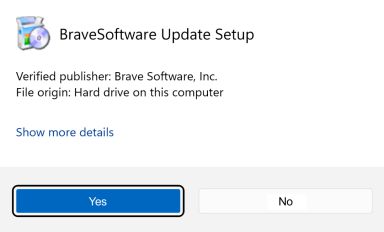
If you're prompted to, click Yes in the User Access Control dialog.
 []
[]
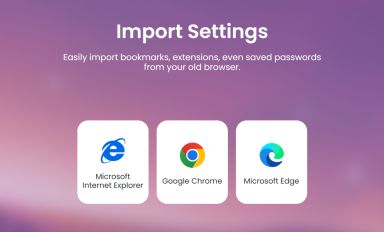
Wait for the installation to finish, then import your browser settings from Chrome.
 []
[]
If your download didnt start automatically, click here.
| Web Proxy Viewer | New URL | Original Page |


![[Brave Software home]](https://brave.com/static-assets/images/brave-logo-sans-text.svg)
![[the BAT icon]](https://brave.com/static-assets/images/bat-logo.svg)
![[Google Play Store button]](https://brave.com/static-assets/images/playstore.en.png)
![[Apple App Store button]](https://brave.com/static-assets/images/app-store-badge.en.png)
![[Brave Software home]](https://brave.com/static-assets/images/brave-logo.svg)
![[close]](https://brave.com/static-assets/icons/close-icon.svg)
![[]](https://brave.com/static-assets/images/interstitial-step-1.png)
![[]](https://brave.com/static-assets/images/interstitial-step-2.png)
![[]](https://brave.com/static-assets/images/interstitial-step-3.png)
![[Download QR code]](https://brave.com/static-assets/images/interstitial-download-qr.png)