Yes
Dismiss
| [ Web Proxy ] |
| Viewing: https://brave.com/wallet/ | [Back] [Original] |
The secure, built-in crypto wallet that supercharges your browser for Web3.
Download BraveEnable it in settings or click  [Wallet icon] in the toolbar to get started.
Enable it in settings or click [wallet.svg] in the toolbar to get started.
After onboarding, tap the browser menu, and tap [Wallet icon] to get started.
Tap the browser menu, and tap [Wallet icon] to get started. Dont see it? Update to the latest version of Brave on the Play Store
App Store.
 [Brave Browser Screenshot]
Get the security you trust from Brave without the hassle and risks of third-party extensions. Brave Wallet is built into the browserit just needs to be switched on.
Manage tokens and NFTs without jumping between apps and extensions. Get all the features of leading browser wallets in one secure and convenient place.
 []
[]
Use Brave Wallet to connect to DApps and unlock all new experiences on the Web. Join a decentralized community. Buy and sell NFTs. Explore decentralized finance, social media, and gaming. And discover all that Web3 has to offer.
 []
[]
Most wallet apps use a watered-down Web browser for Web3 connectivity. Brave works differently, without compromisesbuilding a world-class crypto wallet directly into its full-fledged privacy browser. And it's available on every major device.
Buy crypto right in your wallet with a credit card, bank transfer, and more. Track market performance of top coins with price feeds and market rankings powered by CoinGecko. Or view your NFTs in a multi-chain gallery view.
Brave Wallet supports transparent and private shielded Zcash transactions, providing accountability without sacrificing user privacy.
Features
Browser native (no extension to download)
NFT support
Available on desktop & mobile
Ledger & Trezor support *
Buy, store, send, & connect to DApps on Solana
Buy, store, send, & connect to DApps on Ethereum & EVM chains
Buy, store, & send FIL on the Filecoin chain *
Integrated DEX aggregator for token swaps on Solana
Integrated DEX aggregator for token swaps on Ethereum & EVM chains
Open source
Crypto market data
* Desktop only, with mobile support coming soon.
Enable it in settings or click [Wallet icon] in the toolbar to get started.
Enable it in settings or click [wallet.svg] in the toolbar to get started.
After onboarding, tap the browser menu, and tap [Wallet icon] to get started.
Tap the browser menu, and tap [Wallet icon] to get started. Dont see it? Update to the latest version of Brave on the Play Store
App Store.
Brave, and Brave Wallet, are entirely free to use. However, most blockchain transactions require network fees (e.g. Ethereum gas fees). Fees vary on each network based on demand and other factors.
Certain types of transactions (like swaps and crypto purchases) may also include Brave fees. These fees will be displayed transparently, and are similar toor the same asother wallets.
Looking to invest in cryptocurrency? It's important to consider a crypto wallet first. This beginner's guide will help you understand what a wallet is and how to use it.
Looking to find out how to set up a custodial cryptocurrency wallet? Check out our easy-to-follow guide on choosing and setting up a custodial wallet.
When it comes to crypto wallets, the two main options are custodial and non-custodial (aka self-custody). The difference comes down to private keys. In this primer, we'll discuss the pros and cons of each type, and explain how to set up a self-custody crypto wallet.
Why are recovery phrases important? In this article, we explain what they are used for and why it's so important to manage them accordingly.
Not sure which crypto wallet is the most secure for your needs? In this guide, we break down the different elements you should consider when choosing one.
In this article, we look at the pros and cons of Brave Wallet and MetaMask so you can decide which is right for you.
An Ethereum wallet is how you'll store, manage, and transact with ether (ETH) and other Ethereum-based assets. An Ethereum wallet is also your key to exploring the Ethereum blockchain, including its broader ecosystem of apps. In this article, we'll give an overview of Ethereum wallets, the various options, and how to get started.
A Solana wallet is how you'll manage your Solana-based assets like SOL, and interact with the Solana blockchain and the various apps built on it. In this article, we'll give an overview of Solana wallets, the various options, and how to get started.
A multi-chain crypto wallet allows you to store assets on (and interact with) multiple blockchain networks (as opposed to just a single network). In this article, we'll give an overview of multi-chain wallets, the various options, and how to get started.
 [Brave Software home]
 [close]
 [Brave logo]
Open the installer from Chrome's downloads (it should be in the upper right corner of this window).
 []
[]
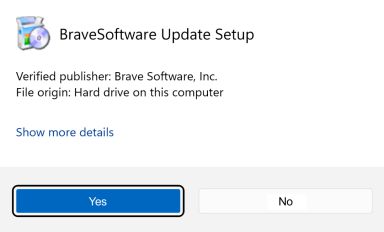
If you're prompted to, click Yes in the User Access Control dialog.
 []
[]
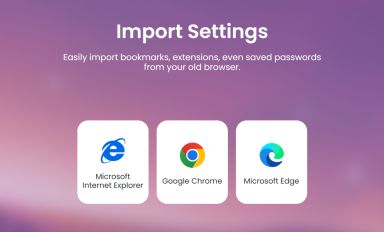
Wait for the installation to finish, then import your browser settings from Chrome.
 []
[]
If your download didnt start automatically, click here.
| Web Proxy Viewer | New URL | Original Page |




![[Brave Software home]](https://brave.com/static-assets/images/brave-logo-sans-text.svg)
![[Wallet icon]](https://brave.com/static-assets/icons/wallet.svg)
![[]](https://brave.com/wallet/images/multi-chain-logos.png)
![[]](https://brave.com/wallet/images/wallet-page-illustration.png)
![[Coinbase logo]](https://brave.com/static-assets/images/coinbase-logo.svg)
![[Metamask logo]](https://brave.com/static-assets/images/metamask-logo.svg)
![[Opera logo]](https://brave.com/static-assets/images/opera-logo.svg)
![[Phantom logo]](https://brave.com/static-assets/images/phantom-logo.svg)
![[Google Play Store button]](https://brave.com/static-assets/images/playstore.en.png)
![[Apple App Store button]](https://brave.com/static-assets/images/app-store-badge.en.png)
![[Brave Software home]](https://brave.com/static-assets/images/brave-logo.svg)
![[close]](https://brave.com/static-assets/icons/close-icon.svg)
![[]](https://brave.com/static-assets/images/interstitial-step-1.png)
![[]](https://brave.com/static-assets/images/interstitial-step-2.png)
![[]](https://brave.com/static-assets/images/interstitial-step-3.png)
![[Download QR code]](https://brave.com/static-assets/images/interstitial-download-qr.png)