Yes
Dismiss
| [ Web Proxy ] |
| Viewing: https://brave.com/shields/ | [Back] [Original] |
 [Brave Shields screenshot]
 [Brave Shields menu]
 [Brave Mobile Shields screenshot]
 [Brave Shields icon] in the address bar of any page to find out.
 [Brave Mobile Shields screenshot]
 [Brave Mobile Shields screenshot]
By default, Brave has the strongest privacy protections of any popular browser. And Shields are a core part of that protection. Heres a long list of what they can do:
Third-party ad & tracker blocking, on every page you visit. Available in Standard and Aggressive mode.
Resource replacement: Brave will block-and-replace problematic resource scripts with a stripped-down, more private version that still allows the page to function.
CNAME uncloaking: Some third-party trackers use cloaking tactics to hide where code really comes from, and circumvent ad blockers. Brave can see through this evasion, and stop it from happening.
Block cross-site cookies, and thus prevent site-to-site tracking.
Ephemeral storage: Block third-party application storage (e.g. whats used with cookies), but replace with a temporary, auto-deleted storage that still allows sites to function.
Randomizing browser APIs: Brave prevents sites from tracking you based on your browser fingerprint by slightly randomizing (or occasionally removing) the browser features trackers use to follow you. For example, Brave randomizes APIs that are vulnerable to fingerprinting to ensure both privacy and site functionality. It also blocks highly identifying APIs.
Block browser-language and font fingerprinting: Brave further strengthens its fingerprinting protections by preventing users from being identified based on preferred browser language.
Your digital fingerprint is the unique set of data points (like your graphics hardware, audio hardware, device type, and more) that, when combined, could help identify you online. By default, Brave protects you from tracking based on your browser fingerprint, by randomizing that fingerprint. The Brave browser makes you look different to every site, each time you restart the browser. This prevents sites from using fingerprinting to track you across sites or even from one online session to another.
You can test these protections yourself with the Electronic Frontier Foundations Cover Your Tracks fingerprinting tool.
Yes. But know that with Shields down, some of the privacy protections of Brave will be disabled. If you see a site thats not working, first verify that the site is trusted before putting Shields down.
If you still want to disable Shields, click the [Brave Shields icon] icon in the address bar and turn Shields off. If the site then works as expected, click the Report a broken site button so our developers can investigate and try to fix the broken functionality for other users.
Note that toggling Shields off will only disable for the particular site youre viewing. Shields will still be up for other sites you visit.
Standard is the Brave default. It applies the blocking and filtering approaches that the browser thinks provide the best privacy for the most users.
The Aggressive option, by contrast, applies an even greater number of protections, even if that means an increased risk of breaking sites.
Learn more, and see a detailed tabular view of the differences.
 [Brave Software home]
 [close]
[Brave logo]
[close]
[Brave logo]
Open the installer from Chrome's downloads (it should be in the upper right corner of this window).
 []
[]
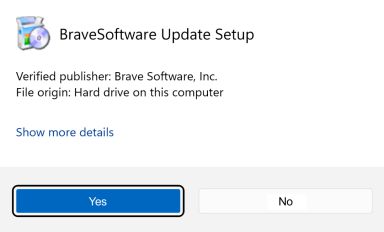
If you're prompted to, click Yes in the User Access Control dialog.
 []
[]
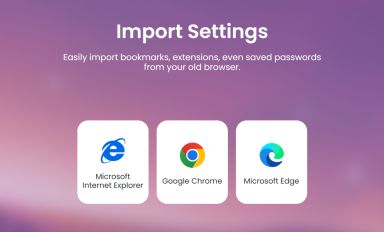
Wait for the installation to finish, then import your browser settings from Chrome.
 []
[]
If your download didnt start automatically, click here.
| Web Proxy Viewer | New URL | Original Page |



![[Brave Software home]](https://brave.com/static-assets/images/brave-logo-sans-text.svg)
![[Google Play Store button]](https://brave.com/static-assets/images/playstore.en.png)
![[Apple App Store button]](https://brave.com/static-assets/images/app-store-badge.en.png)
![[Brave Software home]](https://brave.com/static-assets/images/brave-logo.svg)
![[close]](https://brave.com/static-assets/icons/close-icon.svg)
![[]](https://brave.com/static-assets/images/interstitial-step-1.png)
![[]](https://brave.com/static-assets/images/interstitial-step-2.png)
![[]](https://brave.com/static-assets/images/interstitial-step-3.png)
![[Download QR code]](https://brave.com/static-assets/images/interstitial-download-qr.png)