Yes
Dismiss
| [ Web Proxy ] |
| Viewing: https://brave.com/glossary/https/ | [Back] [Original] |
HTTPS (HyperText Transfer Protocol, Secure) is a secure version of HTTP, the standardized method by which Web browsers and Web servers talk to each other over a network. HTTPS generally protects data in transit between a server (where a website or app “lives”) and the client (the phone or computer) you’re browsing from. Some browsers now automatically upgrade sites to HTTPS, or will warn you if HTTPS isn’t available; sites where HTTPS is not available should be visited with caution.
Look in your browser’s address bar. If the URL in the address bar starts with “https://”, that means you’re using HTTPS.
Browsers will try to use HTTPS if a website supports it, which most do. In fact, many sites now use HTTPS exclusively. Search engines will rank sites that don’t support HTTPS lower than those that do. The general trend on the Web is towards using HTTPS universally.
HTTPS has two main functions:
By contrast, when you visit a non-HTTPS site (in other words, an HTTP site), both of the above protections are absent. It’s best to avoid entering any personal information on non-HTTPS sites, and more generally to try to avoid HTTP sites where possible.
HTTPS doesn’t solve all Web privacy problems. Even if you visit a website over HTTPS, the site may be tracking you. The site’s owners may be mishandling your personal data, such as by storing it insecurely or even selling it to other companies. HTTPS can’t prevent any of that.
Also, certificates don’t protect against phishing sites with addresses that are very similar to—but slightly different from—popular website addresses. These addresses “squat” at URLs based on a common typo, such as “googel.com” instead of “google.com” (although in this case Google owns both of those addresses). A typo-squatting phishing site may have a valid certificate, but the certificate doesn’t prove that you’re actually visiting the “real” website you intended to.
SSL (Secure Sockets Layer) and TLS (Transport Layer Security) are standardized methods for Web browsers and Web servers to perform encryption and identity verification when using HTTPS. SSL is older, and was superseded by TLS.
Your browser may sometimes show warnings about invalid certificates. Depending on the specific warning, this could mean that the site’s administrators have misconfigured something, or that your connection is being intercepted.
Whatever the warning is, it’s important to consider the source. If you see a certificate warning when you go to Google, it’s virtually certain that your connection is being intercepted: a sophisticated tech company like Google would not misconfigure their certificates. If you see a warning when you go to your local restaurant’s site, that’s probably just a mistake.
Browsers will give you the option to proceed after you see a certificate warning, but it’s best practice to not do so. Even if you avoid downloading files or entering personal information (like a username or password), the site may still be dangerous.
Brave’s easy-to-use browser blocks ads by default, making the Web faster, safer, and less cluttered for people all over the world.
Get Brave [Brave Software home]
 [close]
 [Brave logo]
Open the installer from Chrome's downloads (it should be in the upper right corner of this window).
 []
[]
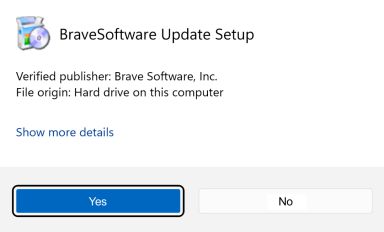
If you're prompted to, click Yes in the User Access Control dialog.
 []
[]
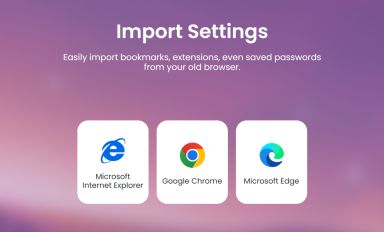
Wait for the installation to finish, then import your browser settings from Chrome.
 []
[]
If your download didnt start automatically, click here.
| Web Proxy Viewer | New URL | Original Page |



![[Brave Software home]](https://brave.com/static-assets/images/brave-logo-sans-text.svg)
![[Google Play Store button]](https://brave.com/static-assets/images/playstore.en.png)
![[Apple App Store button]](https://brave.com/static-assets/images/app-store-badge.en.png)
![[Brave Software home]](https://brave.com/static-assets/images/brave-logo.svg)
![[close]](https://brave.com/static-assets/icons/close-icon.svg)
![[]](https://brave.com/static-assets/images/interstitial-step-1.png)
![[]](https://brave.com/static-assets/images/interstitial-step-2.png)
![[]](https://brave.com/static-assets/images/interstitial-step-3.png)
![[Download QR code]](https://brave.com/static-assets/images/interstitial-download-qr.png)