Yes
Dismiss
| [ Web Proxy ] |
| Viewing: https://brave.com/glossary/ransomware/ | [Back] [Original] |
Ransomware is a type of malicious software (malware) that encrypts the contents of your device so it’s unusable, then offers to restore your device (your phone, computer, or tablet) in exchange for a payment to the ransomware operator.
Ransomware is a malicious usage of a technique called encryption. Encryption transforms meaningful, usable data into an unintelligible, scrambled form. The original data can only be restored by using a small piece of secret data called a “key.” Ransomware encrypts the data on your device (such as documents, spreadsheets, photos, and other files), making it effectively unusable. The key required to undo (or “decrypt”) the encryption is held by the ransomware operator, who offers to give you the key and allow you to recover your data in exchange for a payment.
The goals of ransomware operators vary. One goal is simply to make money from ransom payments, by releasing the ransomware more or less indiscriminately. However, sometimes the goal is to damage or embarrass a specific target, like a particular company, by causing data loss and interruption of business.
General anti-malware practices will reduce your chances of getting ransomware. The most important ones are:
Ideally, you have a recent backup of your important data. If so, the best course of action is to factory-reset your device, make sure it has all available software updates applied, and then restore from your backup.
It is generally not a good idea to pay the ransom. There’s no assurance that you’ll get your device unlocked even if you pay. The people who operate ransomware are not trustworthy. Paying the ransom should be a last resort, and is not recommended.
Brave’s easy-to-use browser blocks ads by default, making the Web faster, safer, and less cluttered for people all over the world.
Get Brave [Brave Software home]
 [close]
 [Brave logo]
Open the installer from Chrome's downloads (it should be in the upper right corner of this window).
 []
[]
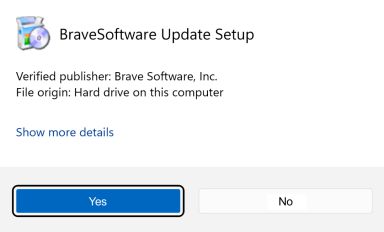
If you're prompted to, click Yes in the User Access Control dialog.
 []
[]
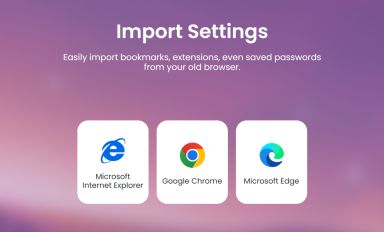
Wait for the installation to finish, then import your browser settings from Chrome.
 []
[]
If your download didnt start automatically, click here.
| Web Proxy Viewer | New URL | Original Page |



![[Brave Software home]](https://brave.com/static-assets/images/brave-logo-sans-text.svg)
![[Google Play Store button]](https://brave.com/static-assets/images/playstore.en.png)
![[Apple App Store button]](https://brave.com/static-assets/images/app-store-badge.en.png)
![[Brave Software home]](https://brave.com/static-assets/images/brave-logo.svg)
![[close]](https://brave.com/static-assets/icons/close-icon.svg)
![[]](https://brave.com/static-assets/images/interstitial-step-1.png)
![[]](https://brave.com/static-assets/images/interstitial-step-2.png)
![[]](https://brave.com/static-assets/images/interstitial-step-3.png)
![[Download QR code]](https://brave.com/static-assets/images/interstitial-download-qr.png)