Yes
Dismiss
| [ Web Proxy ] |
| Viewing: https://brave.com/glossary/vpn/ | [Back] [Original] |
A virtual private network (VPN) enables data to be sent from your device over the Internet (e.g. to a website) via an encrypted tunnel. VPNs can be used to remotely access private networks, or to shield personal info like your IP address, and generally allow for added privacy and security. But note that not all VPNs are created equal.
Using a VPN can help protect your privacy from the networks and ISPs that your Internet traffic goes through, which is especially important if you don’t trust them. But note that a VPN is not a replacement for an ISP. You always need an ISP to access the Internet. Your connection to a VPN still uses the Internet access that your ISP provides.
 [ISPs and your Internet access]
ISPs and your Internet access
[ISPs and your Internet access]
ISPs and your Internet access
There are several types of VPN, all based on the same technologies:
First, you’ll need to sign up for an account with a VPN provider, such as Brave VPN. Depending on the VPN provider, you may have to download an app and install a configuration file (each provider will give you specific instructions). Brave VPN is built directly into the Brave Browser, which means you won’t need to download a separate app.
Once you’ve created an account, you’ll need to log in to your VPN account within the app, and then connect to the VPN. You can turn the VPN on and off whenever you want. While you’re connected to the VPN, all of your Internet traffic will be sent to the VPN provider, who will then send it onward to its real destination.
 [VPNs and your Internet access]
VPNs and your Internet access
[VPNs and your Internet access]
VPNs and your Internet access
Some VPN providers, including Brave, also let you switch the geographic location your traffic will appear to be coming from. This can get around geographic restrictions that some websites have. (For example, a streaming site might show certain videos only to viewers in certain countries, using your public IP address to make that determination.)
 [IP address]
IP address
[IP address]
IP address
It’s very important to choose a trustworthy provider. Using a VPN involves placing a lot of trust in the provider, because they will be able to see your Internet activity while you’re connected to the VPN. As long as you’re browsing using HTTPS, the VPN provider won’t be able to see the content of your browsing, but they will be able to tell which sites you’re on.
There are plenty of VPN providers that log your activity, and sell information about it to third parties. Free providers are especially likely to do so; operating a VPN costs money, and if you’re not paying the provider, someone else must be.
Brave VPN does not log your activity or sell your information.
There are two main ways in which a VPN protects your privacy:
Note that a VPN doesn’t protect you from other forms of Web tracking, like cookie-based tracking or fingerprinting. You can protect yourself from that by using a browser—like Brave—that has built-in protections against these kinds of tracking.
By using a VPN, you’re trusting the VPN provider to keep your activity private. Avoid free VPN providers, since they’re likely to be logging your activity and selling information about it to third parties.
Brave’s easy-to-use browser blocks ads by default, making the Web faster, safer, and less cluttered for people all over the world.
Get Brave [Brave Software home]
 [close]
 [Brave logo]
Open the installer from Chrome's downloads (it should be in the upper right corner of this window).
 []
[]
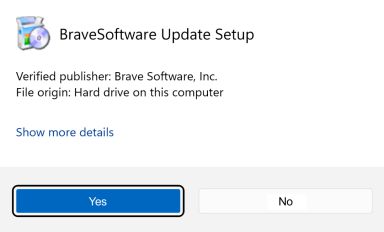
If you're prompted to, click Yes in the User Access Control dialog.
 []
[]
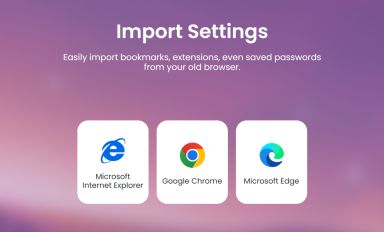
Wait for the installation to finish, then import your browser settings from Chrome.
 []
[]
If your download didnt start automatically, click here.
| Web Proxy Viewer | New URL | Original Page |



![[Brave Software home]](https://brave.com/static-assets/images/brave-logo-sans-text.svg)
![[ISPs and your Internet access]](https://brave.com/glossary/images/Brave-Blog-29.svg)
![[VPNs and your Internet access]](https://brave.com/glossary/images/Brave-Blog-30.svg)
![[IP address]](https://brave.com/glossary/images/Brave-Blog-28.svg)
![[Google Play Store button]](https://brave.com/static-assets/images/playstore.en.png)
![[Apple App Store button]](https://brave.com/static-assets/images/app-store-badge.en.png)
![[Brave Software home]](https://brave.com/static-assets/images/brave-logo.svg)
![[close]](https://brave.com/static-assets/icons/close-icon.svg)
![[]](https://brave.com/static-assets/images/interstitial-step-1.png)
![[]](https://brave.com/static-assets/images/interstitial-step-2.png)
![[]](https://brave.com/static-assets/images/interstitial-step-3.png)
![[Download QR code]](https://brave.com/static-assets/images/interstitial-download-qr.png)