


Table of Contents
It probably happens to you every day: There you are, trying to read an article, and you cant even scroll down because a privacy notice has hijacked the page. It warns, This site collects cookies, prompting you to accept, deny, or accept only necessary cookies. What are these cookies? What do they do? Are they good or bad? What connection do they have with your privacy? Are they called biscuits in the UK? (Not this kind, no.) This article breaks it all down for you.
What Is an Internet Cookie?
An internet cookie, often just called a cookie, is a small text file that a website stores on your device (like a computer or smartphone) when you visit that site. The term was coined in 1994 by Netscape chief architect Lou Montulli: Think of it as a digital tag that helps websites remember you and your preferences. Cookies are created by the websites server and sent to your browser, where theyre stored for future use. Theyre essential for making the web more user-friendly, but can also raise privacy concerns if not managed properly hence the prompts to accept or reject cookies.
Magic Cookies
The term cookie in computer-speak actually predates the advent of the World Wide Web. Pre-1994, it was called a magic cookie. It was used in the context of UNIX operating systems the basis for most modern operating systems, including Linux and MacOS to refer to a type of tag or message between users and computers, and back again. According to a Reddit AMA (ask me anything) session given by none other than Montulli himself:
Its based on a fortune cookie, a message wrapped in a container. The name cookies comes from a software trick from an old operating systems manual I read a few years earlier, a technique for passing information back and forth between the user and the system. For some reason, the small piece of data exchanged had been called a magic cookie. Inspired by that earlier model, [I] sketched out an architecture for a web-based cookie that would give the medium a sense of memory without compromising privacy.
HTTP Cookies
HTTP cookies operate through HTTP (Hypertext Transfer Protocol), the system that powers web communication. When you visit a website, the server sends a cookie to your browser via an HTTP response header called Set-Cookie. Your browser stores this cookie and sends it back to the server with every subsequent request using the Cookie header. This back-and-forth lets the server recognize you and tailor the experience, like keeping you logged in or showing relevant content.
Below, youll see what a cookie looks like behind the scenes. This is an example of a persistent cookie (Ill explain what that means in a bit) that your computer might make when you access the site for fictitious cosmetics retailer, Schlefora.com. You wont see this at all from the front end, but the cookie script, which is saved in your browser, would look like this:
Name: session_id
Value: a9f3e9a8c1234d76a9f567bb0f8912df
Domain: schlefora.com
Path: /
Expires: Wed, 25 June 2025 10:00:00 GMT
Secure: True
HttpOnly: True
The text above is a way of identifying that particular visit you made to Schlefora; here, session is another term for visit.
This is what each component means:
- Name/Value: This pairs a label with a piece of data (like a unique session ID).
- Domain: The website that set the cookie.
- Path: The specific page or folder it applies to. (Its blank here because its a fake site and there is no path.)
- Expires: When the cookie will be deleted by the browser.
- Secure: Only send the cookie over HTTPS.
- HttpOnly: Makes it inaccessible to JavaScript (for security).
Where Are Cookies Stored?
Cookies are stored on your device by your web browser, typically in a dedicated folder. For example, in Google Chrome, cookies are saved within the browsers user profile directory (e.g., ~/Library/Application Support/Google/Chrome/Default/Cookies on a Mac). Each browser has its own storage system. You can view or delete these cookies through your browsers settings, usually under the privacy or history section. From a user point of view, this is what the drop-down menu looks like in Chrome, giving you the option of which cookies you want to delete:
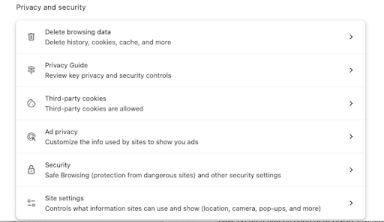
This is what it looks like in Safari (first, find system settings under the apple icon at the top left of your Safari browser):

What Are Cookies Used For?
Cookies serve a range of purposes, from improving website functionality to enabling targeted advertising. Here are some common uses:
Session Management
Cookies keep track of your activity during a single browsing session. For instance, when you log into a website for your bank account, a session cookie stores your authentication details so you dont have to log in again on every page. These cookies typically expire when you close your browser, ensuring temporary, secure access.
Personalization
Ever notice how websites suggest products or content based on your past visits? Cookies store data about your preferences, like your location, language, or browsing history, to customize your experience. For example, an e-commerce site might show you items similar to ones youve viewed, making your shopping more relevant.
Advertising
Cookies are a cornerstone of online advertising. They track your behavior across sites like which pages you visit or what you search for to build a profile of your interests. Ad networks use this data to serve targeted ads, increasing the chances youll click on them. While this can make ads more relevant, it also raises privacy questions. To address these privacy concerns, advertisers are pivoting toward platforms that can leverage first-party data, rather than third-party data.
What Data Do Cookies Collect?
Cookies can collect various types of data, depending on their purpose and the websites setup. While they dont store large amounts of information directly, the data they hold can be powerful when combined with other tracking methods. Heres a look at what they typically gather:
User Identifiers
Cookies often contain unique IDs that link your device to a website or ad network. These IDs dont include your name, but act like a digital fingerprint, letting sites recognize you across visits. For example, a login cookie might store a user ID to keep you signed in.
Browsing Behavior
Cookies can track which pages you visit, how long you stay, and which links you click. This data helps websites understand user behavior and optimize content. Ad cookies might also record your searches or viewed products to tailor ads across different sites.
Device and Settings Information
Some cookies collect details about your device, like your browser type, operating system, or screen resolution. They might also store your preferences, such as language or font size, to ensure the website displays correctly and feels personalized.
What Are the Different Types of HTTP Cookies?
Not all cookies are the same they vary in purpose, lifespan, and origin. Understanding the types of cookies helps you grasp their role and impact. Here are the main categories:
First-Party Cookies
First-party cookies are created and used by the website youre visiting. Theyre typically used for essential functions like remembering your login, storing cart items, or saving your preferences. These cookies are generally safer and less privacy-invasive since theyre limited to one domain (the site youre on).
Third-Party Cookies
Third-party cookies are set by domains other than the one youre visiting, often by ad networks or analytics providers. They track your activity across multiple sites to build a profile for targeted ads or analytics. For example, a third-party cookie from an ad platform might follow you from a news site to a shopping site, serving relevant ads. These cookies are more controversial due to privacy concerns.
Session Cookies
Session cookies are temporary and expire when you close your browser. Theyre used for short-term tasks, like keeping you logged in during a single visit or tracking your progress through a multi-step form. They dont store data long-term, making them less intrusive.
Persistent Cookies
Persistent cookies stay on your device for a set period (days, months, or years) or until you delete them. Theyre used for long-term personalization, like remembering your login details or preferences across visits. While convenient, they can collect more data over time.
Why Are Third-Party Cookies Being Phased Out?
Over the past several years, major browsers and regulators have taken steps to phase out third-party cookies in response to growing concerns about user privacy. Third-party cookies set by domains other than the one a user is actively visiting have been widely used for tracking users across sites and building detailed behavioral profiles, often without their explicit consent. This cross-site tracking has drawn scrutiny from consumers and regulators alike, prompting legislation such as Europes GDPR and Californias CCPA. In response, browsers like Safari and Firefox began blocking third-party cookies by default, and Google Chrome, which commands over 60% of browser market share, announced in 2020 that it would phase them out entirely (although this plan changed somewhat).
This shift marks a fundamental change in how digital advertising and personalization are handled, pushing the industry toward privacy-preserving alternatives such as first-party data, contextual advertising, and predictive AI models. Some performance advertising platforms combine rich first-party behavioral signals with contextual analysis to optimize ad performance without compromising user privacy.
Realize leverages Taboola's extensive first-party data from powering publisher editorial and ad units, providing unmatched insights and targeting capabilities.
How Cookies Affect User Privacy
Cookies are a double-edged sword: They make the web more convenient, but can compromise your privacy if misused. As websites and advertisers rely on cookies to track behavior, users face growing concerns about data collection and control.
Tracking and Profiling
Third-party cookies, in particular, enable cross-site tracking, allowing companies to build detailed profiles of your online habits. These profiles can include your interests, location, and even inferred demographics, which are often shared with advertisers. Without transparency, you might not know whos collecting your data or how its used.
Data Security Risks
Cookies themselves dont contain viruses, but they can be vulnerable to attacks like cross-site scripting (XSS), where hackers steal cookie data to impersonate you. If a website doesnt secure its cookies properly (e.g., with HTTPS or the Secure attribute), your data could be at risk. Many users dont realize how much data cookies collect or how to manage them: Websites often use vague cookie consent notices, making it hard to opt out of tracking. This lack of clarity can leave you feeling powerless over your personal information.
GDPR vs. U.S.
Legal regulations about cookies differ by region. The GDPR (used in the EU) requires websites to obtain explicit, informed consent before placing any non-essential cookies on a users device. In contrast, U.S. laws like the CCPA allow websites to use cookies by default and require only that users be given the option to opt out. The GDPR emphasizes prior user control, while U.S. rules generally focus on transparency and the right to refuse.
Here is an example of a cookie alert that a user might see if logging in to a website from a U.S.-based computer or phone. This is taken from the atlantic.com news site. Notice that the default is that if you accept, you are agreeing to accept third-party cookies. You have to take an additional step to opt out. This would not be considered GDPR-compliant.

By contrast, here is a cookie alert you might see if logging into a website from an EU-based device. This is taken from the EU parliament official site. Notice that you get the choice to refuse or accept up front, without any additional steps. This is what makes it GDPR-compliant.

How to Enable and Remove Cookies
Managing cookies gives you control over your online experience and privacy. Most browsers let you enable, disable, or delete cookies through their settings, and you can also use tools to fine-tune how cookies work.
Enabling Cookies
To enable cookies, go to your browsers settings (usually under Privacy or Security). For example, in Chrome, navigate to Settings > Privacy and security > Cookies and other site data and select Allow all cookies or Block third-party cookies. Enabling cookies is often necessary for websites to function properly, like for logins or shopping carts.
Deleting Cookies
You can delete cookies to clear stored data and start fresh. In most browsers, find the option under Settings > Privacy > Clear browsing data. Select Cookies and other site data and choose a time range (e.g., last hour, or all time). Be aware that deleting cookies will log you out of sites and reset preferences.
Using Browser Extensions
For more control, consider extensions like uBlock Origin or Privacy Badger, which block trackers and unwanted cookies. You can also use Incognito or Private browsing modes, which prevent cookies from being stored after your session ends, though they dont block cookies entirely.
Key Takeaways
Cookies are small text files that websites use to remember your preferences, manage sessions, and enable features like personalization and advertising. They collect data like user IDs, browsing behavior, and device details, which can enhance your experience but also raise privacy concerns.
Types of cookies include first-party (site-specific, safer) and third-party (cross-site, used for ads), as well as session (temporary) and persistent (long-term). Cookies can track your online activity, sometimes without clear consent, posing privacy and security risks if not managed. You can enable or remove cookies via browser settings or use extensions for more control, balancing functionality with privacy. Third-party cookies are being phased out due to privacy concerns.
Frequently Asked Questions (FAQs)
Whats the difference between first-party and third-party cookies?
First-party cookies are set by the website youre visiting and only work for that site, handling tasks like logins or preferences. Third-party cookies come from external domains (e.g., ad networks) and track you across multiple sites for ads or analytics. First-party cookies are less privacy-invasive, while third-party cookies are often restricted by modern browsers due to tracking concerns.
What is a session cookie vs. a persistent cookie?
A session cookie is temporary, stored only until you close your browser, and used for short-term tasks like keeping you logged in during a visit. A persistent cookie remains on your device for a set period, enabling long-term features like remembering your login or preferences across visits.
How do I delete cookies?
To delete cookies, go to your browsers settings (e.g., Settings > Privacy > Clear browsing data in Chrome). Select Cookies and other site data, choose a time range, and confirm. This will log you out of sites and clear stored preferences. You can also delete specific cookies via developer tools.
How will marketers track users without cookies?
With third-party cookies being largely phased out, marketers are shifting to alternatives like first-party data (collected directly from users), contextual advertising (based on page content), and privacy-preserving technologies like Googles Privacy Sandbox. These methods aim to balance targeting with user privacy.
Can cookies be used for analytics tracking?
Yes, cookies are widely used for analytics, tracking metrics like page views, time spent, and user journeys. Tools like Google Analytics use cookies to identify returning users and measure site performance, helping website owners optimize content and user experience.
How do you make GA4 cookie-compliant?
To make Google Analytics 4 (GA4) cookie-compliant, implement a cookie consent management platform (CMP) to get user consent before setting analytics cookies. Use GA4s consent mode to adjust tracking based on user preferences (e.g., disabling cookies if consent is denied). Ensure your privacy policy discloses cookie use and complies with regulations like GDPR or CCPA.
How are cookies different from app tracking?
Cookies are browser-based text files that track web activity, while app tracking uses device identifiers (e.g., IDFA on iOS) or SDKs to monitor in-app behavior. Cookies are limited to web browsers, while app tracking spans mobile apps and can collect more device-specific data. Both raise privacy concerns but operate in different ecosystems.
How do I implement a secure cookie?
To implement a secure cookie, use the following attributes in the Set-Cookie header:
- Secure: Ensures the cookie is only sent over HTTPS.
- HttpOnly: Prevents access via JavaScript, reducing XSS risks.
- SameSite=Strict or SameSite=Lax: Limits cross-site requests to prevent CSRF attacks.
- Set a short expiration time for sensitive cookies and encrypt their contents if storing sensitive data. Always test cookies on a secure server.


![[Uniliver CaseStudy]](https://www.taboola.com/wp-content/uploads/2026/06/uniliver.png)
![[Mitsubishi CaseStudy]](https://www.taboola.com/wp-content/uploads/2026/06/mitsubishi.png)
![[cookie tracking]](https://www.taboola.com/wp-content/uploads/2025/06/cookie-tracking-scaled.jpg)
![[]](https://www.taboola.com/wp-content/uploads/2026/06/sidebar-banner-image.png)
![[chrome cookie settings]](https://realize.com/wp-content/uploads/2025/06/chrome-cookie-settings.png)
![[]](https://realize.com/wp-content/uploads/2025/06/firefox.png)
![[]](https://realize.com/wp-content/uploads/2025/06/the-atlantic-cookies-notice-copy-2.jpg)
![[Democracy]](https://realize.com/wp-content/uploads/2025/06/Democracy.png)
![[campaign analytics]](https://www.taboola.com/wp-content/uploads/2026/08/campaign-analytics-1024x576.jpg)
![[campaign reporting]](https://www.taboola.com/wp-content/uploads/2026/07/campaign-reporting-1024x562.jpg)
![[campaign reporting]](https://www.taboola.com/wp-content/uploads/2026/06/campaign-reporting-1024x562.jpg)
![[Instagram]](https://www.taboola.com/wp-content/uploads/2026/07/frame-2147223556-1.svg)
![[X]](https://www.taboola.com/wp-content/uploads/2026/07/frame-2147223558.svg)
![[Linkedin]](https://www.taboola.com/wp-content/uploads/2026/07/frame-2147223557.svg)
![[YouTube]](https://www.taboola.com/wp-content/uploads/2026/07/frame-2147223556.svg)