Yes
Dismiss
| [ Web Proxy ] |
| Viewing: https://brave.com/learn/how-to-delete-search-history/ | [Back] [Original] |
 []
See all articles
[]
See all articles
Big Tech search engines like Google keep a history of what you search and what you click. Why? Because that data is valuable—it helps them make money by selling targeted ads.
Want to delete your search history? It’s definitely possible to do so on your device (which can be helpful if you’re on a public or family computer). But as far as Big Tech options like Google or Microsoft Bing, your search history is still stored even after you delete the history on your device.
In this guide, we’ll look at how to clear search and browsing history, and look at some alternatives search engines that don’t collect your data in the first place.
Most often, when people ask how to “clear history” or “delete history,” they’re actually referring to browser history. This is the list of pages you’ve visited in your Web browser. But note that searches you conduct within your browser can also be tracked by the search engine itself (e.g. Google or Microsoft Bing).
So why clear your search history? Usually, it’s to hide a search you don’t want others to see. Been researching a birthday present on a shared home computer? Or a personal medical issue on a public computer? These are great—and common—reasons to clear history in your search engine.
But again, note that clearing search history usually only clears it from the device itself. The tech company that powers that search engine is often keeping a record of your searches, and this record won’t be cleared by deleting history from your device.
Here are step-by-step instructions to clear your search history on Google and Bing.
To delete Google search history on your device:
Note: In the Your data in Search section you’ll also find options to customize the info Google can collect in the future.
To delete Bing search history on your device:
Note: In the Search history page you can also customize privacy settings by clicking Privacy matters.
If you actually want to clear browsing history (as opposed to just search history) from your device, you can easily do so on most major browsers. You’ll also find an option to clear cookies or cache, too.
To delete your browsing history on Google Chrome:
Note: If you’re syncing your Google account between devices (e.g. between your phone and laptop), you may want to turn off syncing if you only want to delete the browsing history on one particular device.
To delete your browsing history on Microsoft Edge:
To delete your browsing history on Firefox:
To delete your browsing history on Brave:
It’s important to note that private windows (or “Incognito mode”) can hide your search and browsing history on your device. But for Big Tech browsers like Google Chrome or Microsoft Edge, private / incognito windows don’t stop your activity from being collected.
Private / incognito windows can help if you share a computer and don’t want others to see your search / browsing history. But to keep your browsing history truly private, you’ll instead want a privacy browser like Brave.
Most often, when people ask how to delete their search / browsing history, what they’re really looking for is privacy. From others who might share their device, and from Big Tech’s prying eyes. As you can see, deleting search / browsing history is only half the equation. For real privacy, you’ll want a browser / search engine combo that doesn’t collect your data in the first place. This is where Brave comes in.
Brave blocks trackers and ads. It blocks fingerprinting and phishing attempts. And neither the Brave browser nor Brave Search can profile you. While Brave still gives you the option to clear browsing history on your device, there’s no worry about Brave keeping a history of what you searched or browsed. Unlike Google or Microsoft, Brave doesn’t collect your data in the first place.
Brave blocks the bad stuff online; by using Brave, you block Big Tech from profiting off your data. Download Brave and try it today.
This article gives a primer on search algorithms, the basic building block of search engines, and the thing that powers the query results you see on search engines like Google, Bing, DuckDuckGo, and Brave Search.
Read this articleIn this article, we'll introduce the basics of search engine advertising. What search ads are, how they work, and how Big Tech options like Google use search ads to collect your data. We'll also discuss private alternatives like Brave Search ads.
Read this articleMore and more people are switching to private search engines like Brave Search, and away from Big Tech options like Google. But how do these private options affect advertisers? Can private search show useful ads, protect users, and support the continued operation of the search engine itself? In this article, a discussion of how private search engines impact ads and advertisers.
Read this articleBrave’s easy-to-use browser blocks ads by default, making the Web faster, safer, and less cluttered for people all over the world.
Get Brave [Brave Software home]
 [close]
 [Brave logo]
Open the installer from Chrome's downloads (it should be in the upper right corner of this window).
 []
[]
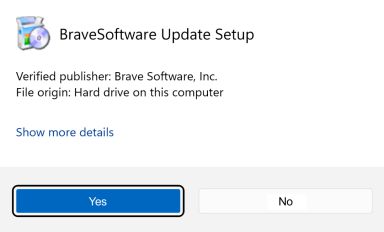
If you're prompted to, click Yes in the User Access Control dialog.
 []
[]
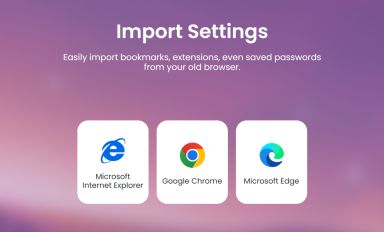
Wait for the installation to finish, then import your browser settings from Chrome.
 []
[]
If your download didnt start automatically, click here.
| Web Proxy Viewer | New URL | Original Page |



![[Brave Software home]](https://brave.com/static-assets/images/brave-logo-sans-text.svg)
![[]](https://brave.com/static-assets/icons/icon-arrow-left.svg)
![[Google Play Store button]](https://brave.com/static-assets/images/playstore.en.png)
![[Apple App Store button]](https://brave.com/static-assets/images/app-store-badge.en.png)
![[Brave Software home]](https://brave.com/static-assets/images/brave-logo.svg)
![[close]](https://brave.com/static-assets/icons/close-icon.svg)
![[]](https://brave.com/static-assets/images/interstitial-step-1.png)
![[]](https://brave.com/static-assets/images/interstitial-step-2.png)
![[]](https://brave.com/static-assets/images/interstitial-step-3.png)
![[Download QR code]](https://brave.com/static-assets/images/interstitial-download-qr.png)